
Union Bank of India net banking provides secure access to a wide range of financial services through its digital portal. Users can access almost all of the bank’s services through the internet banking facility. These include the most important things, such as checking balance, managing, activating and even blocking cards, applying for loans and more.
Read on to learn more about Union Bank of India Net banking, how to register and if you have an active account, how to get the best out of it.


Union Bank of India Net Banking Registration
Union Bank net banking registration is the first step to accessing digital banking services. This process is simple and can be completed online or at the branch. Activation is mandatory before using any services.
Union Bank of India Net Banking Registration Online For Retail Banking
To register for Union Bank of India net banking online, you can follow the steps below:
- Visit the official Union Bank Online Portal
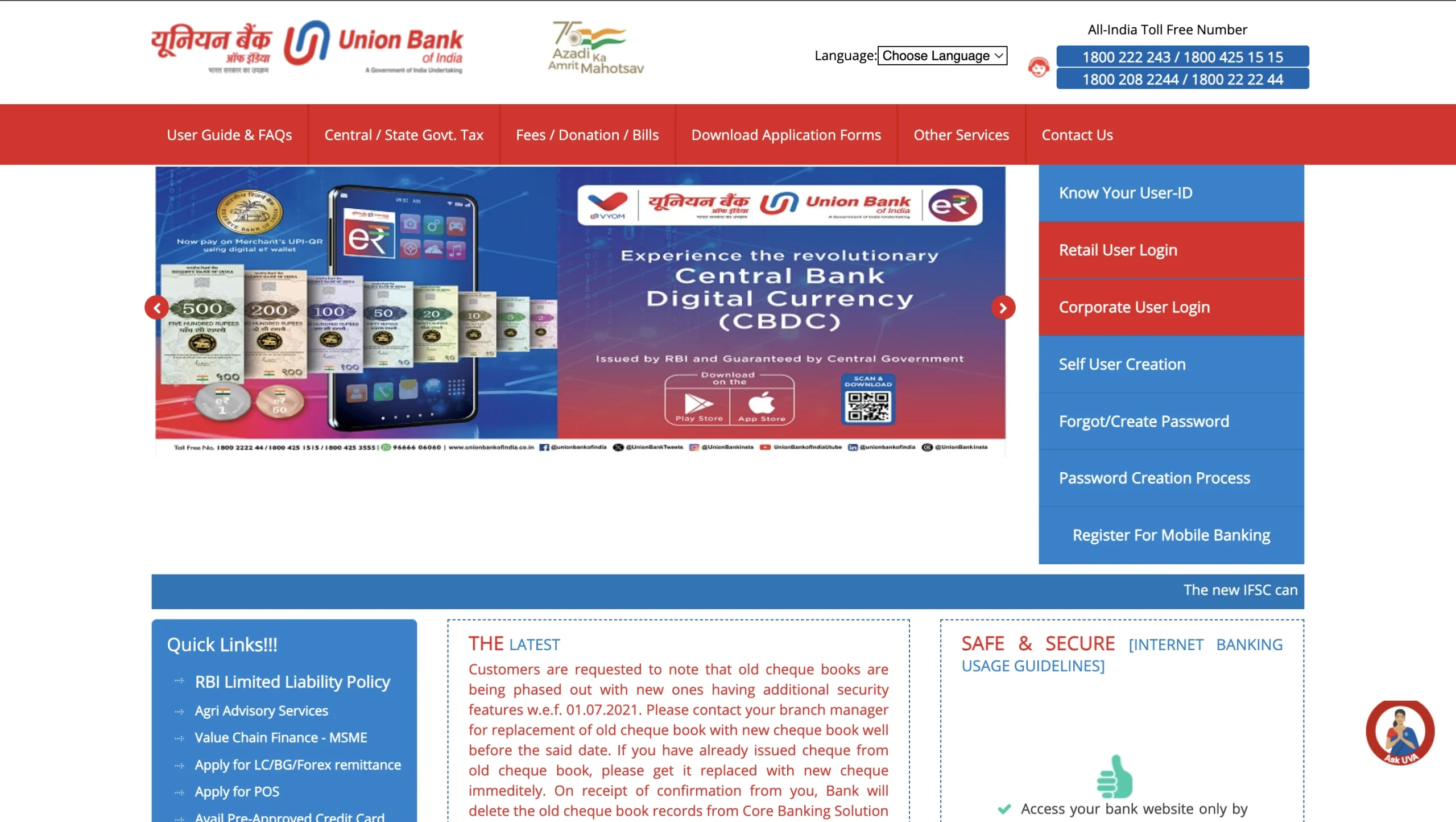
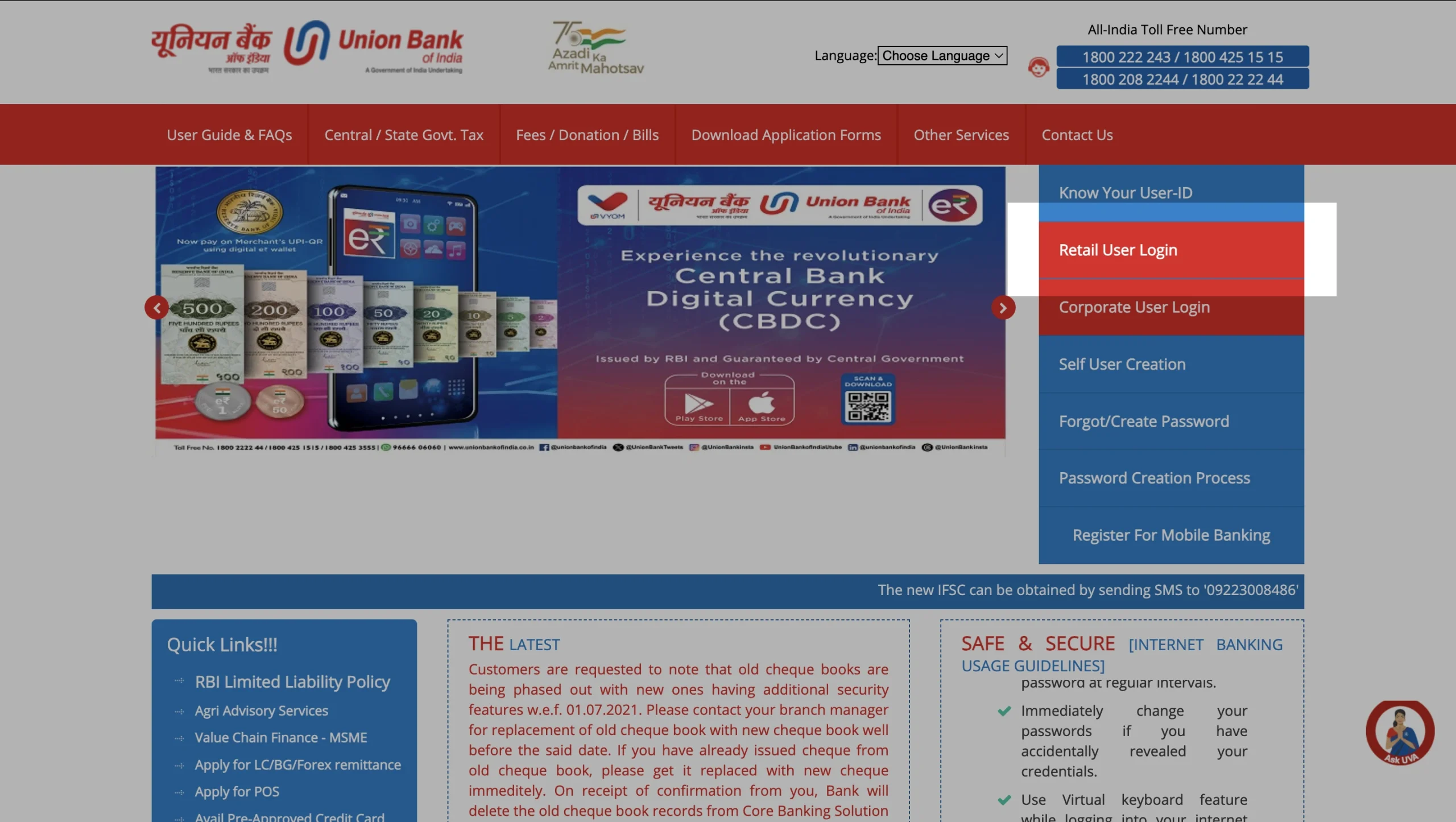
- Click on the option ‘Retail user Login’.
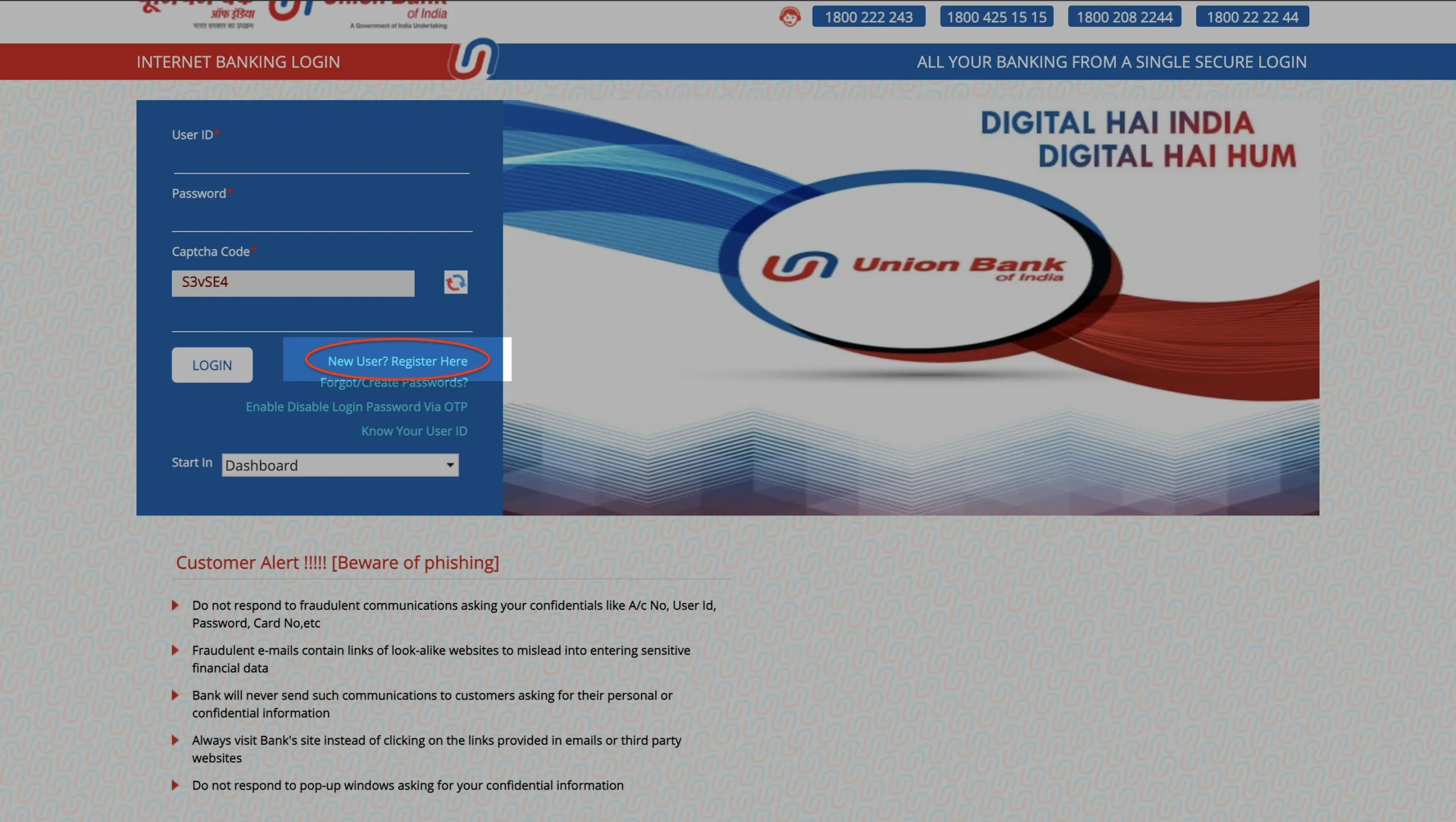
- On the following screen, click on the new registration option.
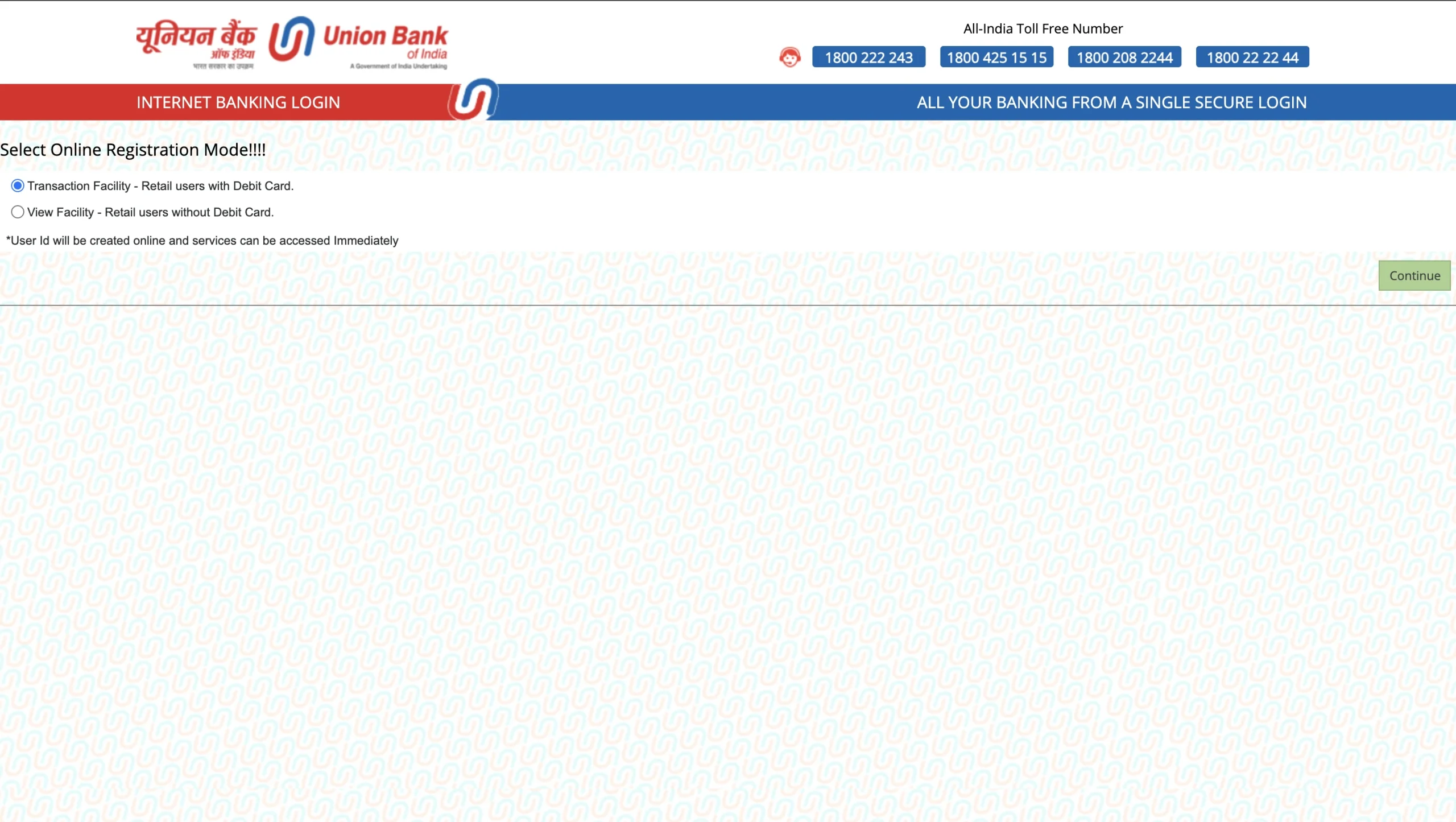
- Choose between the two options based on your plan to register with or without your Debit Card. Hit ‘Continue’.
- On the following page, enter your Account Number, Date of Birth, PAN Number and captcha codes and hit ‘Continue’.
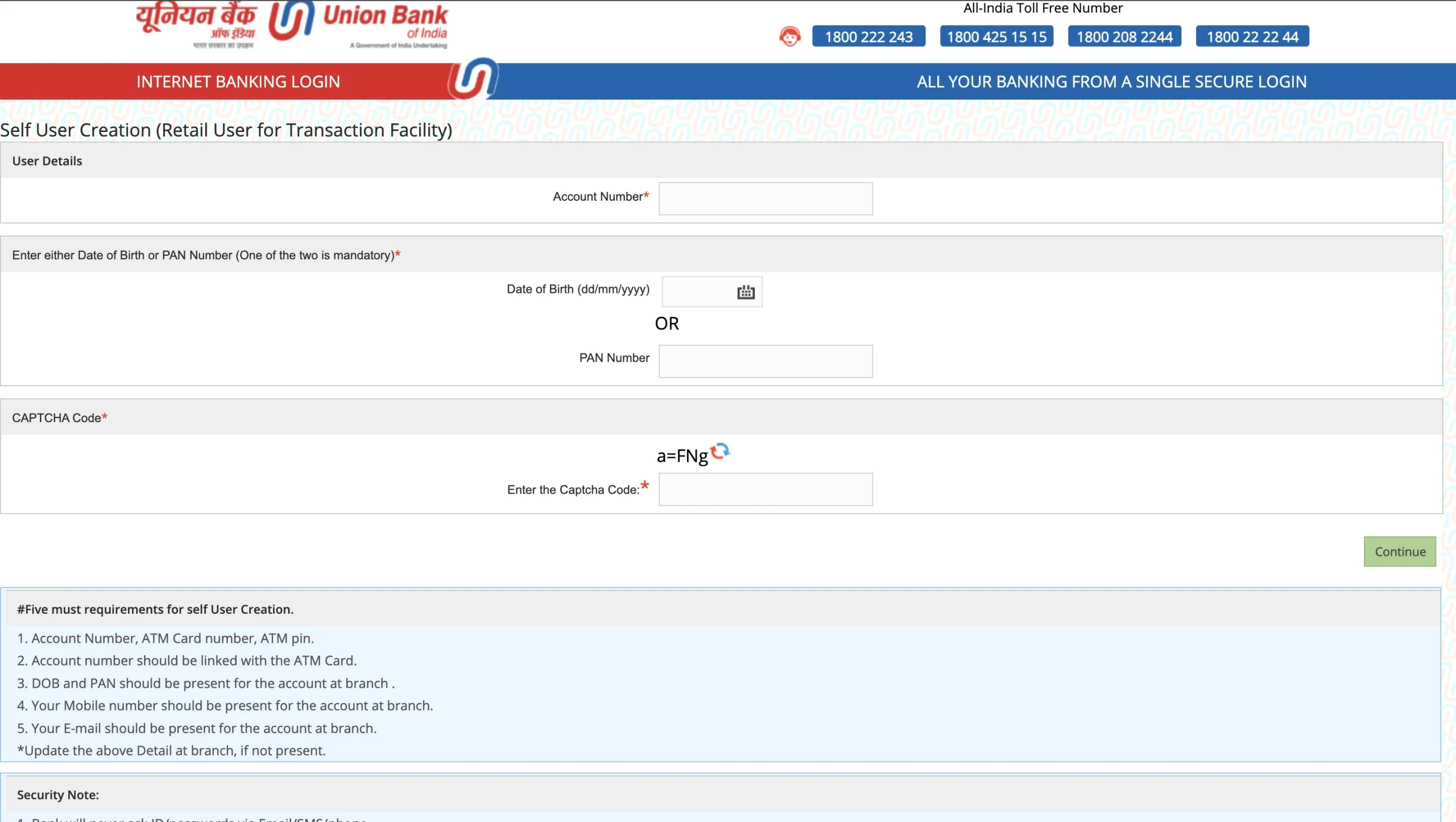
- Based on your selection, you will be asked for account verification either using the debit card or any other proof provided by the bank at the time of account opening.
- You can enter the portal for account details creation. You can create the following details here:
- User ID,
- Login Password and
- Transaction Password
You can use these details to log in to your Union Bank netbanking later.
Make sure you have
- Account Number, ATM Card number, ATM pin.
- The account number should be linked with the ATM Card.
- DOB and PAN should be present for the account at the branch.
- Your Mobile number should be present for the account at the branch.
- Your email should be present for the account at branch

Union Bank of India Net Banking Registration Online For Corporate Banking
Registering for Corporate Net Banking with Union Bank of India has an offline process through the branch, as it requires specific authorisations and documentation for businesses.
You can use the following methods for corporate banking registration:
- Go to the official website of the Union Bank of India.
- On the top, you can find a tab named ‘Download Application Forms’.
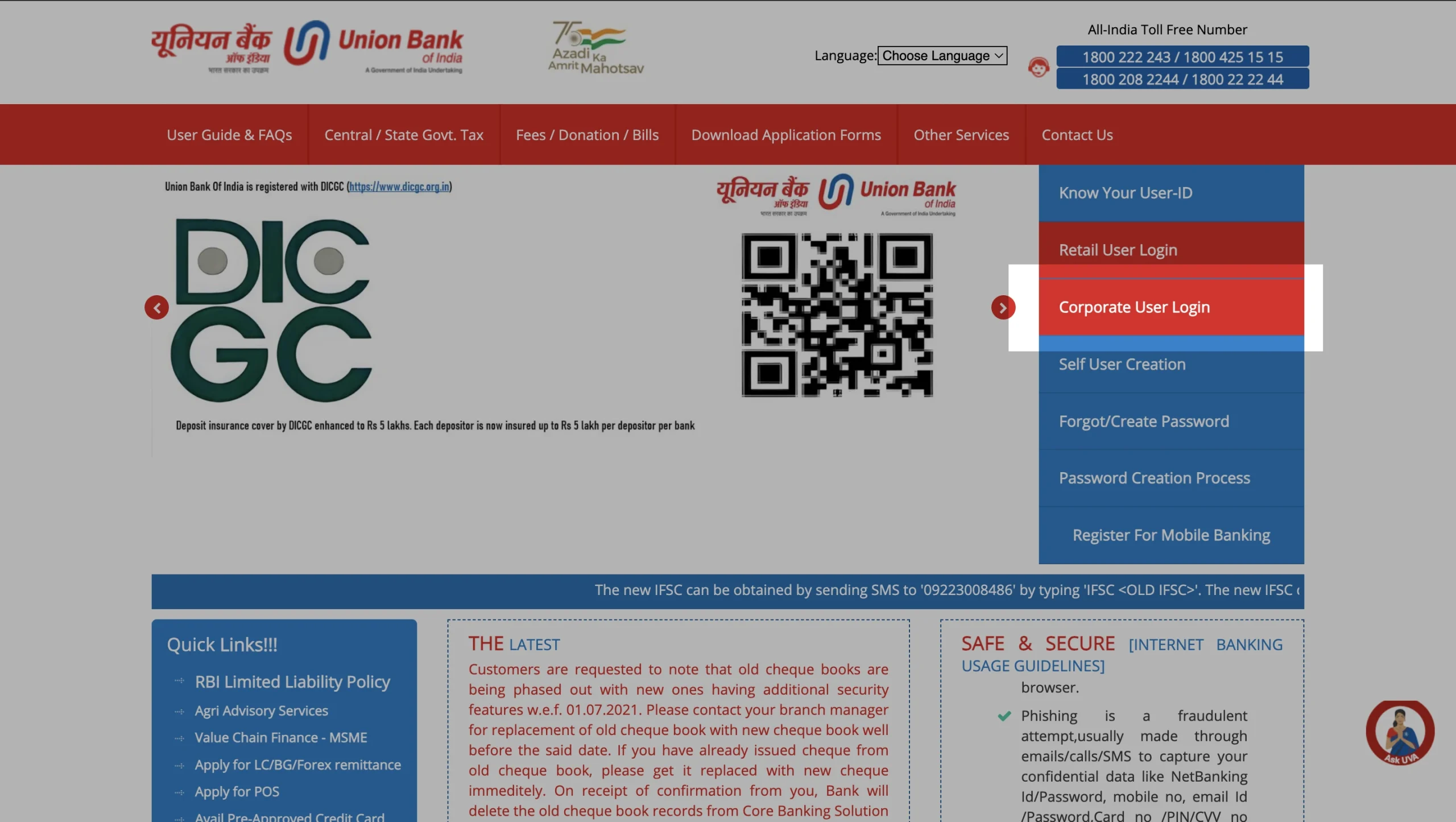
- Click on the ‘Internet Banking Application’ option.
- Alternatively, you can paste the link
‘https://www.unionbankonline.co.in/Upload/IBApplication.pdf’ on your browser and download the application form. - Fill out the form accurately and completely.
- With the necessary supporting documents, visit the nearest branch.
- Once your application is cross-checked and verified, you will receive your temporary credentials for login.
You can use these credentials to log in and later change the details of your Union Bank of India net banking.
UBI Net Banking Login
Once registered, users can perform a secure Union Bank of India net banking login. The login page supports both retail and corporate users. A password reset option is also available if credentials are forgotten.
To log in, you can follow these steps given below:
- Go to the Union Bank Net Banking Login page.
- Choose ‘Retail’ or ‘Corporate’ login.
- Based on your selection, one of the two windows can open: for retail and corporate.
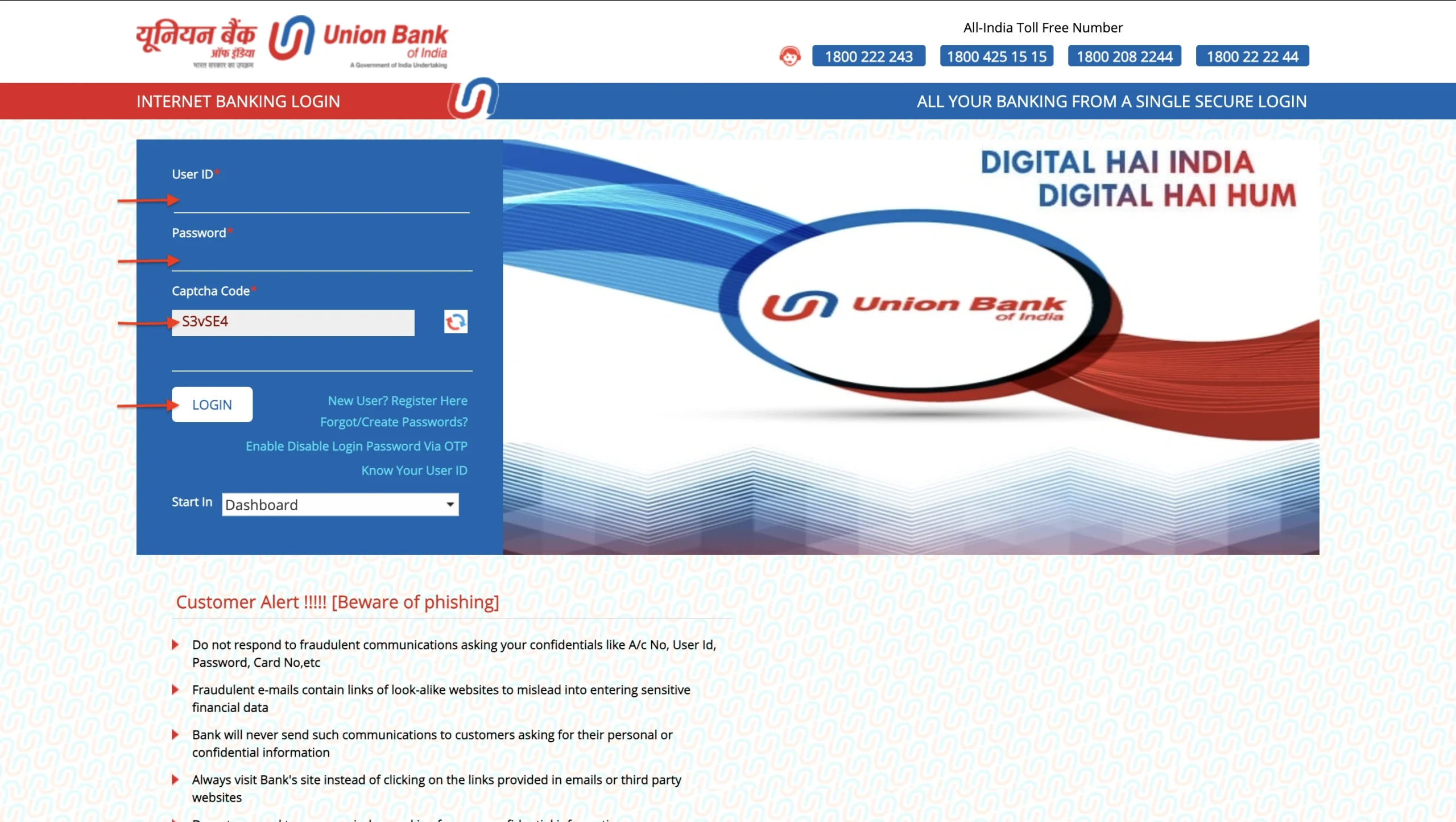
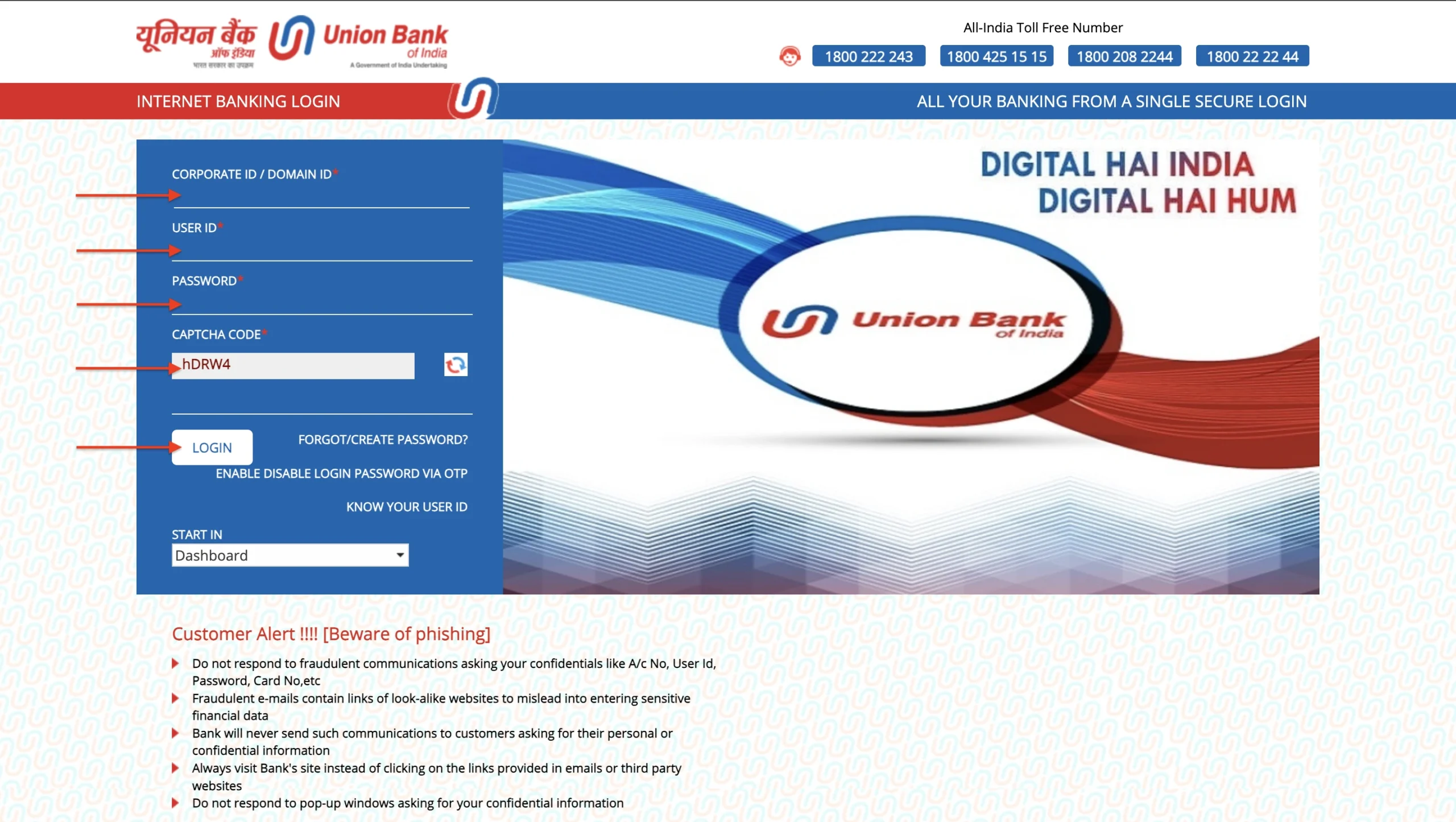
- Enter your user ID and password, fill out the captcha and hit login (enter corporate ID for corporate login).
- Complete OTP authentication if required.
In any case, if you forgot your password and want to reset your password, you can use the following steps:
- Click on ‘Forgot Password’ on the login page
- Enter account and user details
- Authenticate via OTP
- Set a new password for login or transactions

Services Offered by Union Bank of India Net Banking
Union Bank of India net banking services are designed for convenient and secure digital banking. Customers can access almost all of the financial and non-financial services without visiting a branch.
Here are some of the services they offer:
- Balance enquiry and statements
- Fund transfers via NEFT, RTGS, IMPS, UPI
- Loans and schemes (Personal loans, Home loans, Educational loans, etc.)
- Credit card and Debit card management.
- Bill payments (electricity, mobile, DTH, etc.)
- Opening fixed deposits or recurring deposits
- Cheque book request
- Setting transaction limits
- Downloading account statements
Customer Care for UBI Net Banking
Union Bank of India customer care service offers a defined solution to any of your concerns. If you face issues with internet banking, the linking opportunity team can assist with login, registration, password reset, and technical errors.
Here are various details of customer care support and how you can reach them:
| General helpline number | 1800 2222 44 / 1800 208 2244 (In India – Toll Free)
1800 425 1515 / 1800 425 3555 (In India – Toll Free) |
| For premium customers | 1800 425 2407 |
| Reporting fraud/disputed transactions | 1800 2222 43 |
| ebanking@unionbankofindia.bank | |
| Blocking netbanking facility | block.netbanking@unionbankofindia.bank |
Features and Benefits of UBI Online Banking
The Union Bank of India net banking portal is equipped with quick features offering convenience, security, and 24/7 accessibility for its users. The bank ensures that the customers get world-class support and enhance their convenience of usage.
Key benefits include:
- 24/7 access to account information.
- No branch visit is required for most services.
- Secure two-factor authentication.
- Corporate account handling via the Union Bank of India corporate login.
- Mobile app and desktop access.
- Paperless service requests.

Union Bank of India Netbanking Transaction Limits and Charges
Here is a detailed comparison between various netbanking transactions based on their upper and lower limits.
| Transfer Type | Minimum Limit | Maximum Limit (Per Transaction) | Maximum Limit (Per Day) |
| NEFT | ₹1 | No upper limit
(₹1 Cr during off-hours) | No fixed daily cap |
| RTGS | ₹2 Lakhs | No upper limit
(₹1 Cr during off-hours) | No fixed daily cap |
| IMPS | ₹1 | ₹5,00,000 | ₹5,00,000 |
| UPI (General) | ₹1 | ₹1,00,000 | ₹1,00,000 |
| UPI (High-Value Categories) | ₹1 | ₹2,00,000 or ₹5,00,000
(select categories) | Based on bank policy |
| UPI (New Users) | ₹1 | ₹5,000 | ₹5,000 |
There can also be additional charges incurred with payments, which are explained in the table below:
| Service Type | Charge | Remarks |
| NEFT (Online) | ₹0 | Free for retail customers |
| RTGS (Online) | ₹0 | Free for retail customers |
| IMPS | ₹2.50 to ₹15 + GST | Varies by transaction amount and bank’s internal fee structure |
| UPI (P2P/P2M) | ₹0 | No charges on standard UPI transfers |
| UPI via PPI (e.g., wallets) | 1.1% Interchange (Merchant Only) | Applies to transactions above ₹2,000; charged to merchant, not customer |
| New Beneficiary Cooling Period | Applicable | Temporary lower limit may apply |
| Corporate User Limits | Custom per mandate | Limits set during registration which is typically much higher |

Download the Buddy Loan App Now!
One solution to each of your financial needs at your fingertip.

Scan to download now

