
A UAN password is the secure login credential used with your Universal Account Number on the EPFO Member Portal. It allows employees to access online Employees’ Provident Fund services such as PF balance checks, EPF passbook downloads, EPFO KYC update, claim filing, PF claim tracking, and PF transfer.
Since your EPFO account contains sensitive employment, Aadhaar, bank, and retirement savings information, the UAN password is important for account security. If you forget it, lose mobile access, or suspect unauthorized use, you should reset it immediately.


Common Reasons for UAN Password Reset
UAN password reset is usually required when a member cannot access the EPFO Member Portal or wants to improve account security.
Common reasons include:
- Forgotten UAN password after long inactivity
- Repeated incorrect login attempts
- UAN account temporarily locked
- Mobile number changed or inactive
- OTP not received during login or reset
- Aadhaar details not matching EPFO records
- Suspected unauthorized access
- Password not working on the EPF passbook portal
- UAN has not been activated yet
- Browser, captcha, or portal loading errors

Prerequisites Before the UAN Password Reset Process
Before resetting your UAN password, keep the required details ready. This helps avoid failed verification, OTP errors, or session timeouts.
You need:
- Active UAN
- Aadhaar linked with UAN
- Mobile number linked with Aadhaar
- Correct name, date of birth, and gender as per Aadhaar
- Stable internet connection
- Access to SMS OTP
- Updated KYC details, where applicable
If your Aadhaar-linked mobile number is inactive, update it first before attempting the reset.
Steps to Reset UAN Password Using the EPFO Forgot Password Option
The easiest way to reset your UAN password is through the ‘Forgot Password’ option on the official EPFO Member Portal.
Steps to Reset UAN Password Online
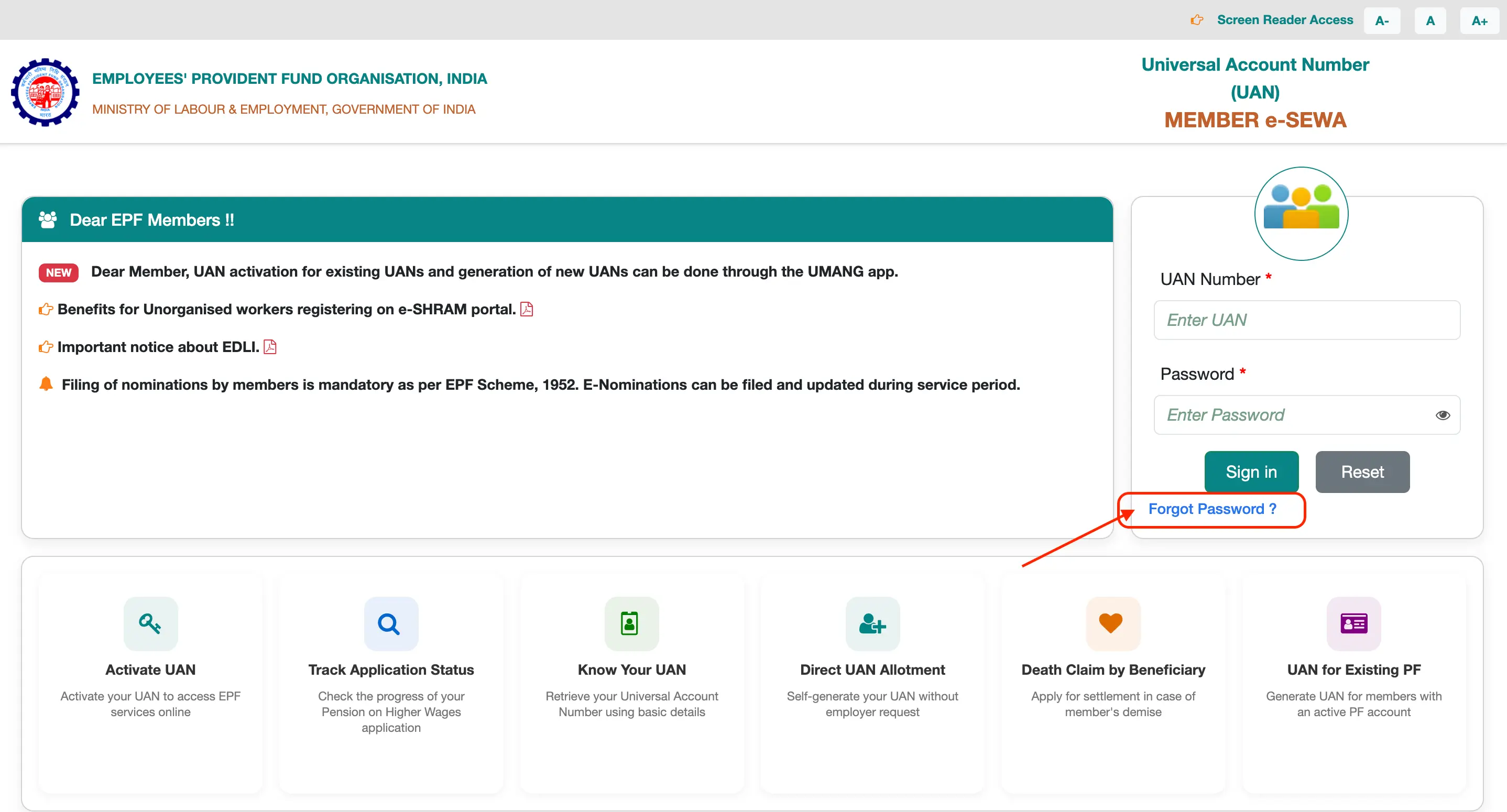
1. Visit the official EPFO Member Portal.
2. Click Forgot Password below the login section.
3. Enter your 12-digit UAN.
4. Enter the captcha code shown on the screen.
5. Click Submit.
6. Enter your personal details, such as: Name, Date of birth and Gender.
7. Enter your Aadhaar number and provide consent for Aadhaar authentication.
8. Click Verify.
9. Enter the mobile number linked with Aadhaar.
10. Click Get OTP.
11. Enter the OTP received on your mobile.
12. Create a new password and confirm it.
13. Click Submit to complete the password reset.
What happens after a reset?Once submitted successfully:
|

Steps to Reset UAN Password Without Registered Mobile Number
You may still be able to reset your UAN password if you no longer have access to the old mobile number registered with EPFO. The reset process depends on Aadhaar-based verification.
Steps to Reset UAN Password Without Old Registered Mobile Number
1. Open the EPFO Member Portal.
2. Click Forgot Password.
3. Enter your UAN and captcha.
4. Verify your personal details.
5. Use Aadhaar-based authentication.
6. Enter the mobile number currently linked with Aadhaar.
7. Receive and enter the OTP.
8. Set a new password.
Important Cases
| Situation | What You Can Do |
| Old EPFO mobile inactive, but Aadhaar mobile active | Reset using Aadhaar OTP |
| Aadhaar mobile is also inactive | Update your mobile number with Aadhaar first |
| Aadhaar and EPFO details mismatch | Correct details through the employer |
| No OTP access at all | Password reset cannot be completed online |
OTP verification is mandatory. If you cannot receive OTP on any linked number, update your mobile number before trying again.
Steps to Change UAN Password After Logging in to EPFO Portal
If you remember your current UAN password, you do not need to use “Forgot Password.” You can change it after you log in to the EPFO Portal.
Steps to Change UAN Password After Login
- Go to the EPFO Member Portal.
- Log in using your UAN and current password.
- Complete OTP verification if prompted.
- Go to the Account section.
- Select Change Password.
- Enter your old password.
- Enter your new password.
- Re-enter the new password for confirmation.
- Complete Aadhaar OTP verification if required.
- Click Change Password.
Steps to Reset UAN Password Using UMANG App
The UMANG app provides mobile access to several EPFO services. EPFO-related services may also support Aadhaar-based Face Authentication for UAN activation and identity verification.
Steps to Use UMANG for UAN Services
- Download the UMANG app from the Google Play Store or Apple App Store.
- Open the app and log in.
- Search for EPFO services.
- Select the relevant UAN service.
- Choose the Face Authentication option, where available.
- Follow the on-screen instructions.
- Complete Aadhaar-based face verification.
- Continue with UAN activation or related service access.
For detailed steps, refer to the UAN registration guide.
UAN Password Format Rules
Your new UAN password must follow EPFO’s password format rules. If the password does not meet these rules, the portal may reject it.
UAN Password Requirements
| Requirement | Rule |
| Length | Usually 7 to 20 characters |
| Uppercase letter | At least one required |
| Lowercase letter | At least one required |
| Number | At least two digits required |
| Special character | At least one required |
Examples of Strong UAN Passwords
Avoid These Passwords
A strong password should be easy for you to remember but difficult for others to guess. |
UAN Password Reset Errors
Password reset errors usually occur because of incorrect details, OTP delays, Aadhaar mismatch, inactive UAN, or portal issues.
| Error Message / Issue | Likely Cause | Suggested Solution |
| UAN Password Not Available | UAN inactive or password never created | Activate UAN first |
| Details Not Matching | Aadhaar and EPFO records differ | Correct details through employer |
| UAN Does Not Exist | Wrong UAN entered | Use “Know Your UAN” |
| OTP Not Received | Network or SMS delay | Retry after some time |
| Captcha Error | Incorrect captcha entry | Refresh and re-enter the captcha |
| Account Locked | Repeated wrong password attempts | Wait and try again later |
| Password Not Accepted | Format rules not followed | Use required uppercase, lowercase, digits, and special character |
| Passbook Login Failed | Password sync delay | Wait 4–6 hours |
Security Tips After UAN Password Reset
After resetting your password, secure your EPFO account to prevent unauthorized access.
Follow these tips:
- Never share your UAN password or OTP.
- Do not save passwords on public computers.
- Avoid logging in through cybercafés.
- Use only official EPFO websites.
- Do not click suspicious EPFO-related links from SMS or WhatsApp.
- Use a strong and unique password.
- Change your password regularly.
- Keep your Aadhaar-linked mobile number active.
- Use anti-virus or anti-malware software.
- Log out after every session.
| Official Website Safety TipAlways check that the website domain belongs to: epfindia.gov.in
Avoid fake portals that ask for payment, OTP, or bank details. |
How Long Does UAN Password Reset Take?
UAN password resets usually complete quickly, but different EPFO services may update at different times.
| Activity | Expected Time |
| Password reset on Member Portal | Immediate |
| OTP delivery | Usually within a few seconds to minutes |
| Member Portal login after reset | Immediate |
| EPF Passbook portal sync | Around 4–6 hours |
| Correction of mismatched records | Depends on employer or EPFO processing |
Reasons for Delay
Password reset or login may be delayed due to:
- EPFO portal traffic
- SMS gateway delay
- Incorrect Aadhaar details
- Network issues
- System maintenance
- Passbook portal synchronization lag
If the new password does not work on the passbook portal immediately, wait a few hours before trying again.
EPFO Helpdesk for UAN Password Reset Problems
If you cannot reset your password online, use official EPFO support channels.
| Support Channel | Details | Best For |
| EPFO Member Portal | https://unifiedportal-mem.epfindia.gov.in/ | Password reset, login, and UAN services |
| EPFiGMS Portal | https://epfigms.gov.in/ | Grievances and unresolved complaints |
| Toll-Free Helpline | 14470 / 1800 11 8005 | General EPFO support |
| Email Support | support-gms@epfindia.gov.in | Technical grievance support |
| Employer | HR/payroll department | KYC correction, mobile update, record mismatch |
| EPFO Office | Regional office | Complex verification or unresolved issues |

Download the Buddy Loan App Now!
One solution to each of your financial needs at your fingertip.

Scan to download now

