
The Atal Pension Yojana (APY) assigns a unique identifier called the Permanent Retirement Account Number (PRAN) to each subscriber. Similar to a social security number for APY, this PRAN number tracks your account and contributions. You’ll need it for various APY services like accessing account details, downloading your e-PRAN card, or checking transaction history.
If you misplaced your enrolment acknowledgment slip with the PRAN number, you can retrieve it by logging into the NPS website or reprinting your e-PRAN card online.


PRAN Number
PRAN, or Permanent Retirement Account Number, is a unique 12-digit number assigned to individuals who are registered with NPS (National Pension System). Each NPS subscriber is given a distinct PRAN number to facilitate efficient tracking and management of your retirement savings.
There are two categories of NPS accounts: Tier 1 and Tier 2. The PRAN number remains constant for both NPS accounts.
- Tier 1 Account: This is the default NPS account with a fixed lock-in period of 60 years and qualifies for tax deduction.
- Tier 2 Account: This is a voluntary savings account with no tax advantages. It operates like a regular savings account, allowing you to withdraw funds at any time.
Having a PRAN number helps you to invest in NPS and monitor your investments from anywhere. It serves as a secure and permanent reference for all NPS transactions, ensuring a smooth retirement planning process. If you are interested in investing in NPS, you can check your eligibility for NPS here.
Are you looking for a personal loan?

You can get your e-PRAN card which displays your PRAN number. Here are the steps to follow:
Step1: Visit the NPS – National Pension System website.
Step 2: Click on the “Atal Pension Yojana (APY)” tab. Look for the section titled “APY e-PRAN / Transaction Statement View”.
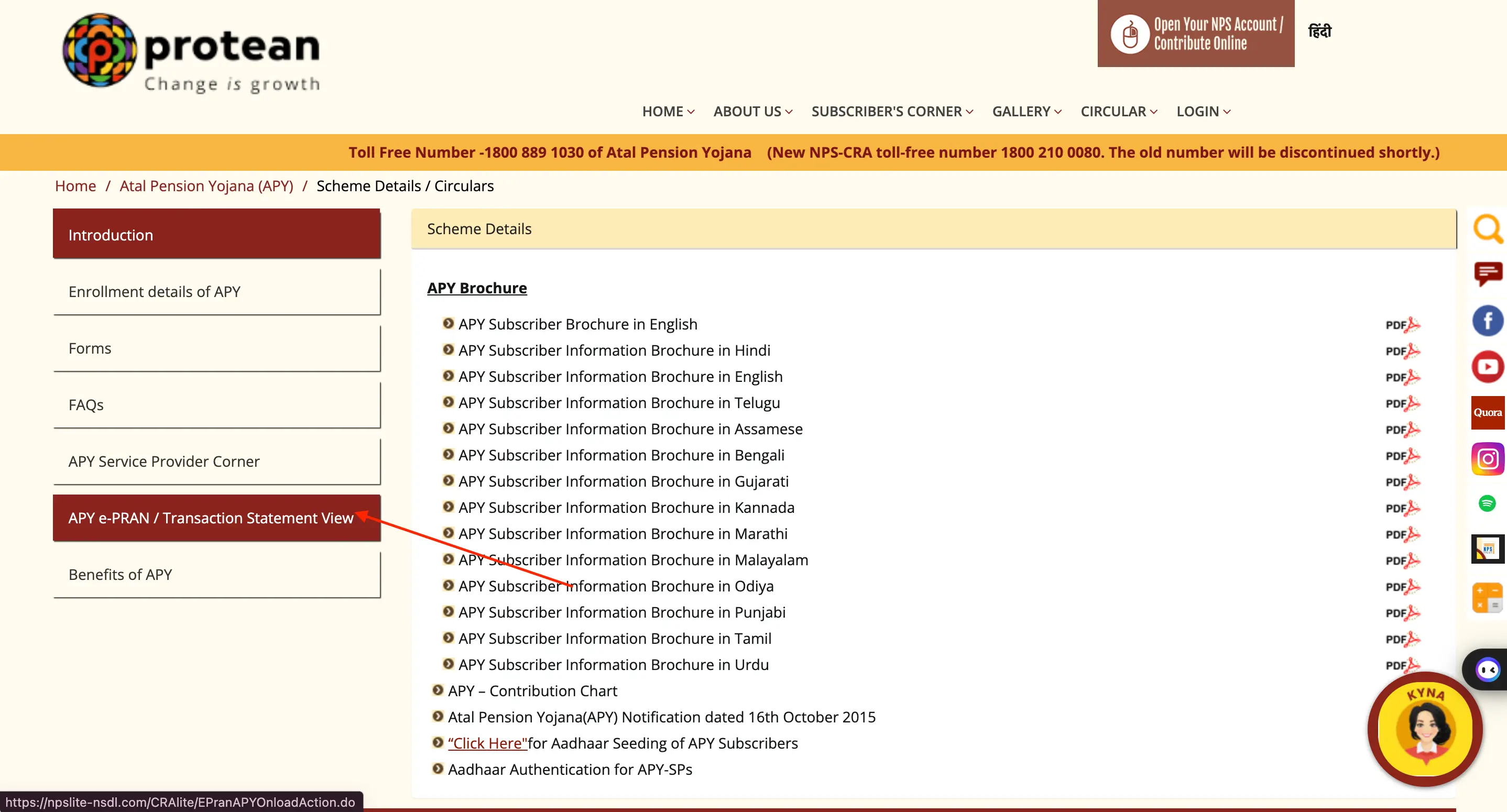
Step 3 (A): Here, you’ll have two options:
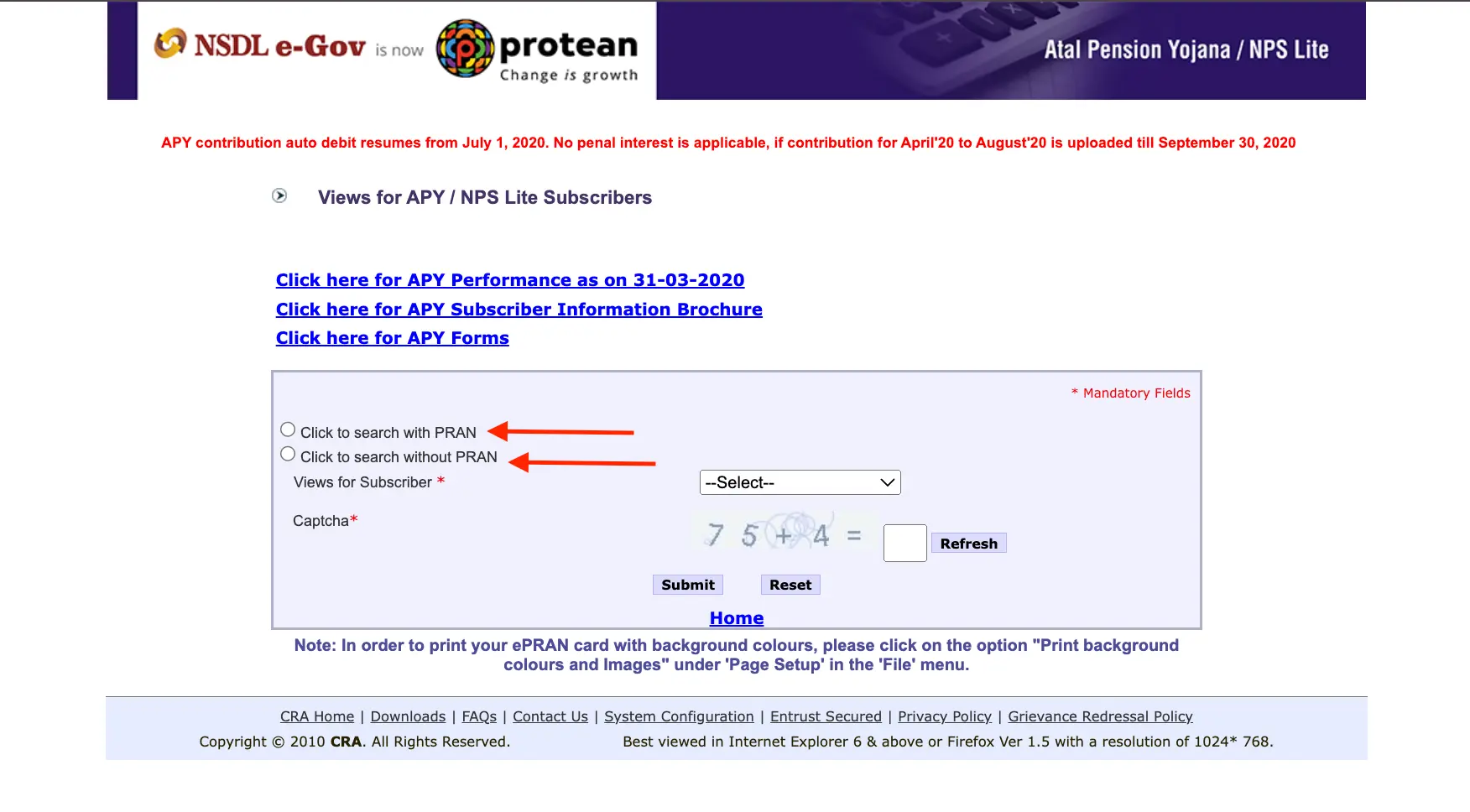
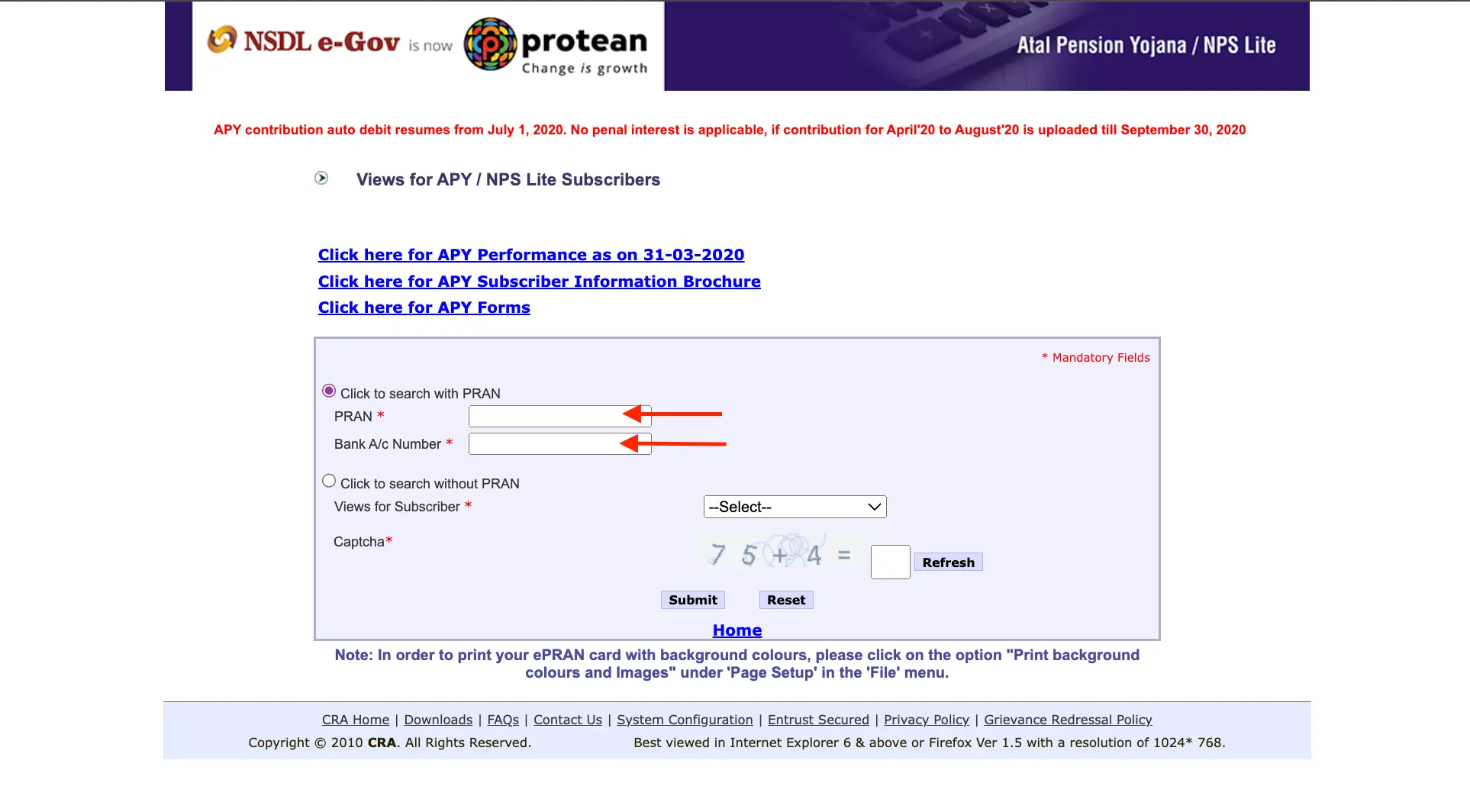
Step 3 (B): Option 1: With PRAN: If you remember a fragment of your PRAN number, you can enter it along with your bank account number to view your e-PRAN card.
Step 3 (C): Option 2: Without PRAN (Click to search without PRAN): This option allows you to search using your registered details. Enter your subscriber name, date of birth, and bank account number.
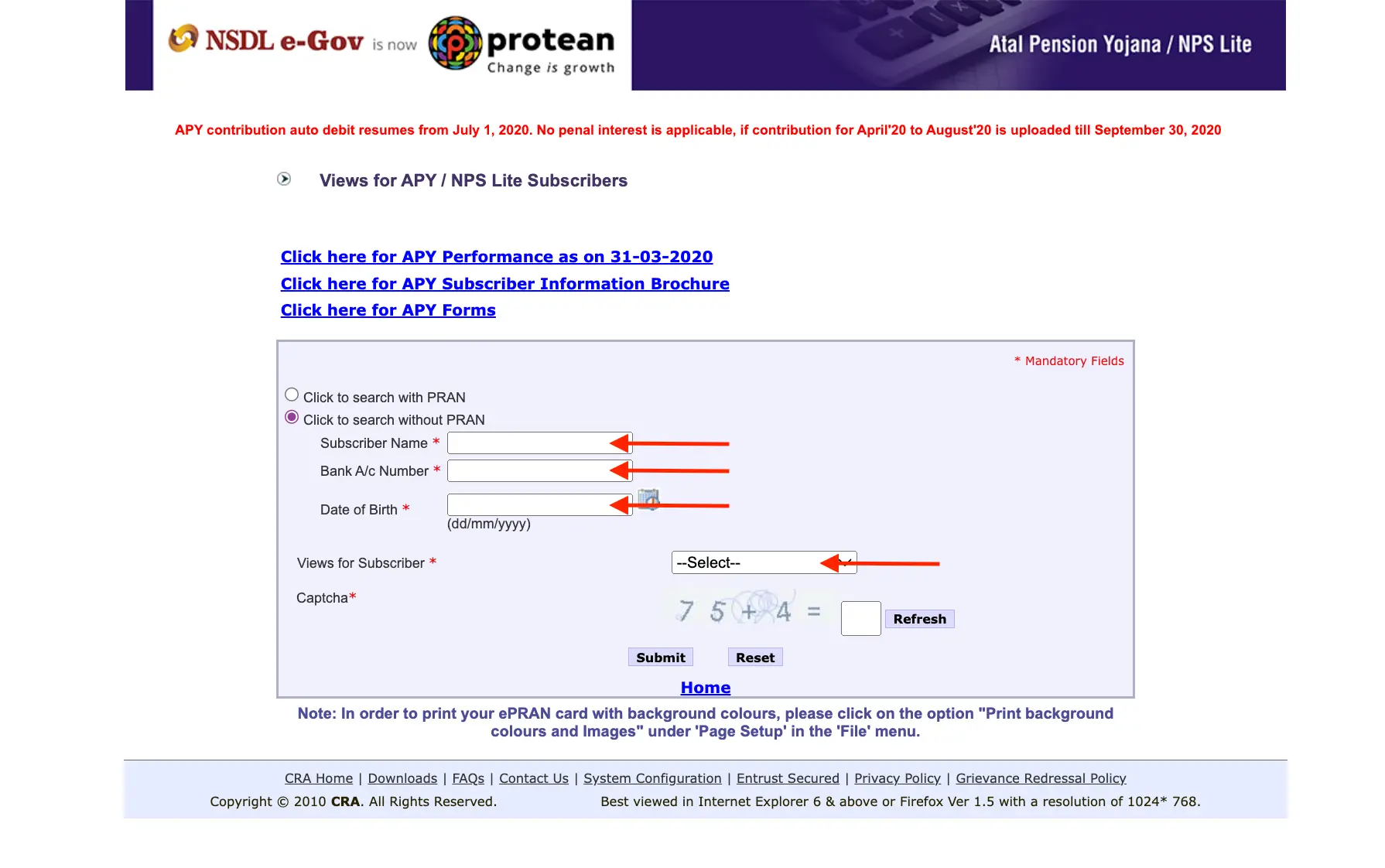
Step 4: Choose the desired option for viewing your e-PRAN card (APY ePRAN and Master Details View or APY/Swavalamban Statement View).
Step 5: Complete the CAPTCHA verification.
Step 6: Click “Submit”.
If the details match, you’ll be able to view your e-PRAN card which includes your PRAN number.
Don’t know your credit score? You can find out for free!
No specific documents are required to find your APY PRAN number online using the NPS website. However, you’ll need some information to complete the search:
With PRAN (if you remember some digits):
- Partial PRAN number (any digits you recall)
- The bank account number linked to your APY account
Without PRAN:
- Subscriber name (as registered with APY)
- Date of birth
- The bank account number linked to your APY account
Additional Note:
While documents aren’t required, having your registered mobile number linked to your APY account is helpful. You might receive a one-time password (OTP) for verification during the process.

Importance of APY PRAN Number
The APY PRAN number is your key to managing your APY account, accessing information, and ultimately receiving your retirement benefits. The APY PRAN number is important for several reasons:
- Unique Identification: It acts like a social security number specifically for your APY account. This unique identifier ensures your account is distinct and simplifies record-keeping.
- Tracks Your Account & Contributions: The PRAN number links you to your APY account, allowing you to monitor your contributions, accumulated corpus, and future pension estimates.
- Access to Services: You’ll need your PRAN number to access various APY services online or through the UMANG App. These services include:
- Viewing account details
- Downloading your e-PRAN card
- Checking transaction history
- Updating your nomination details (optional)
- Possibly requesting contribution changes (depending on program rules)
- Future Benefits: When you reach retirement age, your PRAN number will be crucial for claiming your pension benefits under the Atal Pension Yojana scheme.
Do you need an instant loan?
Here are the methods to retrieve your APY PRAN number:
- Using the NPS Website: This is the most convenient way to retrieve your e-PRAN which displays your PRAN number.
- Check your Enrolment Acknowledgement Slip: If you haven’t lost it, this slip issued after APY registration contains your PRAN number.
- UMANG App: Try logging in to the UMANG App with your registered credentials. If successful, you might be able to view your APY account details, including your PRAN number.
- Contact NPS Helpline: Consider calling the NPS helpline for assistance. They might require additional verification details. You can find the helpline number on the NPS website.
- Visit Nodal Office (for rare cases): In rare instances, visiting your Nodal Office (usually the bank where you registered for APY) might be necessary. You can request a duplicate PRAN card issuance, but they might require a completed form and verification documents.
You can contact customer service through the various channels mentioned below for any queries:
Address
Protean eGov Technologies Limited
1st Floor, Times Tower, Kamala Mills Compound, Senapati Bapat Marg, Lower Parel, Mumbai – 400 013
Tel: 020 6906 6906
Fax: (022) 2495 2594/ 2499 4974
Toll-Free Number For Registered Subscriber (PRAN is Mandatory)
For NPS Subscriber – 1800 2100 080
For NPS Nodal Officers – 1800 2100 081
For APY Subscriber – 1800 889 1030
You can also check other related topics of Atal Pension Yojana

Download the Buddy Loan App Now!
One solution to each of your financial needs at your fingertip.

Scan to download now

