

The Atal Pension Yojana (APY) is a government scheme in India that guarantees a minimum monthly pension after retirement. Launched in 2015, it targets the unorganized sector but is open to all citizens between 18 and 40 years old. You choose your desired pension amount (Rs. 1,000 to Rs. 5,000) and contribute a small, fixed amount monthly. The government co-contributes to boost your savings.
An APY statement tracks your progress. It details your contributions, investment performance (how your money grows), and total account value. Regularly checking it helps you monitor your progress towards your retirement goal. You can identify any gaps and adjust contributions if needed. This empowers you to plan effectively for a secure financial future after retirement.


Atal Pension Yojana Statement Details
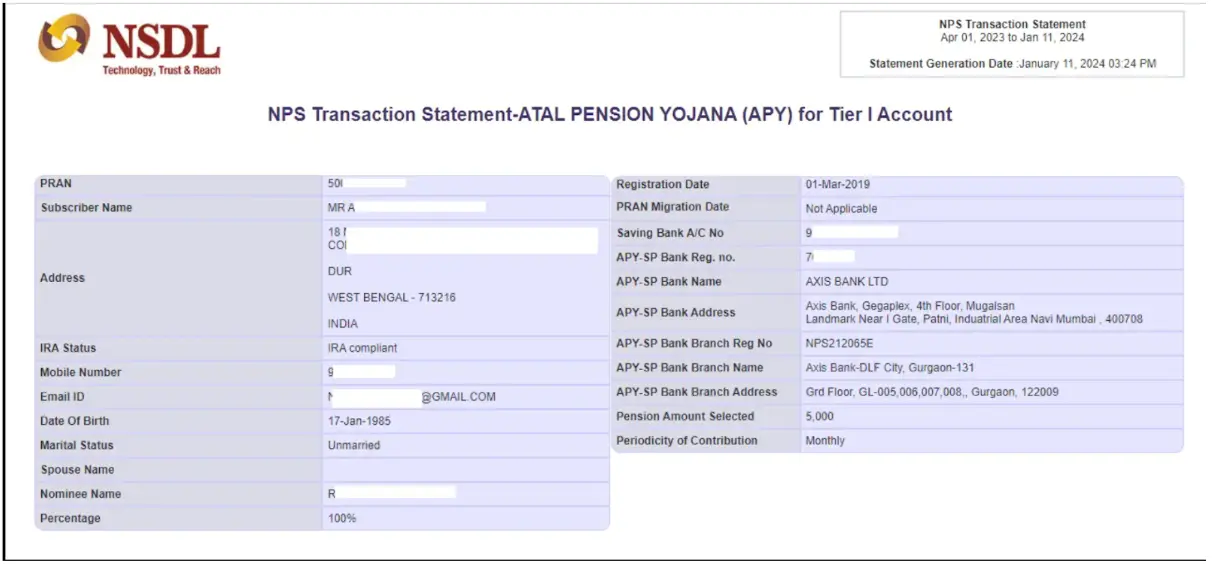
An APY statement is a document that provides details about your contributions, investment performance, and account value within the scheme. It essentially helps you track your progress towards your desired retirement income.
Here’s what you typically find in an APY statement:
- Contributions: This section details the amount you’ve contributed to your APY account, including the frequency (monthly, quarterly, half-yearly).
- Investment Performance: The statement reflects how your contributions have grown over time. This typically includes details on the Net Asset Value (NAV) which determines the units allocated to your account.
- Total Account Value: This section shows the current value of your APY account, representing the total amount accumulated so far.
- Pension Amount: The statement might include a projection of the estimated monthly pension you’ll receive upon reaching retirement age.
Are you looking for a personal loan?

Ways To Obtain Atal Pension Yojana Statement
Two main methods to obtain your Atal Pension Yojana (APY) statement are:
- Online Portal: Access your APY statement online through the National Pension System (NPS) portal if your APY account is linked.
- Bank Branch: Visit the branch where you signed up for APY and request a physical or electronic copy of your statement.
Besides, one can also check their APY contributions on the UMANG App and on NSDL website.
Steps to Check Atal Pension Yojana Statement Online
To check your Atal Pension Yojana balance online, follow these steps:
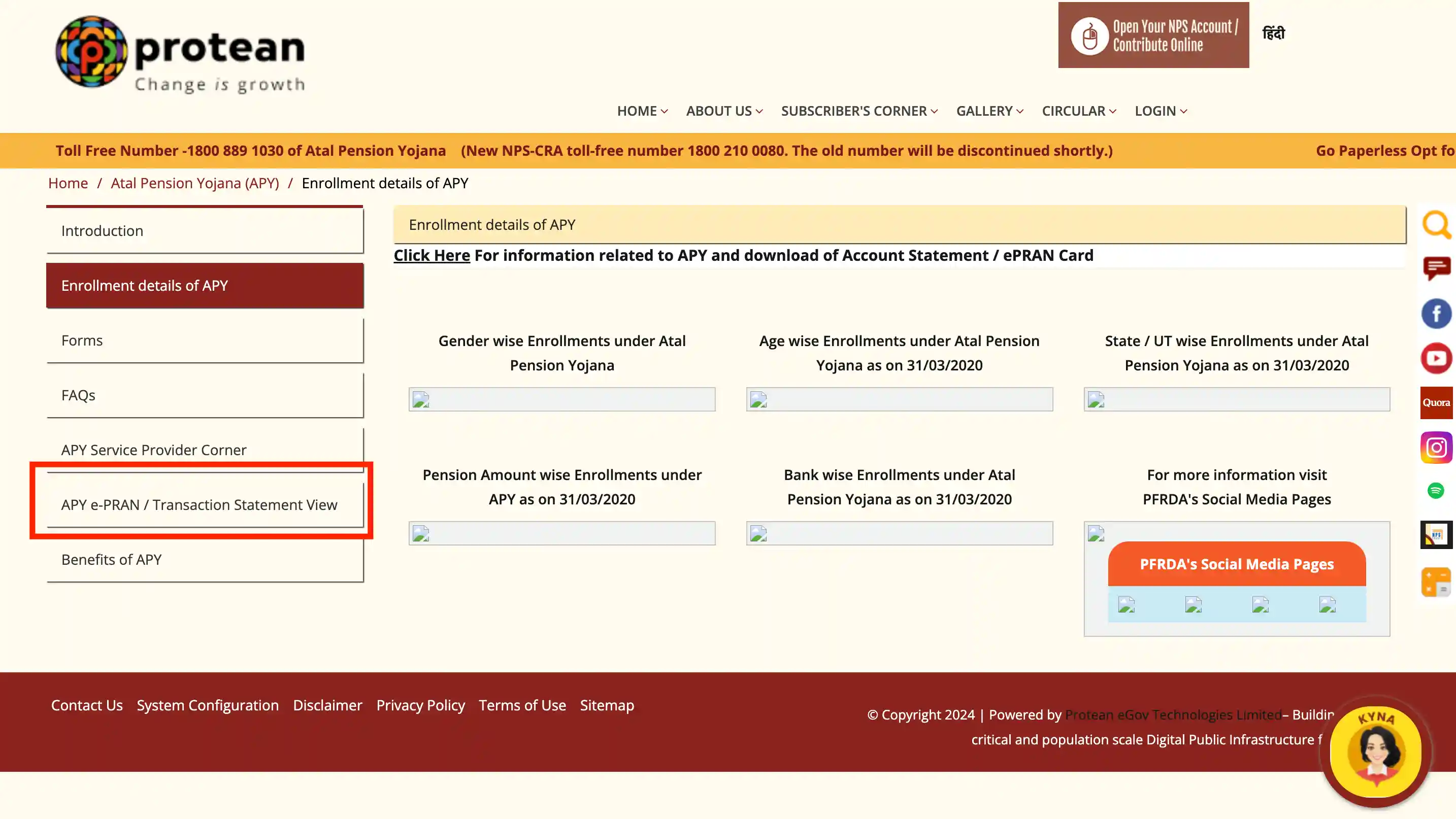
Step 1: Visit the official NSDL APY Portal at https://npslite-nsdl.com/CRAlite/ or https://www.npscra.nsdl.co.in/enrollment-details-of-apy.php
Step 2: Click on ‘APY e-PRAN / Transaction Statement View’.
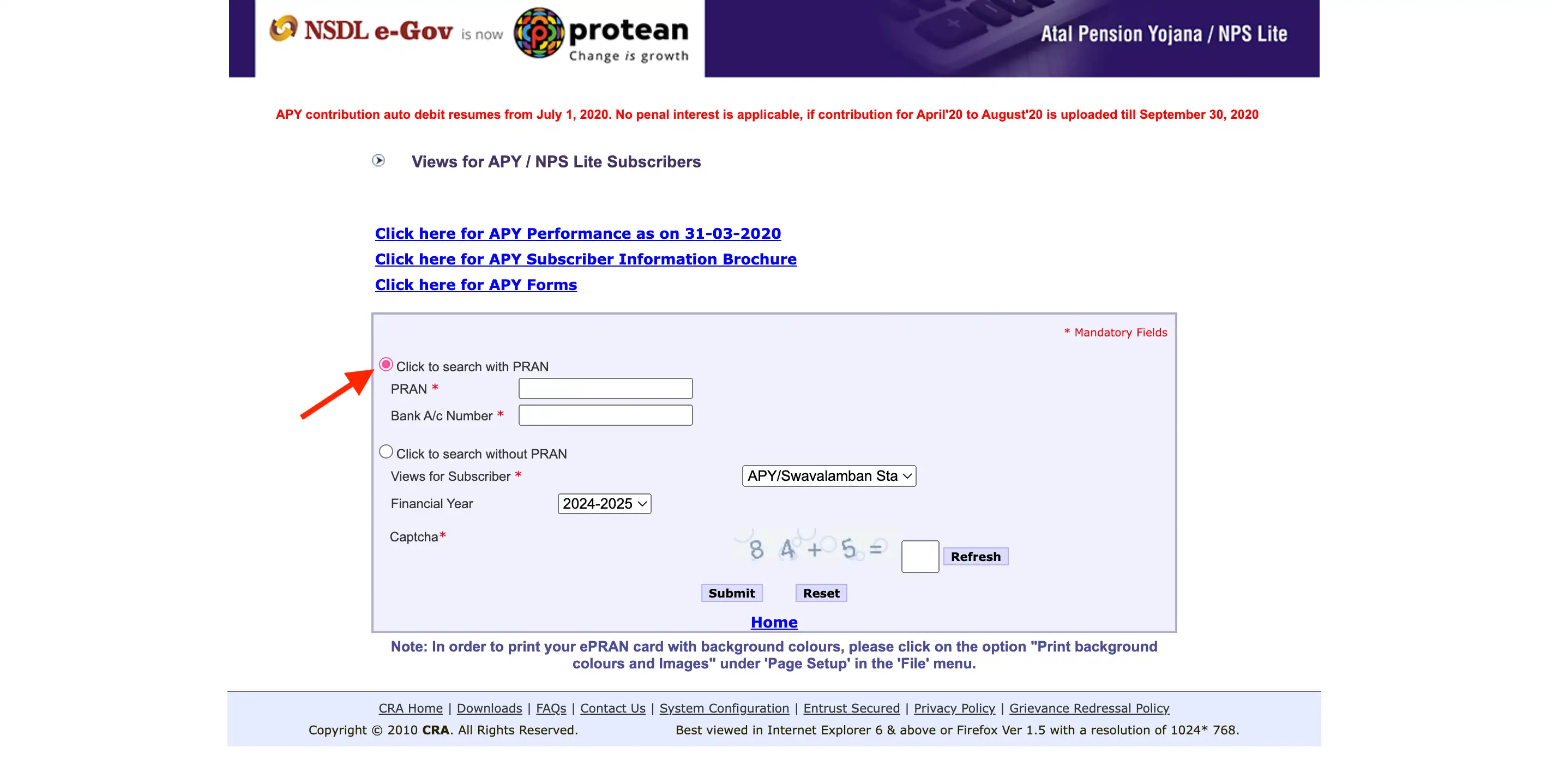
Step 3: Logging in: With PRAN: Enter your 12-digit PRAN and your bank account details associated with your APY account.
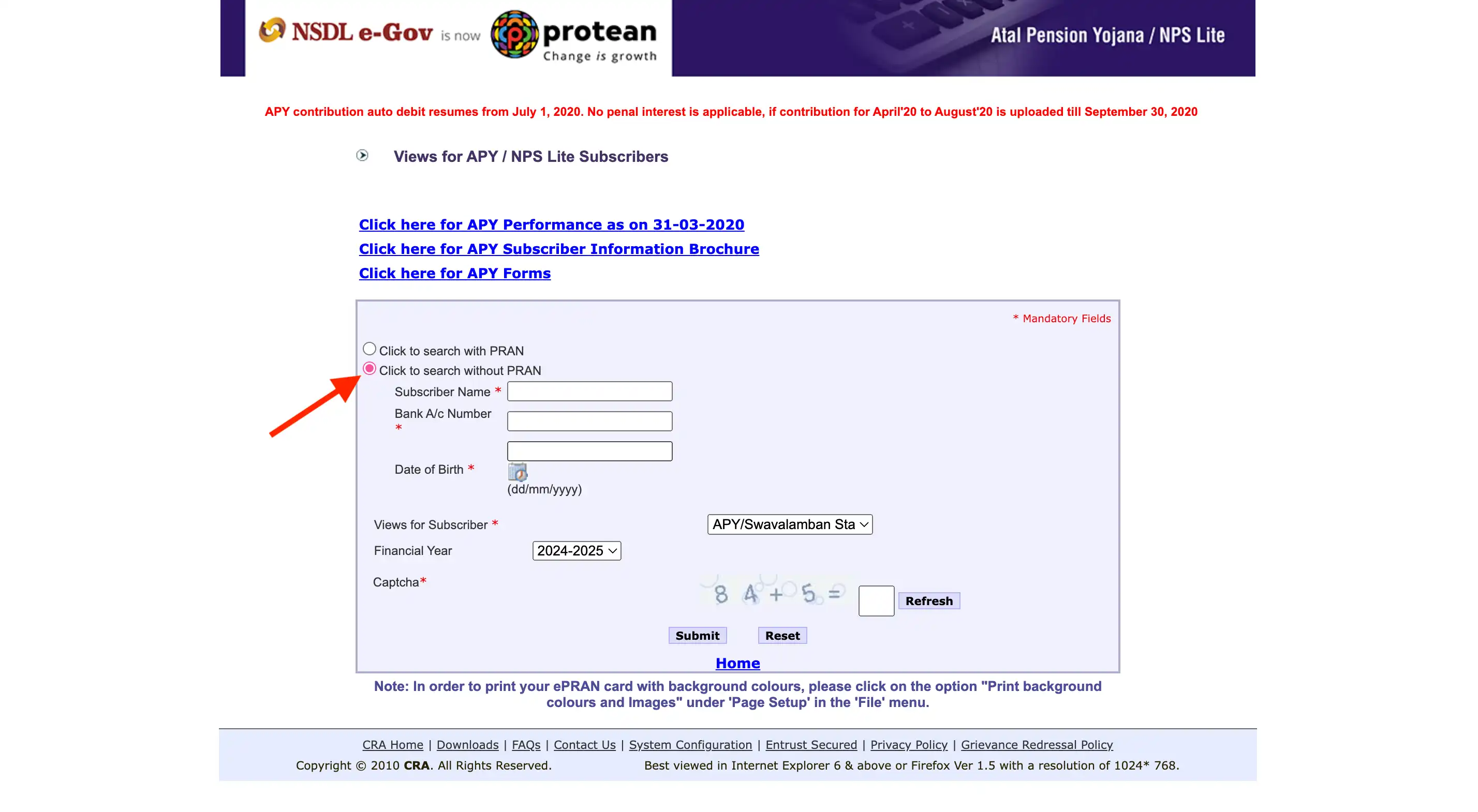
Without PRAN: Enter the subscriber name, bank account number linked to your APY account and your date of birth.
Step 4: Accessing your statement: Once logged in, you’ll see options for “Statement of Transaction View” and “APY e-PRAN View,” which provide detailed records of your contributions and a broader view of your account.
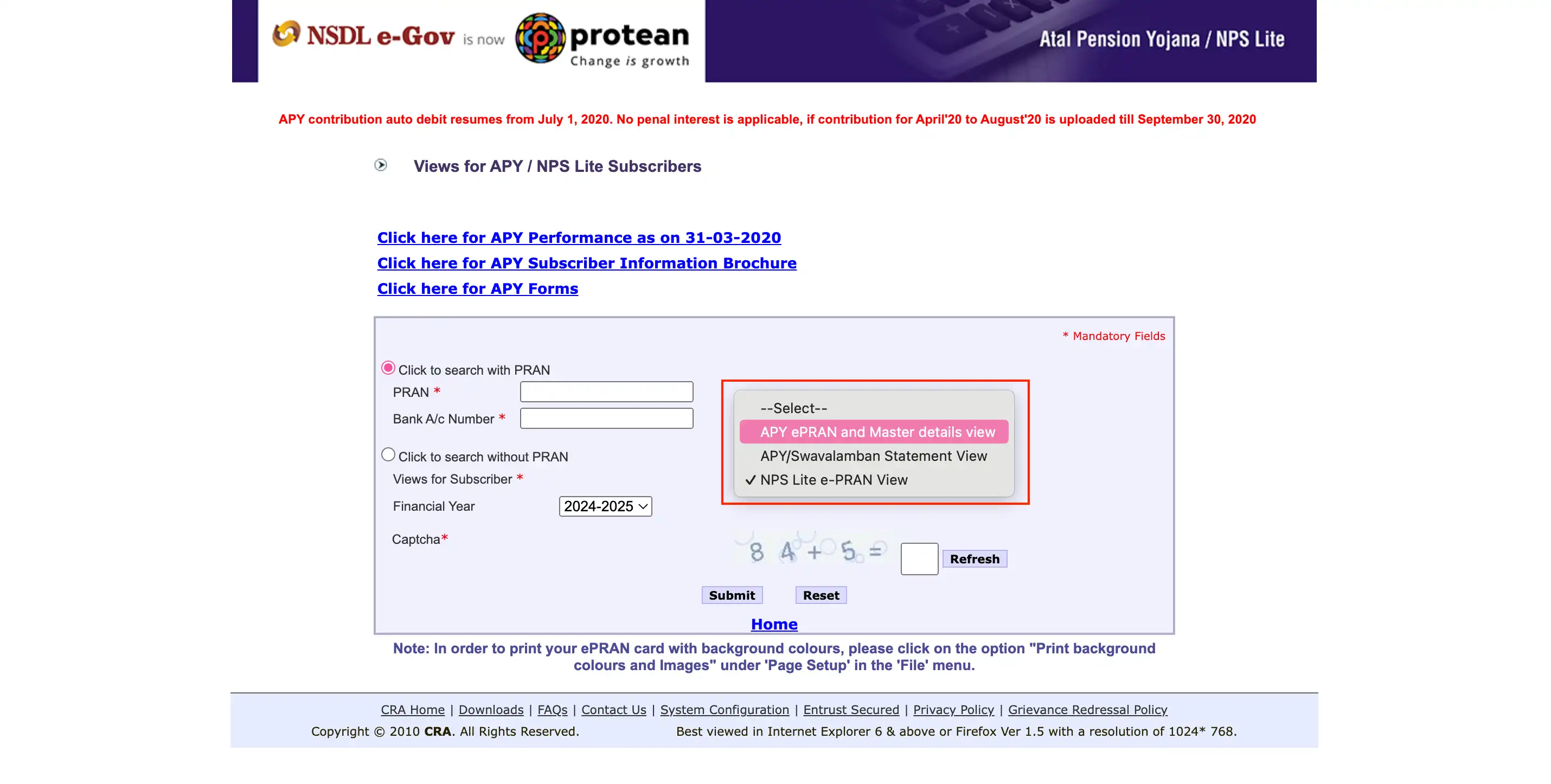
Step 5: View APY Statement: Select the desired view, enter the captcha code displayed on the screen, and click “Submit” to access your APY statement.
Don’t know your credit score? You can find out for free!

Ways to Check Atal Pension Yojana Statement Offline
You can check the APY statement offline in the following ways:
- SMS Notification: You will receive a message on your registered contact number informing you about the status of your monthly payments.
- Annual Physical Statement: You will receive a physical transaction statement annually, which will be mailed to your registered address.
- Email Statement: You will also get an email with the transaction statement.
- Bank Visit: You can visit the bank where you hold your Atal Pension Yojana account to access this information.
Steps to Check Your Atal Pension Yojana Statement Through APY Mobile App
Here are the steps to check your APY statement through the APY mobile app:
- Step 1: Install the NPS Lite and APY mobile app.
- Step 2: Access the app by entering your PRAN details.
- Step 3: An OTP will be sent to your registered mobile number and will be automatically entered into the app. Tap on submit.
- Step 4: You will be directed to the main page, where you can access the transaction statement, displaying your total holdings and asset allocation.
- Step 5: Apart from checking your Atal Pension Yojana balance, you can also view the pension amount, nominee name, e-PRAN card, pension commencement date, and other APY account details.
Importance of Checking Your Atal Pension Yojana Statement
By regularly reviewing your APY statement, you can ensure you’re maximizing the tax benefits, maintaining timely credit to your account, and avoiding any penalties or inconveniences. Here is why you should check your Atal Pension Yojana (APY) statement:
For APY Tax Benefits
- APY contributions are eligible for tax deductions
- You can claim a tax exemption of up to 10% of your total income, with a maximum deduction of ₹1.5 lakh per annum
- Providing the APY transaction statement is required to claim these tax benefits
For Timely Credit & to Avoiding Penalties
- Checking your statement ensures your APY account is credited on time
- This helps you avoid any penalty charges
For Regular Review of APY Contributions
- Regularly downloading and reviewing your APY statement can help prevent inconveniences
- Keep your PRAN (Permanent Retirement Account Number) and bank account details handy to simplify the login process and avoid any hassle
Atal Pension Yojana Customer Care
If you have questions or require assistance regarding the Atal Pension Yojana scheme, you can connect with the right customer care channel.
If you have questions or require assistance regarding the Atal Pension Yojana scheme, you can connect with the right customer care channel.
Address: Protean eGov Technologies Limited
1st Floor, Times Tower, Kamala Mills Compound, Senapati Bapat Marg, Lower Parel, Mumbai – 400 013
- Toll-Free Number For Registered Subscriber (PRAN is Mandatory)
- For NPS Subscriber – 1800 2100 080
- For NPS Nodal Officers – 1800 2100 081
- For APY Subscriber – 1800 889 1030
You can also check other topics for the Atal Pension Yojana
Do you need an instant loan?