

A PAN (Permanent Account Number) card is a crucial document for tracking financial transactions for tax payment, introduced by the Income Tax Department in India. The PAN card includes personal details like name, date of birth, photo, father’s name, and signature. It serves as proof of identity and date of birth for financial transactions.
Applying for a PAN card is now more convenient than ever. Individuals can also apply for a reprinted card or an e-PAN if they have misplaced the original. Individuals or Companies/ Firms can apply for a PAN Card. Individuals above the age of 18, can apply for a PAN independently.
Here, you can easily find means to apply for a PAN Card while guiding you through the initiation process of a PAN Card.


Ways to Apply for PAN Card
There are two primary ways to apply for a PAN card:
- Online Application: This is the preferred method and can be done through UTIITSL (https://www.utiitsl.com/) or NSDL (https://www.nsdl.co.in/). You’ll need to fill out an online form (Form 49A) and upload scanned copies of the required documents.
- Offline Application: You can download Form 49A, fill it out manually, and submit it along with document copies at a PAN facilitation center (PFC) operated by NSDL or UTIITSL.
Are you looking for a loan?

Apply PAN Card Online
You can apply for a PAN card online through the Income Tax portal using your Aadhaar, or through the NSDL and UTIITSL websites. These websites are authorized by the Government of India to issue PAN cards and make any necessary changes or corrections on behalf of the Income Tax Department.
Apply for a PAN Card Online on Protean NSDL Portal
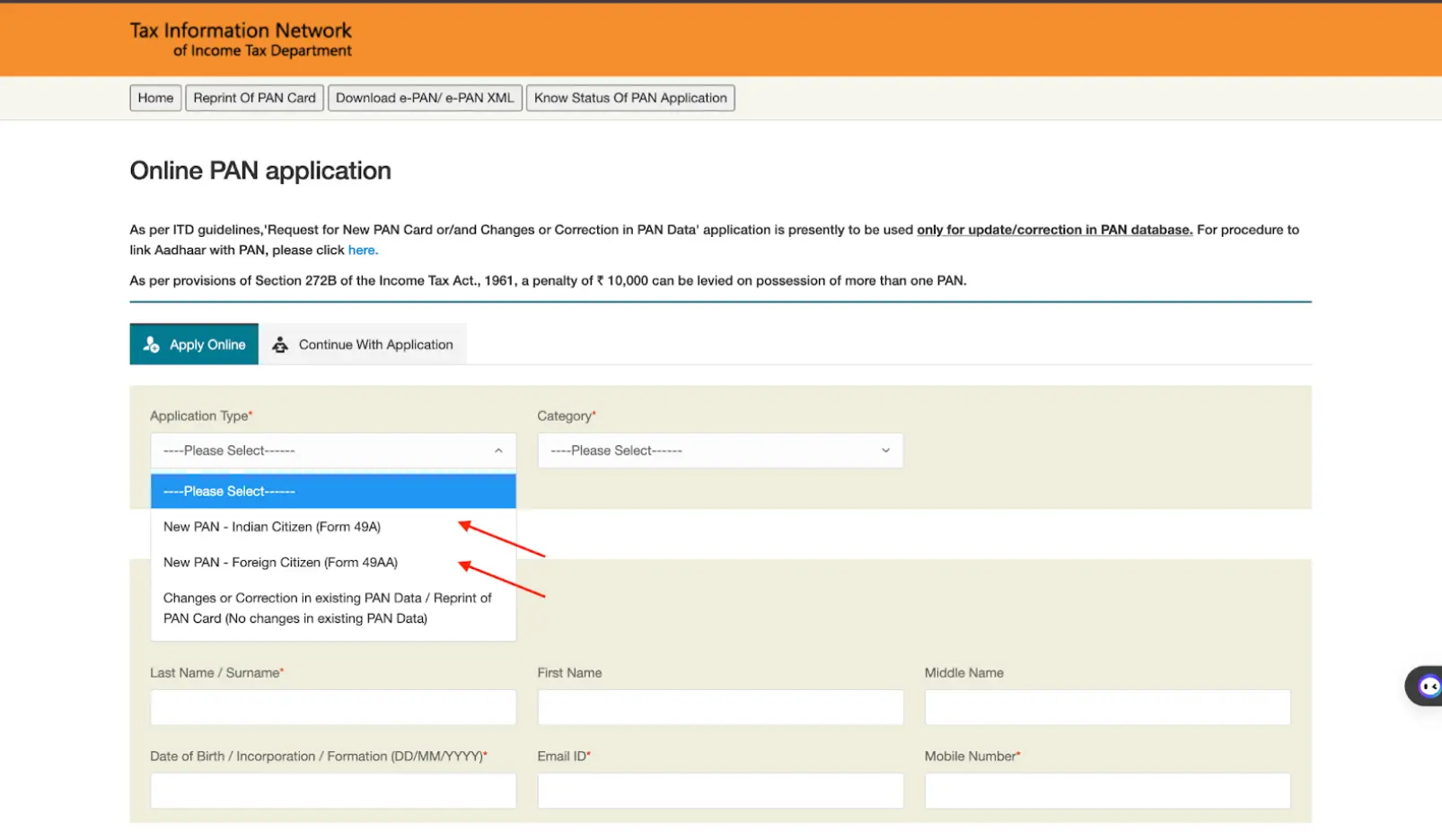
When applying for a new PAN card, you must complete Form 49A if you are an Indian citizen or Form 49AA if you are a foreign citizen. This process is intended for individuals who do not currently possess a PAN card and have never previously applied for one. Here are the necessary steps.
Step 1: Go to the Online PAN Application section on the NSDL website. And select your application type: Form 49A (for Indian Citizens) or 49AA (for Foreign Citizens).
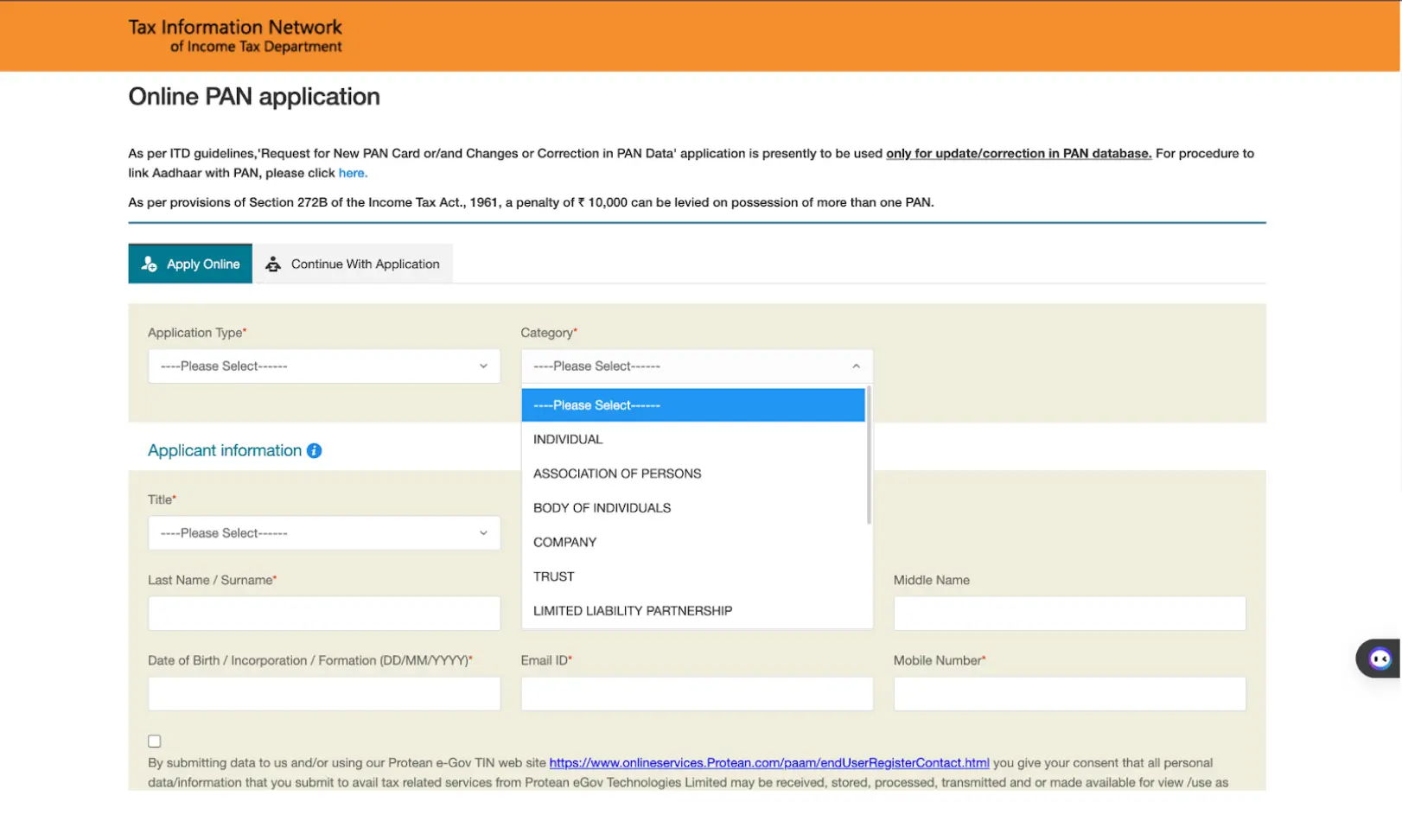
Step 2: Choose your Category. You can select from the following options: Individual, Association of Persons, Body of Individuals, Trust, Limited Liability Partnerships, Firm, Government, Hindu Undivided Family, Artificial Judicial Person, and Local Authority.
Step 3: Complete the Title, Last Name/Surname, First Name, Middle Name, Date of Birth/Incorporation/Formation in the format DD/MM/YYYY, Email ID, Mobile Number, and Captcha code. Then proceed to submit the form.
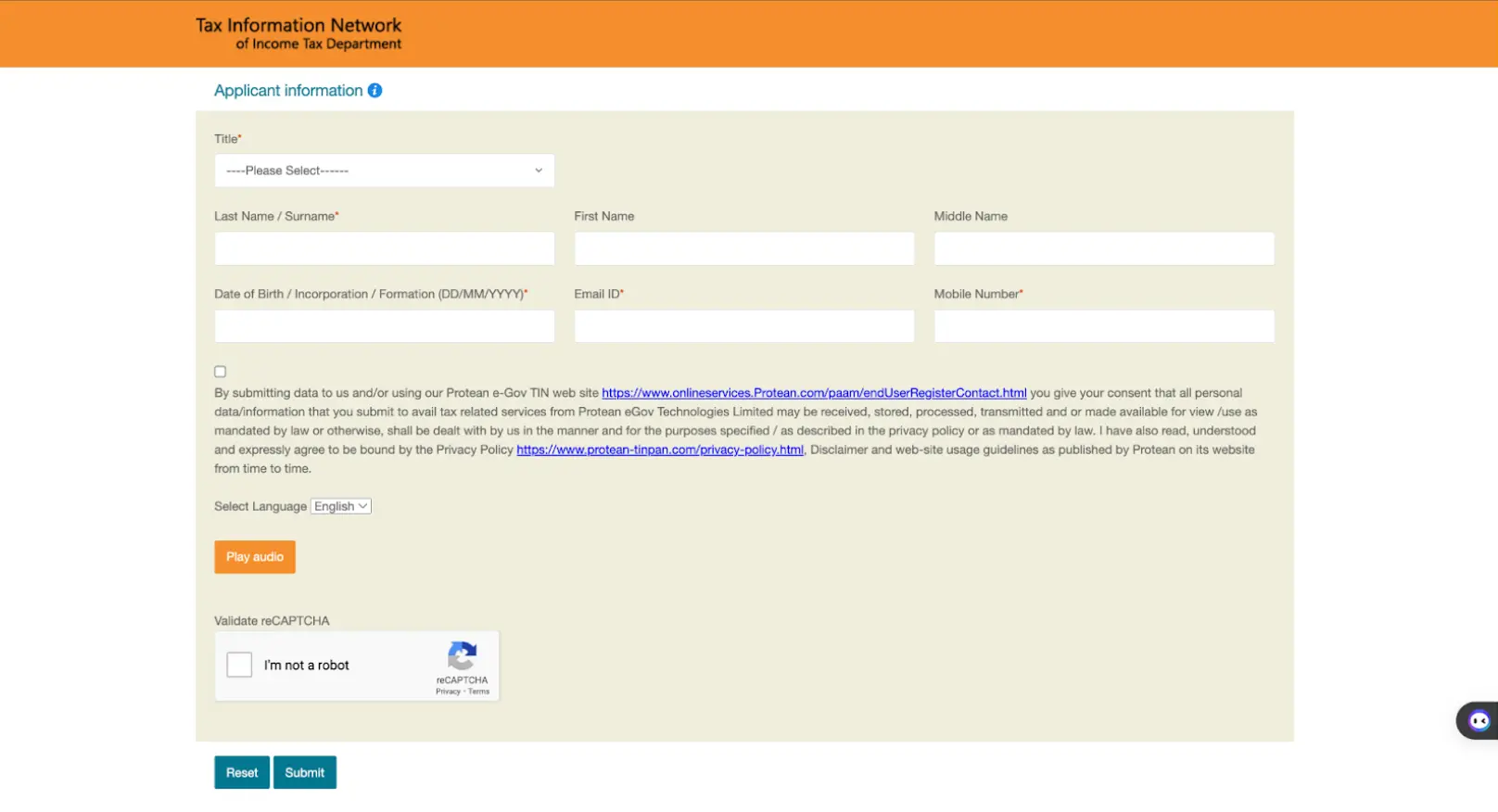
Step 4: After completing the previous step, you will receive an acknowledgment with a token number. Then click on ‘Continue with PAN Application Form’ on the next page.
Step 5:You will be directed to provide more personal details similar to Form 49A or Form 49AA. Input all the required information.
Step 6:Choose your mode of document verification, a) Forward application documents physically; b) Submit digitally through digital signature; c) Submit digitally through e-sign.
Step 7:Indicate the documents you are submitting as proof of identity, address, and date of birth. Confirm the declaration, place, and date of application. Review and submit the form carefully to avoid mistakes of any kind.
Step 8:Click on ‘Proceed’ and you will be directed to the payment options. Choose between Demand Draft and Online Payment through Bill Desk.
Step 9:If you choose Demand Draft, you will need to make a DD before starting the application process and provide the DD number, date of issue, amount, and the name of the bank from where the DD is generated on the portal.
Step 10: If you choose Bill Desk, you can pay through Net Banking, Debit, or Credit Cards.
Step 11: Click on ‘I agree to terms of service’ and proceed to pay. The PAN application fees will vary based on whether you are sending documents separately to Protean e-Gov Technologies Limited or uploading them online.
Step 12: If you pay using your credit card, debit card, or net banking, you will receive an acknowledgment receipt and payment receipt. Print the acknowledgment receipt.
Step 13: Attach two recent photographs along with the acknowledgment receipt.
Apply for a PAN Card Online on the UTIITSL Website
To apply for a PAN card online through the UTIITSL website, follow these steps:
Step 1: Complete the PAN card application form found on the UTIITSL website.
Step 2: Submit the application fee. Once payment is successful, you will receive an acknowledgment on the website and through email.
Step 3: Send the required documents to the UTIITSL office via courier within 15 days of submitting Form 49A online.
Step 4: UTIITSL will then review the application and documents, and issue the PAN card within 15 days.
Don’t know your credit score? You can find out for free!

Apply PAN Card Offline
Prospective applicants have the option to apply for a PAN card using the offline method. They can go to a nearby TIN NSDL/UTIITSL center and follow these steps:
Step 1: Download and print Form 49A.
Step 2: Fill out the form and attach two passport-size photographs.
Step 3: Make the payment as a demand draft payable to ‘NSDL – PAN’ in Mumbai/UTIITSL.
Step 4: Attach self-attested photocopies of required proofs with the form.
Step 5: Write ‘APPLICATION FOR PAN-N-Acknowledgement Number’ on the envelope of the application form and send it to:
Income Tax PAN Services Unit,
NSDL e-Governance Infrastructure Limited,
5th floor, Mantri Sterling, Plot No. 341,
Survey No. 997/8, Model Colony,
Near Deep Bungalow Chowk, Pune – 411016
Alternatively, if you are applying for a PAN card through UTIITSL, you can submit the completed application form to the nearest UTIITSL center.
Step 6: Once the application is successfully processed, the PAN will be generated and sent to the applicant’s residential address.
Steps to Update or Correct PAN Card Details Online
If you need to change your PAN details, such as your name, address, or other information, there is a well-defined process to follow. Here are the steps involved:
Step 1: Fill out the online application form on the NSDL website.
Step 2: Pay the application fees using a credit/debit card, demand draft, or net banking, and save the acknowledgment.
Step 3: Submit the supporting documents via courier or postal service to NSDL. Processing will begin once the documents are received.
PAN Card Application Fee
The cost of applying for a PAN card through offline methods is ₹110. If the PAN card needs to be sent outside of India, the applicant must also pay an extra dispatch fee of ₹910.
The fees for submitting a PAN card application online are listed below:
| Mode of PAN application document submission | Fees (inclusive of applicable taxes) |
|---|---|
| Offline mode for a physical card | Dispatch of physical PAN card in India- ₹107 Dispatch of physical PAN card outside India- ₹1,017 |
| Online mode for a physical card | Dispatch of physical PAN card in India- ₹101 Dispatch of physical PAN card outside India- ₹1,011 |
| Offline mode for e-PAN | e-PAN card dispatched at the email ID of the applicant- ₹72 |
| Online mode for e-PAN | e-PAN card dispatched at the email ID of the applicant- ₹66 |
Documents Required for PAN Card Application
To apply for a PAN card online, you need to provide proof of your date of birth. You can submit any of the following documents:
PAN Card Documents Checklist
| Type | Documents Required |
|---|---|
| Proof of Date of Birth (Any-one) | Aadhaar Card, Passport, Birth Certificate, Driving License, Voter ID, Matriculation Certificate, Marriage Certificate, Affidavit (sworn before a magistrate), Domicile Certificate, Central/State Government Health Scheme Card |
| Proof of Address | Aadhaar Card, Passport, Voter ID, Driving License, Domicile Certificate, Property Tax Assessment Order, Bank Statement (latest 3 months), Post Office Passbook, Letter of Allotment (Govt) |
| Recent Proof of Address (not over 3 months old) | Landline Bill, Electricity Bill, Water Bill, Gas Connection Card, Bank Statement, Credit Card Statement |
Do you need an instant loan?
Tracking Your PAN Card Application Status
After submitting your PAN card application, you can easily track the delivery status of your PAN card online using the Speed Post tracking portal. All you need to do is enter the consignment number to track the status. Additionally, you can also track your consignment via SMS by typing ‘POST Track ’ and sending it to 166 or 51969.
PAN Card Allotment For Corporates
The Ministry of Corporate Affairs has integrated the PAN (Permanent Account Number) allotment process into the company incorporation process. This means that when a Private Limited Company, Public Limited Company, or Limited Liability Partnership (LLP) firm is incorporated, the PAN will be automatically allotted. Businesses no longer need to submit separate PAN applications, as the PAN will be reflected in the company’s incorporation certificate. This streamlines the incorporation process, as the PAN will be allotted simultaneously with the company’s incorporation, without the need for a separate application.
Do you need an Emergency loan?
Common Mistakes to Avoid During PAN Card Application
Applying for a PAN card in India is straightforward, but avoiding these common mistakes can ensure a smooth and swift application process:
- Inaccurate Information: Ensure all details (name, address, DOB) on the application match exactly with your documents. Typos and discrepancies can lead to rejection.
- Wrong Signature: Sign both the photograph and the designated area on the form using black ink only. Signatures outside the box or done with a blue pen can cause delays.
- Improper Photograph: Don’t use scanned copies. Attach two recent, matte-finish, passport-sized photographs. Ensure your face is visible and the photographer’s stamp doesn’t obscure it.
- Missing Documents: Double-check that you’ve included all required documents (proof of identity, address, and date of birth) as per category (individual, HUF, etc.).
- Incorrect Fee: Pay the exact application fee based on your chosen mode (physical or e-PAN) and delivery location (India or outside India). Refer to the fee table for clarity.
Want to know more? Check out other PAN related topics from links below:
Importance of e-KYC to Apply for PAN Online
Aadhaar-based e-KYC (electronic Know Your Customer) revolutionizes the process, making it faster and more convenient than ever. Here’s how e-KYC streamlines your online PAN application:
- Instant Verification: By leveraging Aadhaar’s robust database, e-KYC verifies your photo, address, and other details electronically. This eliminates the need for physical document submission and manual verification, saving you significant time and effort.
- Simplified Process: With e-KYC, there’s no need to scan, upload, or courier documents. The entire verification process happens seamlessly online, making the PAN application hassle-free.
- Enhanced Security: e-KYC utilizes Aadhaar’s advanced security features to ensure the authenticity of your information. This minimizes the risk of fraud and protects your personal data.
- Faster Processing: Since e-KYC eliminates manual verification steps, it significantly speeds up the PAN application processing time. You can potentially receive your PAN card much quicker.
Apply For a Personal Loan with Best Interest Rates
Did you know? With a PAN Card you can avail of a loan hassle-free!
If you are looking for more information on PAN card loans, feel free to check out the links below: