

Aadhaar number, a unique 12-digit number issued by UIDAI to every Indian citizen, promotes financial inclusivity. It helps to open a bank account and get access to government schemes. It helps to streamline processes and reduce the great threat of identity theft.
But in case you are facing problems with Aadhaar, in that case, you can reach out to UIDAI customer care service for help. The toll-free number is 1947 and is available 24/7 365 days a year. You can request your answers in Hindi, English, and 10 other regional languages.
This service helps with different Aadhaar-related issues, like enrollment updates, status checks, and complaint redressal.
Aadhar Customer Care Toll-Free Numbers
- 1947
- 18003001947
You can also send them mail at:
help@uidai.gov
Official Website:
https://uidai.gov.in/
Social Media Handles:
@UIDAIF for Twitter
@AadhaarOfficial for Facebook
Aadhaar UIDAI for Youtube


Are you looking for a personal loan?

Headquarters of UIDAI & Regional Office Contacts
UIDAI, established in 2016, is a government agency that manages Aadhaar-related queries. The UIDAI headquarter is in New Delhi. You can directly contact them to get answers to your queries at:
Unique Identification Authority of India
Government of India
Bangla Sahib Road, Behind Kali Mandir
Gole Market, New Delhi -110001
Contact No. : 011-23478653
Regional Offices of UIDAI
UIDAI operates through a network of regional offices across India. Most of the time these regional offices look into Aadhaar-related queries and activities. It includes Aadhaar enrollment centers, updating details in Aadhaar, and giving proper support to the people, in case of any query.
In the table below, we have provided the list of regional offices of UIDAI, how you can contact them, their contact details, etc.
| Telephone No. | |
|---|---|
| 0172-2711947 | grievancecell.rochd@uidai.net.in |
| Grievance Cell: 011-40851426 Reception: 11-40851426 | help@uidai.gov.in |
| 0522-23404979 0522-2304978 | uidai.lucknow@uidai.net.in |
| Grievance Cell Contact No.: 1947 UIDAI RO Mumbai Contact No.: 022-22163492 | help@uidai.gov.in |
| Toll-Free No.:1947 Helpdesk Tel. No.: 9031002292 | helpdesk-roranchi@uidai.net.in |
| 23739269 | – |
| 0361-2221819 | helpdesk.roghy@uidai.net.in |
| toll-Free No.: 1947 Phone: 033-22101060 | westbengal.helpdesk@uidai.net.in |
| — | – |
| Toll-Free No.: 1947 Phone: 0612-2545678 | campoffice.patna@uidai.net.in |
| Toll-Free No.: 1947 Phone: 0674-2914217 | helpodisha-rohyd@uidai.net.in |
| 079-29911701 | grievanceguj-romum@uidai.net.in |
| 0471-2990710 | helpdesk-sokl@uidai.net.in |
UIDAI Grievance Redressal
UIDAI understands people may encounter issues while updating their details on their Aadhaar, or even applying for Aadhaar through online or offline methods.
To address the concerned issue on the UIDAI portal, please read below and understand the step-by-step procedure:
Toll-free number- You can call at UIDAI toll-free number 1947 and get your issues addressed on call only. You can also call the regional office of your State. You can refer to the table above.
- By Post– You can also send your query through registered post to the regional office directly to the RO of your state or to the state’s regional office under which your state also comes. Sometimes, you can directly send the post to the headquarters in Delhi.
For example, if you live in Chhattisgarh, then you have to send it to Hyderabad regional office. For this, you can refer to the table above and get your regional office’s address. - Email: People can share their queries or grievances through mail. Most of the complaints are registered primarily at help@uidai.gov.in. You can check your state’s specific grievance email id.
Not sure of your credit score? Check it out now!

Online Grievance Redressal Through Resident Portal
You can file an online complaint at the resident portal. Fill up a form by providing personal details such as enrolment ID, personal details, location, complaint details, etc. And receive your update on your registered ID or mobile number.
You can follow the steps given below:
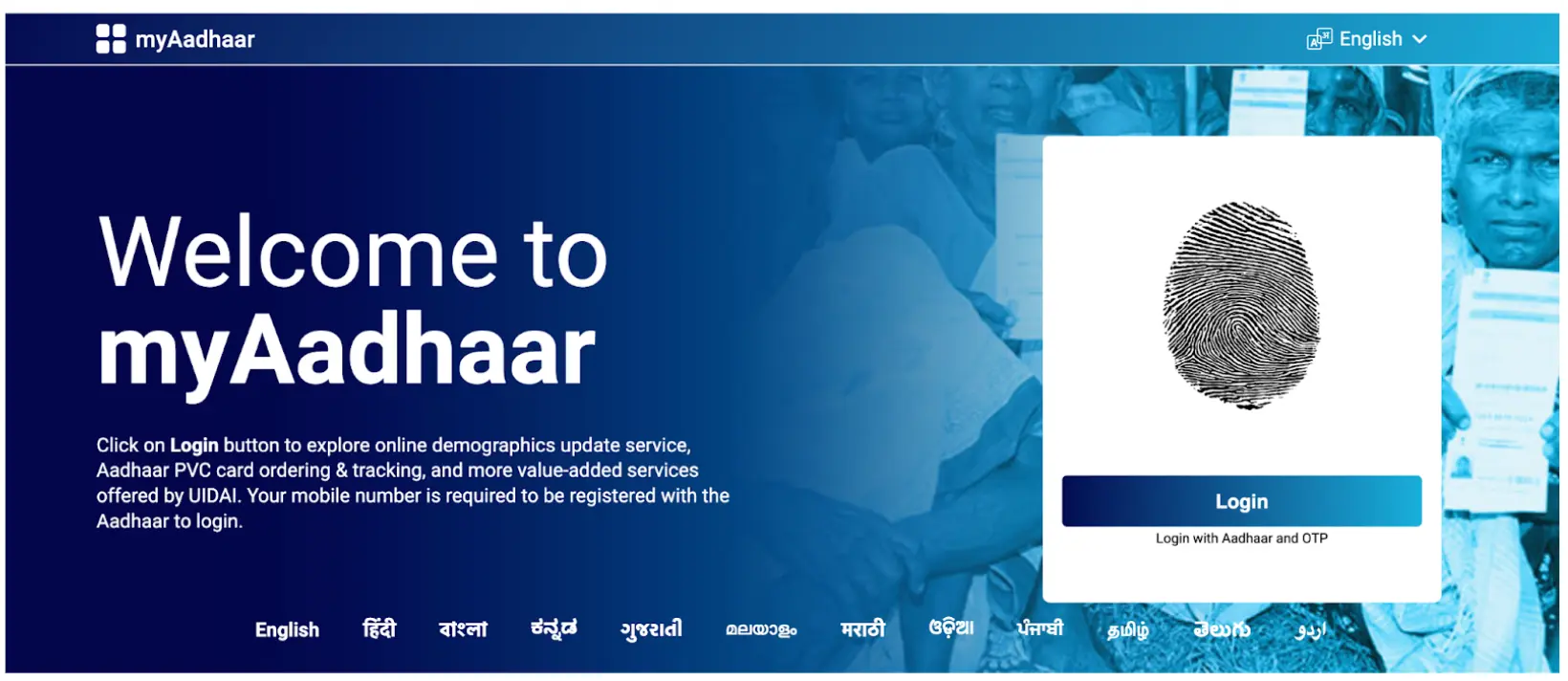
Step 1: Go to myAadhaar official website: https://myaadhaar.uidai.gov.in/
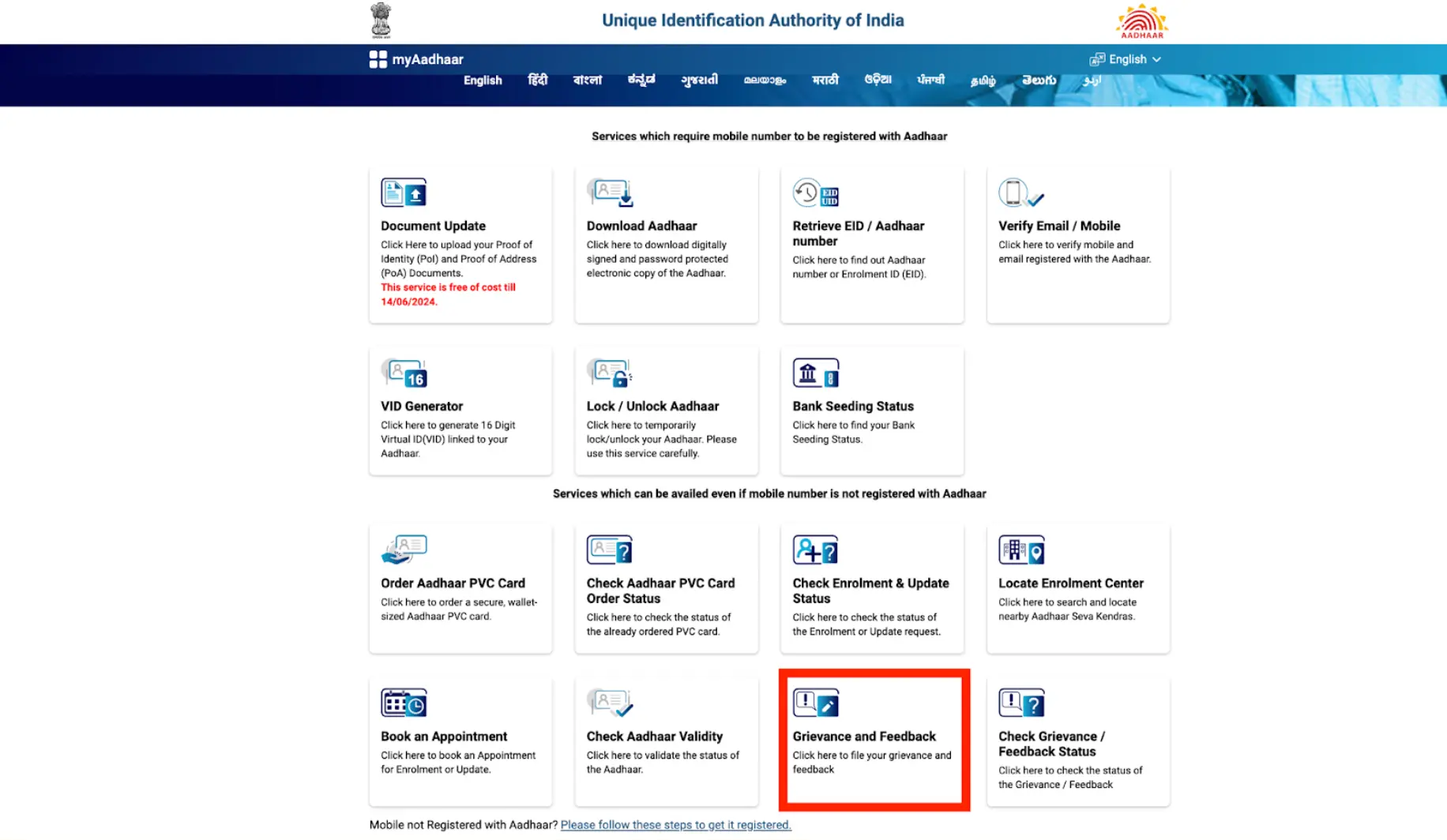
Step 2: Go to Grievance and Feedback popup
Step 3: When you click on the pop-up, you will get a form asking you to fill up your details.
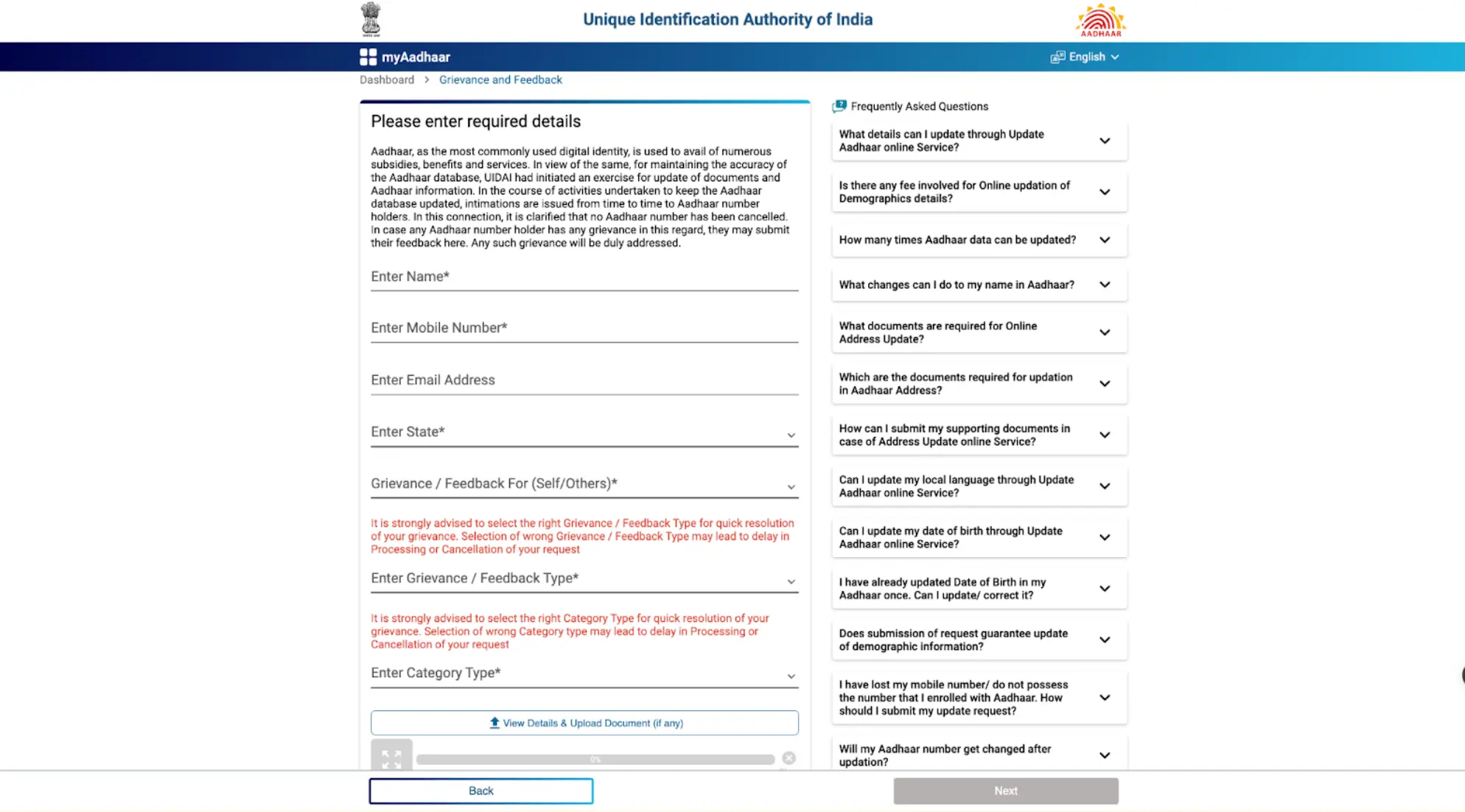
Step 4: Carefully enter all your information. You should keep in mind that the grievance you are seeking, you select that option only. Enter the captcha and your query will be registered with UIDAI.
Step 5: You can check the feedback by clicking on the pop-up of myAadhaar. There you have to provide the complaint ID and click
National Government Services Portal
The National Government Service Portal also known as the “Service Portal of India” acts as a one-stop for accessing all sorts of government services. It makes the work easy by providing a centralised platform for applying for Aadhaar, tracking applications etc. You can type the keywords for your queries, for example: Aadhaar card application. You will different options like, “Link Aadhaar Card With PAN”, or “Check Online your Aadhaar card details”. When you click on it, you will be redirected to the official website of UIDAI or mAadhaar.
UIDAI’s Aadhaar Services on SMS
UIDAI has launched Aadhaar services on SMS for those Aadhaar number holders who don’t have internet access. You can generate a virtual ID, lock your Aadhaar, enable Biometric Lock etc by sending an SMS from your registered mobile number to 1947 in the format mentioned in the table below:
| Purpose | SMS Format |
|---|---|
| To Generate a Virtual ID | GVIDAadhaar-Number-last-4-digits |
| To Retrieve Virtual ID | RVIDAadhaar-Number-last-4-digits |
| To Get OTP | GETOTPAadhaar-NUMBER-last-4-digits |
| To Lock Aadhaar | Step 1: GETOTP (Aadhaar NUMBER-last-4-digits) Step 2: LOCKUID (Aadhaar NUMBER-last 4-digits (6-digits-OTP) |
| To Unlock Aadhaar | Step 1: GETOTP (Virtual-ID-last-6-digits) Step 2: UNLOCKUID (Virtual-ID-last-6-digits) (OTP-6-digits) |
| To Enable Biometric Lock | Step 1: GETOTP (Aadhaar-Number-last-4-digits) Step 2: ENABLEBIOLOCK (Aadhaar-Number-last-4-digits)(OTP-6-digits) |
| To Disable Biometric Lock | Step 1: GETOTP (Aadhaar-Number-last-4-digits) Step 2: DISABLEBIOLOCK (Aadhaar-Number-last-4-digits) (OTP-6-digits) |
| To Temporarily Unlock Biometrics | Step 1: GETOTP (Aadhaar-Number-last-4-digits) Step 2: UNLOCKBIO (Aadhaar-Number-last-4-digits) (OTP-6-digits) |
In the format given above, let’s say the Aadhaar number is 1234-5678-9123
Then GVID 9123 would be the format to generate Virtual ID
RVID 9123 would be the format to retrieve Virtual ID etc.
A complaint or grievance can be sent to the UIDAI Regional Office or Headquarters via post or email. After assessing the complaints, the query is further forwarded to the Regional Office or concerned department. UIDAI has provided multiple channels for people to connect with them and get their queries sorted. However, it is very important to stay updated with the latest government news to take the maximum benefits of schemes and subsidies.
Looking for a personal loan?