

HDFC Net Banking is the online banking platform offered by HDFC Bank, one of India’s leading private sector banks. It offers a valuable service for any HDFC Bank account holder. This service provides a convenient and secure way for HDFC Bank customers to manage their finances anytime, anywhere.
It is valuable for any HDFC Bank account holder, particularly those who prioritize convenience and time-saving solutions for managing their finances and prefer to bank remotely and avoid branch visits.
HDFC Net Banking allows customers to access their accounts and conduct transactions 24 hours a day, 7 days a week, eliminating the need to visit a branch during banking hours.


Features of HDFC Net Banking
HDFC Bank, one of India’s leading financial institutions, offers a comprehensive net banking platform to enhance customer convenience and accessibility. The table below presents the primary features available through HDFC’s online banking service.
| Feature | Description |
|---|---|
| Account Management | View account balances, transaction history, mini statements, and download account statements. |
| Fund Transfers | Transfer funds between your own HDFC accounts or to other bank accounts using IMPS, NEFT, or RTGS. |
| Bill Payments | Pay bills for utilities, mobile recharge, DTH subscriptions, credit cards, and other services. |
| Investments | Invest in Fixed Deposits, Mutual Funds, Shares (through a Demat account), and even manage existing investments. |
| Tax Payments | Pay your taxes conveniently through the platform. |
| Standing Instructions | Set up automated payments for recurring bills. |
| Request Services | Request new cheque books, ATM cards, and other banking services. |
| Track Expenses | Analyze your spending habits and categorize transactions for better financial management. |
| Secure Login | Multi-factor authentication ensures a secure login process for your account. |
Are you looking for a personal loan?

Register for HDFC Internet Banking
Registering for HDFC Internet Banking lets account holders take advantage of these digital services. There are four ways to register for HDFC Net Banking: Online registration, registration at HDFC bank branch, ATM, and phone banking.
Here’s a step-by-step guide that is required to set up your HDFC Internet Banking account.
HDFC Online Registration
Online registration is convenient and can be completed from the comfort of your home. You’ll need your HDFC bank customer ID, registered mobile number linked to your account, and debit card details.
- Step 1: Visit the HDFC Net Banking registration page.
- Step 2: Enter your Customer ID and confirm your registered mobile number.
- Step 3: An OTP (One Time Password) will be sent to your mobile number.
- Step 4: Enter the OTP in the designated field.
- Step 5: If you have an HDFC Bank Debit Card, you can select it and enter the details.
- Step 6: Set a strong and unique IPIN (Internet Banking PIN) that you will use to log in to HDFC Net Banking.
- Step 7: Once you complete these steps, your registration for HDFC Net Banking will be initiated. You might receive an email or SMS notification confirming your registration.
Registration at HDFC Bank Branch
If you prefer in-person assistance or don’t have a debit card linked to your account, you can visit your nearest HDFC Bank branch.
- Step 1: Collect the Net Banking registration form at the branch.
- Step 2: Fill out the form accurately with your details.
- Step 3: Submit the completed form to a branch representative.
- Step 4: The bank will process your registration and send your IPIN via courier to your registered address.
Registration Through ATM
- Step 1: Visit an HDFC Bank ATM.
- Step 2: Insert your HDFC Bank debit card and enter your ATM PIN to proceed.
- Step 3: Find the “Other Options” section on the ATM screen.
- Step 4: Within “Other Options,” select the option for “NetBanking Registration” and confirm your selection.
- Step 5: Your registration request will be submitted, and your unique NetBanking PIN will be sent to your registered address by courier.
Registration Through Phone Banking
- Step 1: Dial the HDFC PhoneBanking number specific to your city.
- Step 2: To verify your identity, provide either your Customer ID and Telephone Identification Number (TIN) or your debit card number and PIN.
- Step 3: A phone banking representative will guide you through the NetBanking registration process.
- Step 4: You’ll receive your NetBanking IPIN (Internet Banking Personal Identification Number) via courier within 5 working days.
Not sure of your credit score? Check it out for free now!

Steps to Login for HDFC Net Banking
Logging in to HDFC Net Banking allows you to manage your accounts, check balances, transfer funds, pay bills, apply for loans, and conduct various other financial transactions 24/7 without visiting a physical branch.
Here are the steps to log in to HDFC Net Banking.
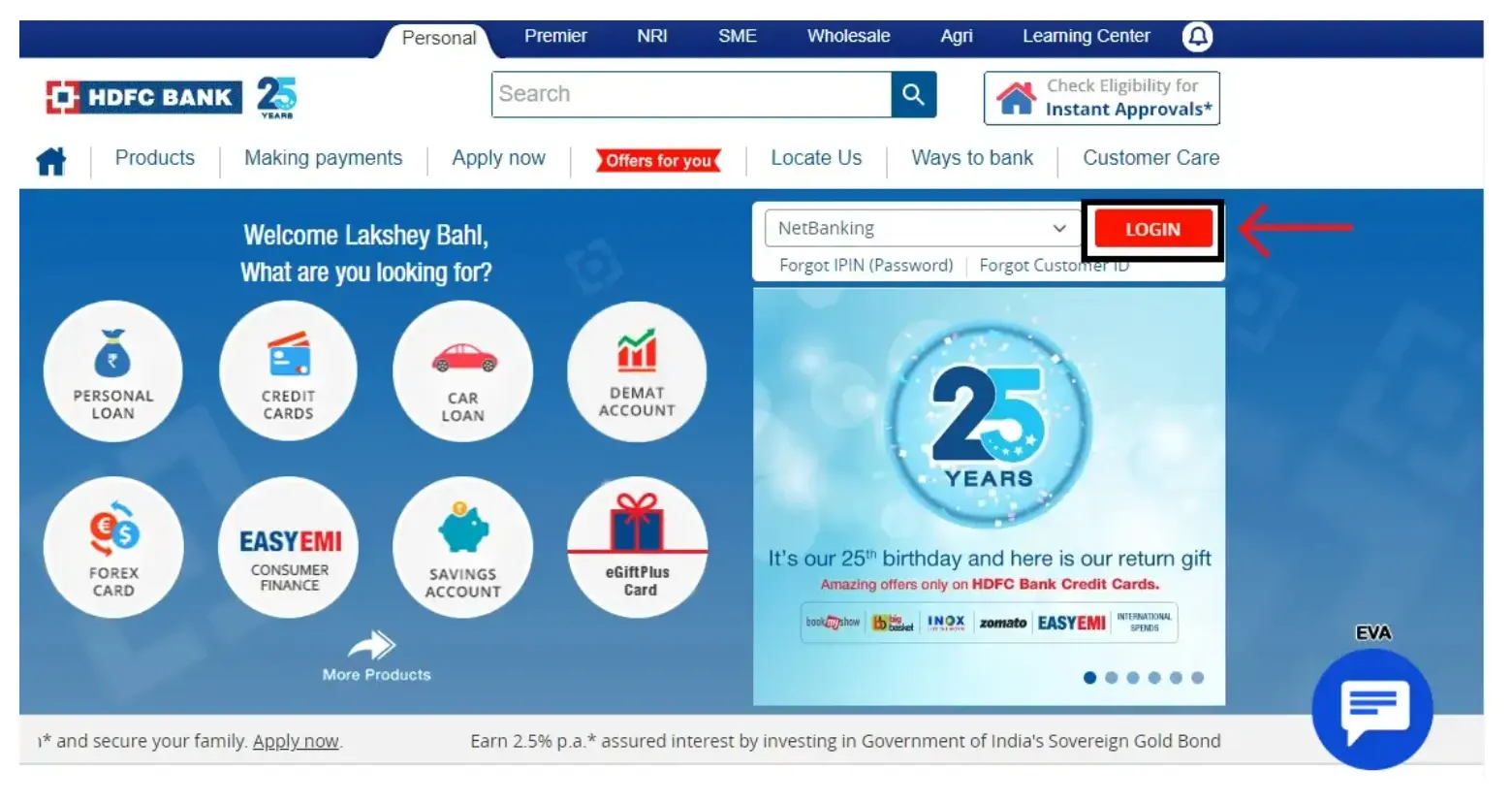
Step 1: Visit the HDFC NetBanking Login Page and find the Net Banking login section.
Step 2: You’ll find designated fields for your Customer ID and registered mobile number. Enter them accurately.
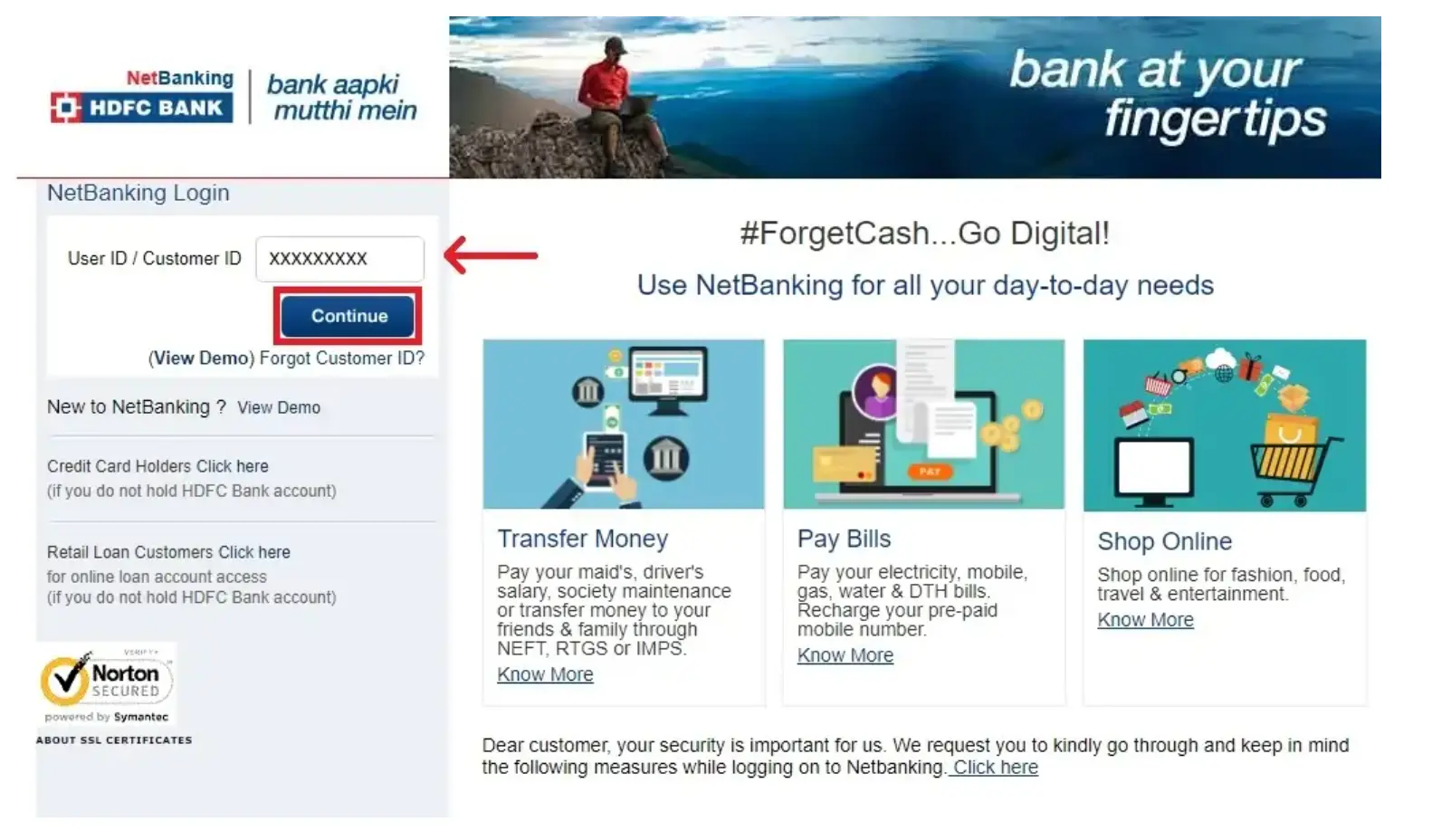
Step 3: After entering your credentials, an OTP will be sent to your registered mobile number. Enter the received OTP in the designated field.
Step 4: Once the OTP is verified, you’ll be prompted to enter your login credentials (Customer ID and IPIN)
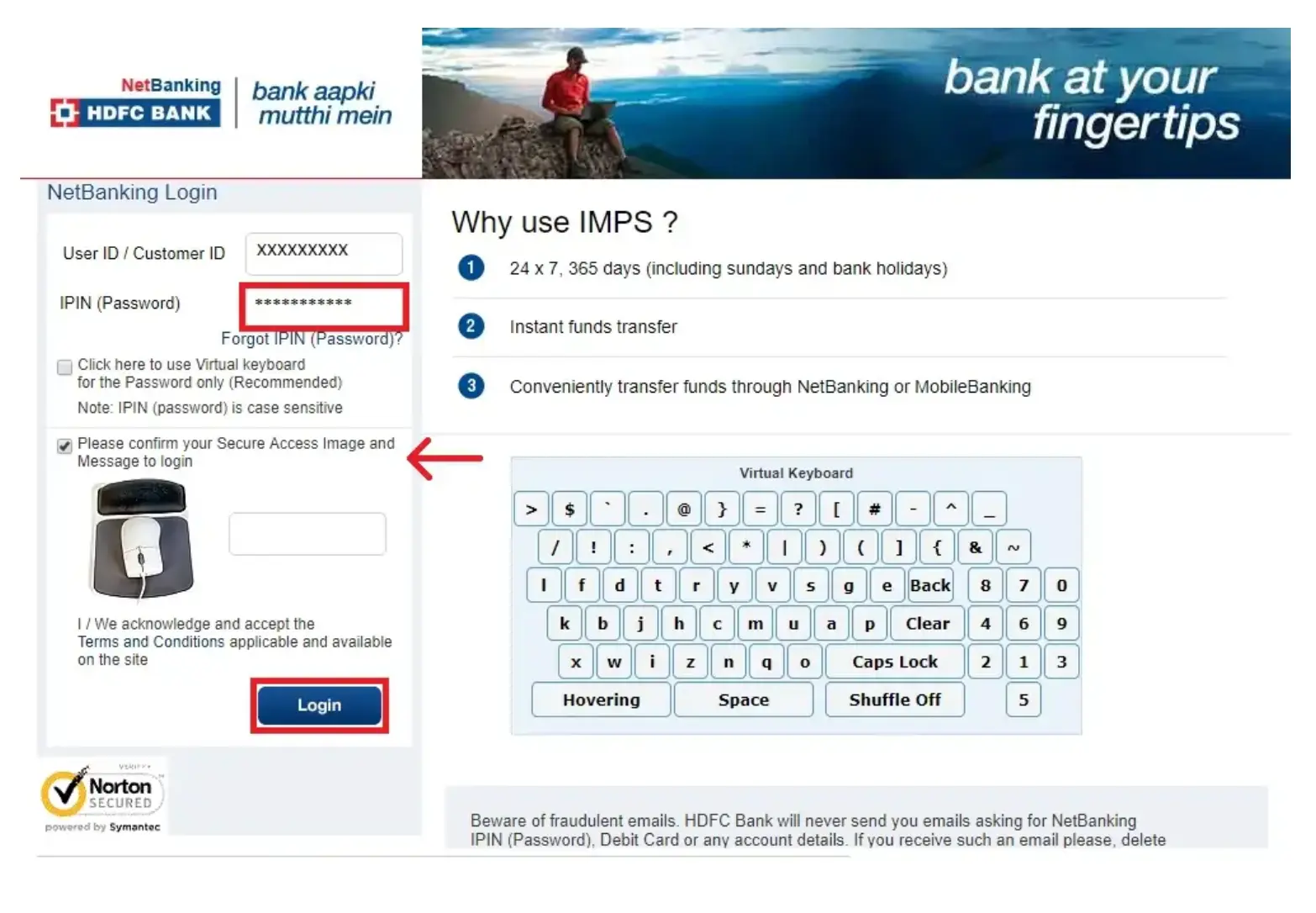
Step 5: Enter your login credentials carefully and click on “Login” or a similar button.
Steps to Check Account Balance For HDFC Net Banking
Checking your account balance through HDFC Net Banking is essential for maintaining financial awareness and control. Here are the steps to check your account balance for HDFC Net Banking.
- Step 1: Log in to your HDFC Bank Net Banking account. Enter your login credentials (CustomerID & IPIN or Username & Password).
- Step 2: Go to the “Accounts” or “My Accounts” section within the Net Banking interface.
- Step 3: Select the account you wish to view the balance for.
- Step 4: Once you select the desired account, your current balance will be prominently displayed.
Do you need an instant loan?
Steps to Transfer Money Using HDFC Net Banking
Transferring money through HDFC Net Banking allows you to send funds quickly and securely. Here are the steps to transfer funds by using HDFC Net Banking.
- Login: Securely access your HDFC Net Banking account.
- Initiate Transfer: Find the “Funds Transfer” section.
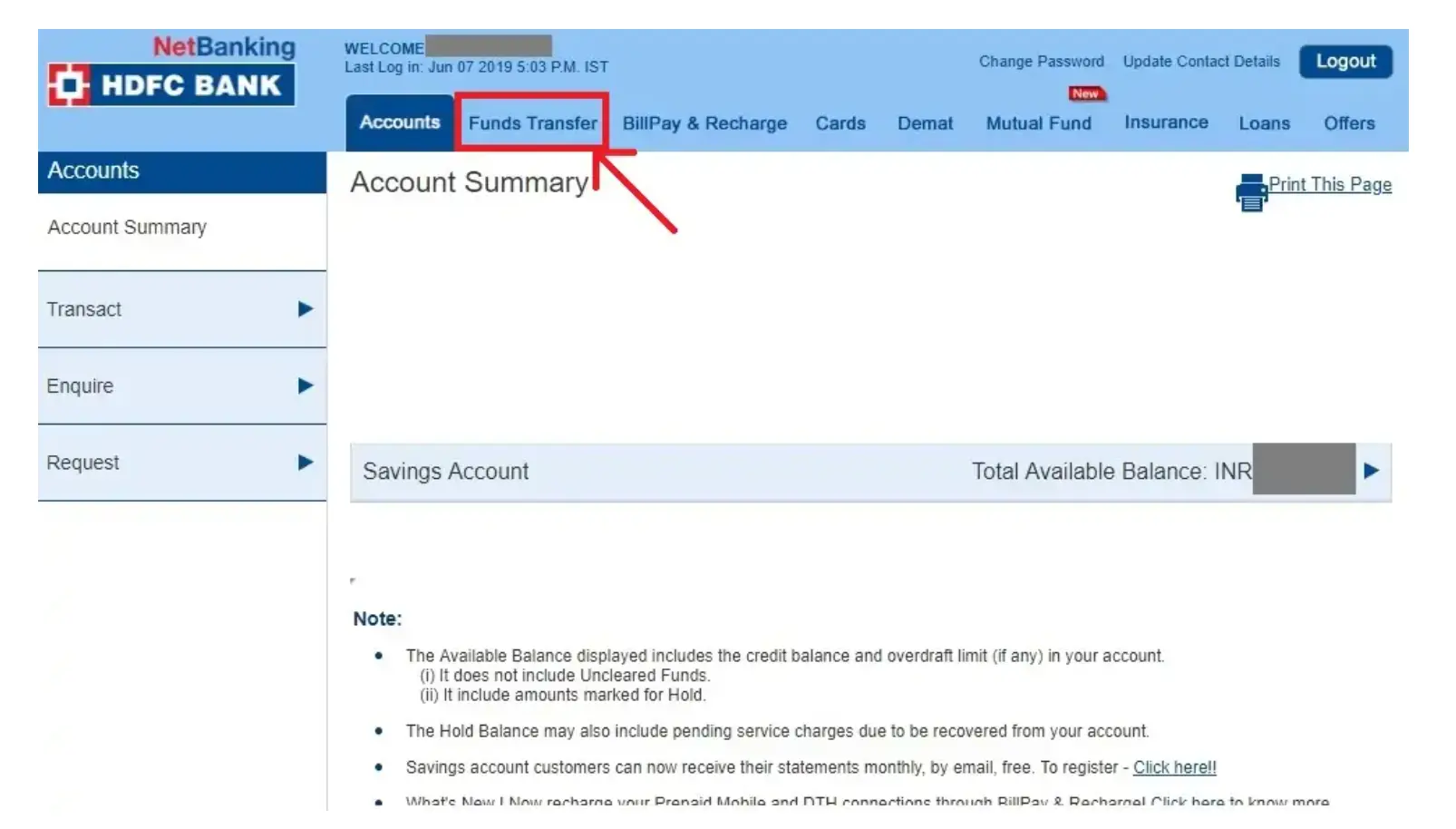
- Choose Transfer Type: Transfer between your HDFC accounts or to other banks.
- Enter Details (for Other Banks): Provide beneficiary name, account number, and IFSC code (ensure accuracy!).
- Select Transfer Method: Choose NEFT (standard), RTGS (urgent), or IMPS (instant) depending on your needs.
- Enter Amount & Reference (Optional): Specify the transfer amount and an optional reference for the recipient.
- Review & Confirm: Double-check all details before confirming.
- Security Step: Enter the OTP sent to your mobile for verification.
- Transfer Confirmation: Receive confirmation upon successful transfer.
Steps to Reset HDFC Net Banking Password
It’s advisable to change your net banking password regularly, typically every 3-6 months, as a proactive security measure. Here are the steps to reset your HDFC Net Banking password.
- Step 1: Visit the HDFC NetBanking login page.
- Step 2: Click on “Forgot Password/ IPIN.”
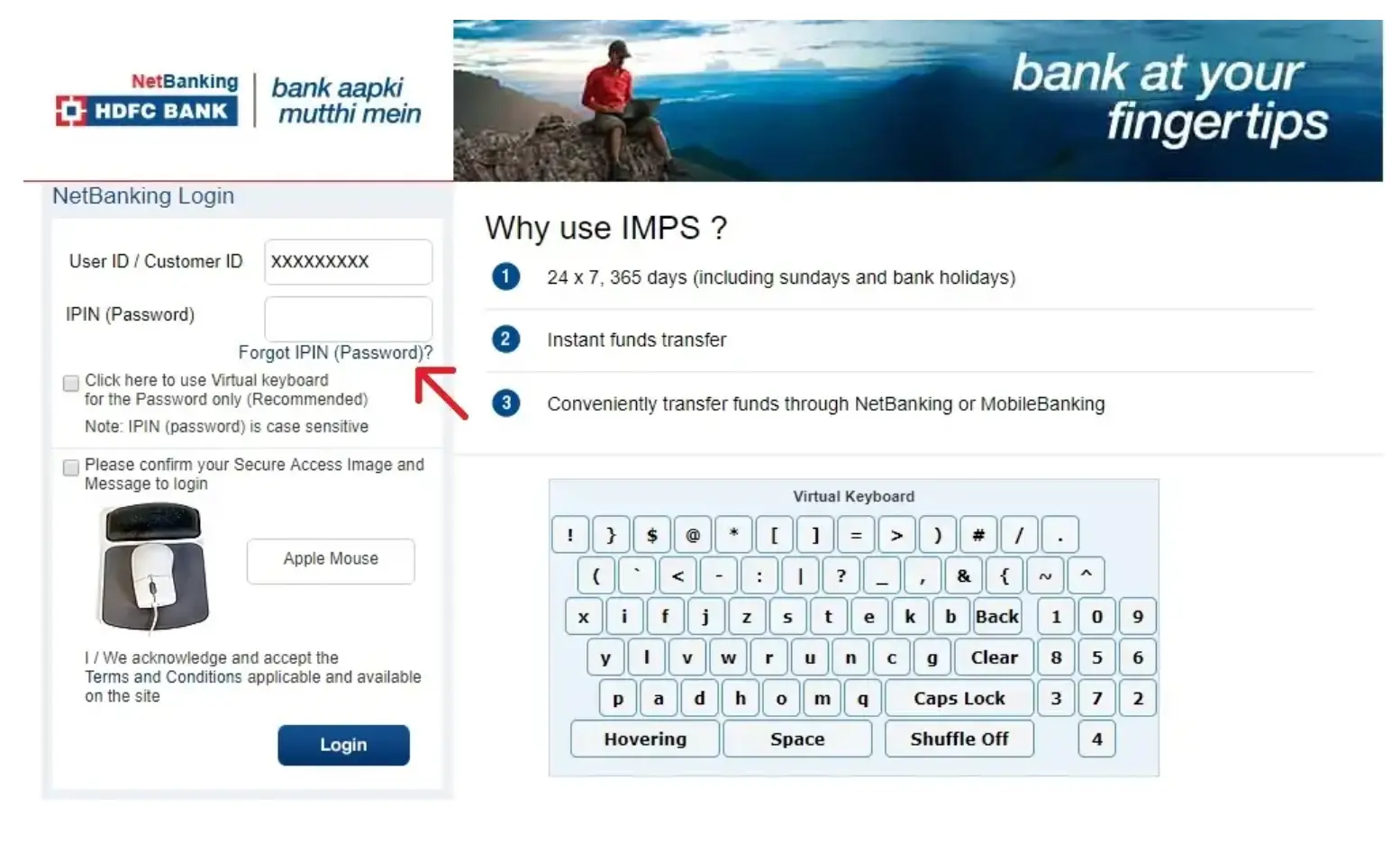
- Step 3: Enter your Customer ID and click “Continue.”
- Step 4: Choose the option “OTP sent to registered mobile number and Debit Card details” as your verification method.
- Step 5: Enter your registered mobile number and click “Continue.”
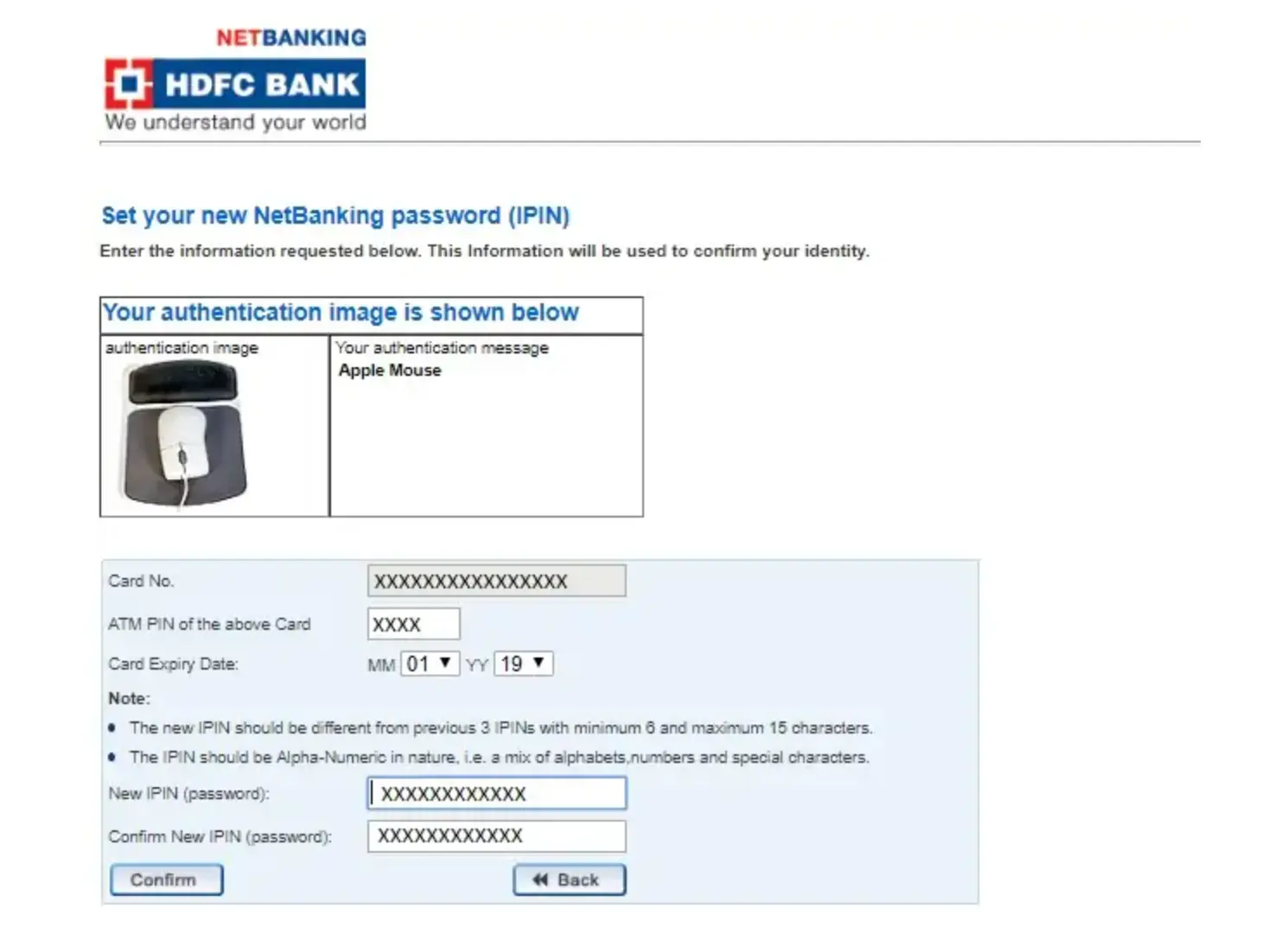
- Step 6: You’ll receive an OTP on your phone. Enter the OTP and your Debit Card details (PIN and expiry date).
- Step 7: Set your new IPIN (password) and confirm it.
Apply For a Personal Loan with low interest rates