

The HDFC Forex Card Login Portal also known as the HDFC Prepaid Card NetBanking Portal, is an online platform for managing HDFC Forex Cards. With the HDFC Forex Card login portal, users can check their card balance, & transaction history, reload cash, set limits, block / unlock card and even manage different currency wallets.
International travelers who use the HDFC Forex Cards (standard Forex Cards and ForexPlus Cards) can rely on this platform to effectively manage their cards effectively, conveniently, and securely.
Keep reading to know how to log in to the HDFC Forex Card portal as well as its benefits, managing the card via mobile app, and more!
International travelers can easily block or unblock their cards, manage PINs, and more using the HDFC Forex Card Login Portal.


HDFC Forex Card NetBanking Login
To log in to your HDFC Forex Card portal, here are the steps to follow:
-
- Visit the official HDFC Bank Prepaid Card NetBanking portal.
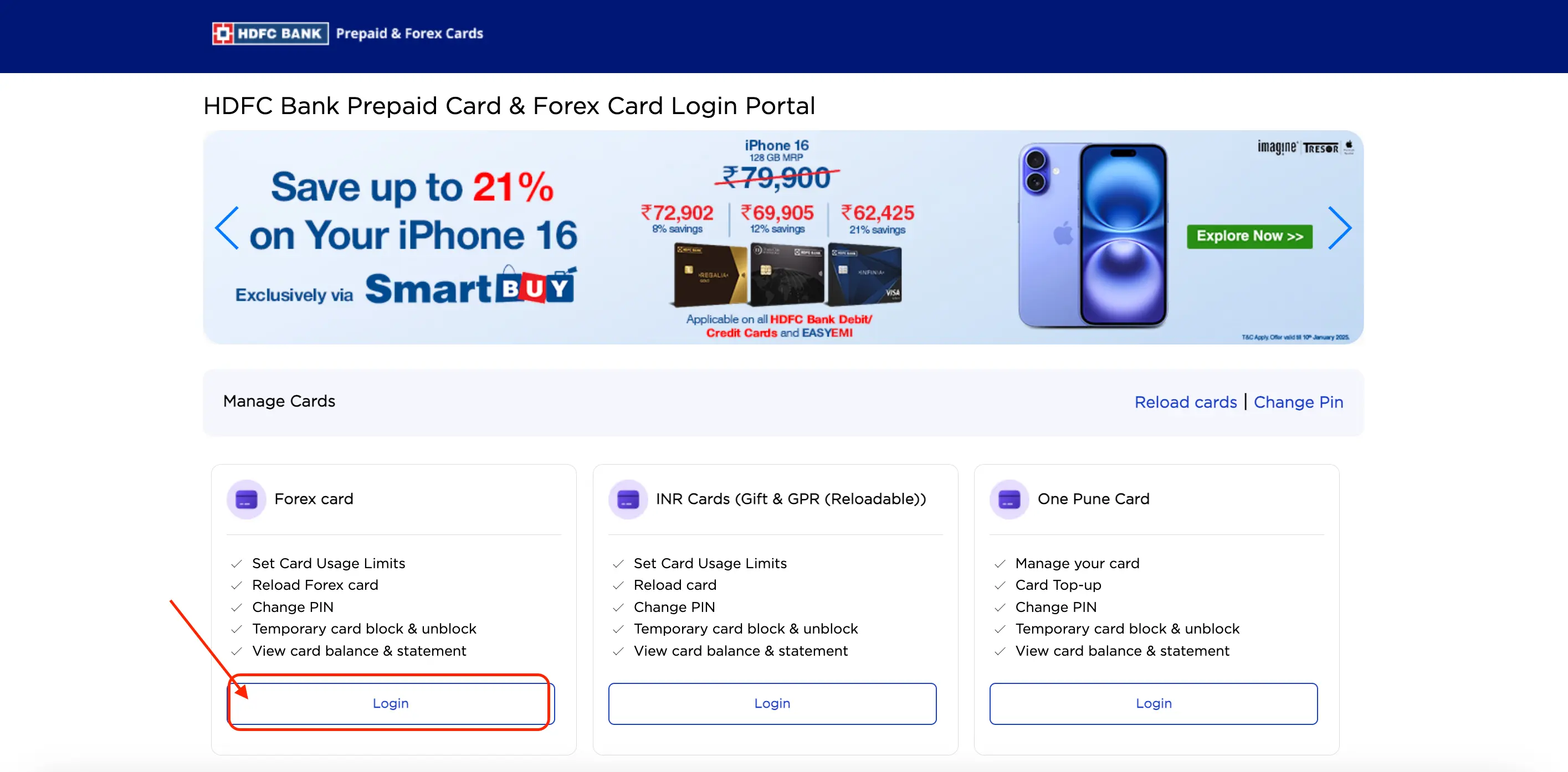
2.Under the ‘Forex Card’ section, Click on the Login button.
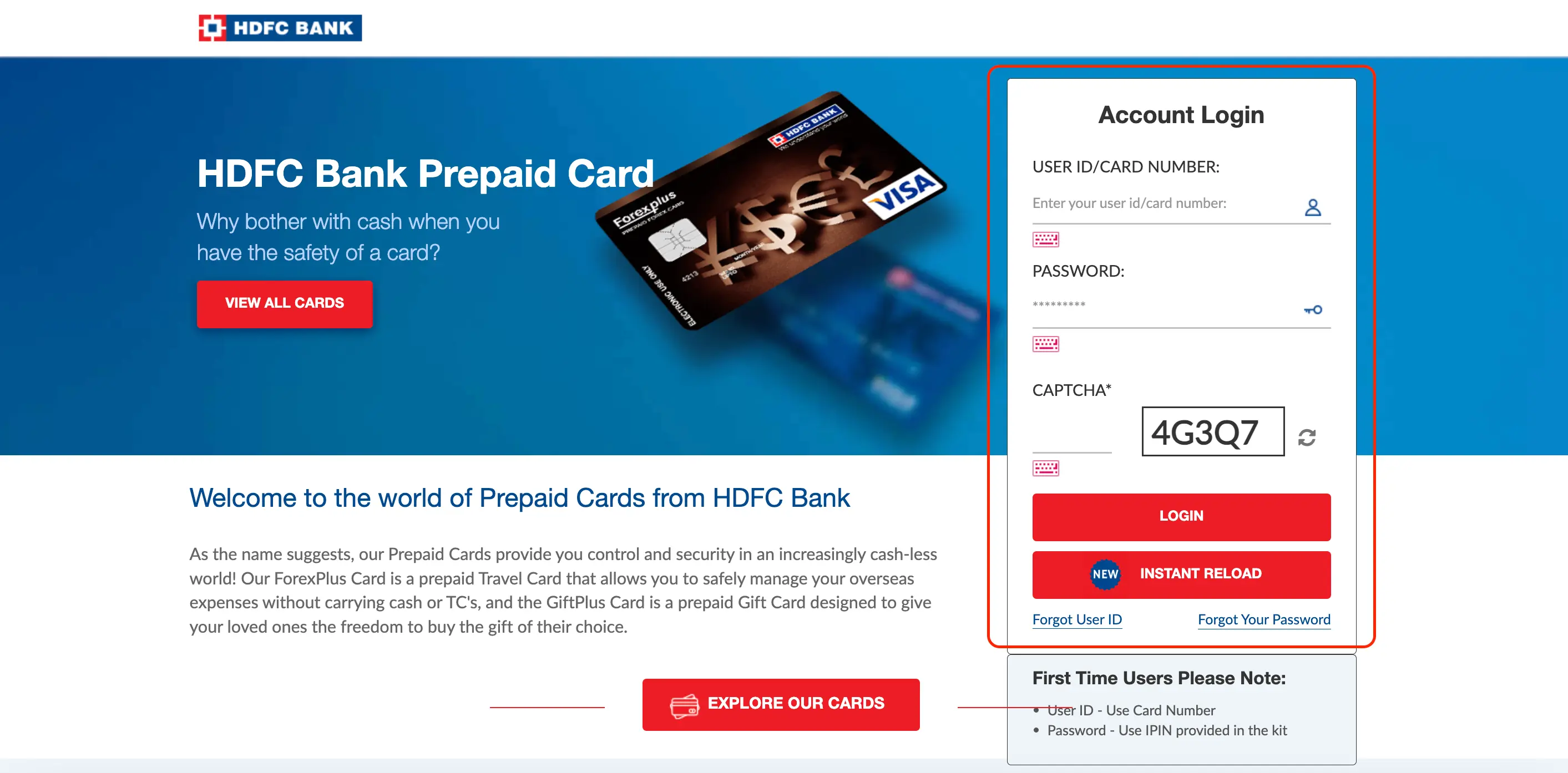
3.Enter the User ID/Card Number.
4.Enter the Password.
5.Enter Captcha as shown.
6.Click the ‘Login’ button to access your account.
Now that you have logged in to the portal, here are some of its top features you can come across.
HDFC Forex Card Login via Mobile App
Managing your HDFC Bank Multicurrency ForexPlus Card through the HDFC Mobile App is simple and convenient. Follow these steps to log in and manage your card on the go:
Step 1:Download and Install the HDFC Bank Mobile App: If you don’t have the app, download it from the Google Play Store (Android) or the App Store (iOS).
Step 2:Open the app and log in using your Customer ID and NetBanking password or your registered mobile number with OTP authentication.
Step 3:Go to the “Prepaid Cards” or “ForexPlus Cards” section from the main menu.
Step 4:Choose your HDFC ForexPlus Card from the list of linked prepaid cards.
Step 5:Access features like checking your balance, enabling contactless payments, setting transaction limits, or viewing transaction history.
Step 6:After completing your tasks, log out to secure your account
Get Zero Annual Fee Credit Cards in one click.
Forgot HDFC Forex Card User ID or Password
Let’s go through the steps to reset your User Id & password for HDFC forex card.
Step 1:Visit the HDFC Forex Card Login Page
Step 2:Choose ‘Forgot User ID?’ if you’ve misplaced your User ID or ‘Forgot Password?’ if you can’t recall your password.
Step 3:Enter Your Registered Details such as mobile, email, etc
Step 4:Verify an OTP.
Step 5:If recovering the User ID, the User ID will be displayed on-screen or sent to your registered email.(or)If resetting the password, create a new, secure password and confirm it.Use the new User ID or Passwords to re-login inro the HDFC Forex Card Login Portal.
First Time Users can use the following as their User ID & Password:
First Time Users User ID: Use Card Number
First Users Password: Use IPIN provided in the kit
Services Offered in HDFC Forex Card Login Portal
The following services are forred at the HDFC Forex Card Login Portal:
- Check Card Balance
- View Mini Statement
- Detailed Transaction History
- Reload Forex Card
- Transfer Funds Between Wallets
- Block/Unblock Card
- Change PIN
- Set Transactional Limits
- Set Alerts
- Monitor Currency Exchange Rates
- Raise Service Requests
- Contact Customer Support
Features of HDFC Forex Card Login Portal
The wide variety of features of HDFC Prepaid Card NetBanking Portal gives customers increased convenience in managing their Forex Cards. Here’s what you need to know:
- Provides a detailed view of the transaction history.
- Helps add funds to cards in supported currencies.
- Helps to easily transfer funds between different currency wallets to suit your travel needs.
- Allows to set or change ATM PIN for secure usage.
- Allows download of detailed electronic statements for record-keeping.
- Allows to enable or disable online payments for added security.
- Allows to temporarily block or unblock the card.
Benefits of Using the HDFC Forex Card Login Portal
Given the plenty of features of the HDFC Forex Card Login Portal, here are the various benefits you can expect:
- Simplifies card management with all functions accessible online.
- Effectively management of Forex Card from any part of the world at any time.
- Provides real-time updates on balance and transaction details.
Not sure of your credit score? Check it out for free now!

Manage Your HDFC Forex Card via Mobile App
Apart from the HDFC Forex Card Netbanking Portal, you can also manage your card account via the HDFC HDFC Bank MobileBanking App.
Check out its key features and benefits:
Features:
- Instant Access using biometric options or a 4-digit PIN ensures quick and secure access to your accounts.
- Manage cards effectively such as blocking lost cards.
- Transfer money instantly, order currency notes or travel cards for travel abroad, and manage your Demat portfolio.
Benefits:
- Advanced security to protect the financial details of the cardholder.
- Wide access to banking services within the MobileBanking App.
- More convenient as banking needs anytime, anywhere, without visiting a branch.
Avail an instant loan in a few simple steps!
