Are you tired of waiting for your BSNL bill to arrive in the mail? BSNL (Bharat Sanchar Nigam Limited) now offers a convenient online service for viewing and downloading your bills. This user-friendly feature allows you to access your billing information anytime, anywhere, right from your computer or smartphone.
By learning how to view your BSNL bill online, you’ll save time, reduce paper waste, and always have your billing information at your fingertips. Whether you’re a home user or a business customer, this guide will walk you through the simple steps to access your BSNL bill electronically.
Read on to discover how easy it is to keep track of your BSNL services and manage your payments efficiently.
BSNL View Bill
BSNL View Bill is an online service Bharat Sanchar Nigam Limited (BSNL) provides that allows customers to access and manage their phone or internet bills easily. Through the BSNL website or mobile app, users can log in using their account credentials, which typically include their phone number or customer ID and a password. This service offers convenience by enabling users to check their bills anytime and anywhere and allows for quick online payments through various methods like credit/debit cards and net banking.

Reasons To View Your BSNL Bill Online
Viewing your BSNL bill online comes with several benefits, some of them are mentioned below:
- Convenience: Access your bill anytime, anywhere without waiting for the physical copy.
- Instant Access: Get immediate information about your charges and usage.
- Environmentally Friendly: Reduce paper waste by opting for digital bills.
- Record Keeping: Easily download and store your bills for future reference.
Step-by-Step Guide to View and Download Your BSNL Bill
Here’s how you can view and download your BSNL bill using different methods.
1. Viewing Your BSNL Bill Online via the BSNL Portal
One of the easiest ways to view your BSNL bill is through the official BSNL portal. Here’s how:
1. Visit the BSNL Portal: Go to the BSNL Selfcare Portal.
2. Login: Enter your user ID and password. If you don’t have an account, you’ll need to register first.
3. Navigate to Bills & Payments: Once logged in, look for the ‘Bills & Payments’ section.
4. View Bill: Select the relevant option to view your current or previous bills.
5. Download PDF: For a more detailed view, you can download the bill in PDF format by clicking on the download button.
2. Using the BSNL App for Bill Viewing
BSNL offers a mobile app that makes it even easier to manage your bills on the go.
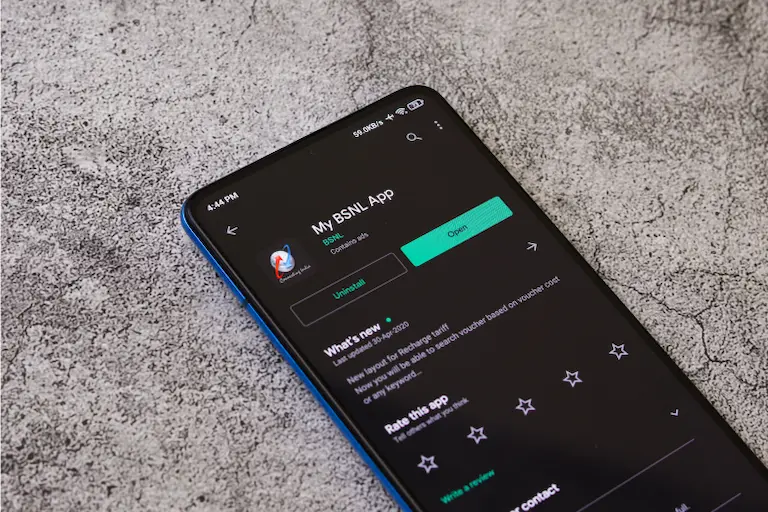
1. Download the App: Search for ‘BSNL App’ on the Google Play Store or Apple App Store and install it.
2. Login: Use your BSNL account credentials to log in.
3. Select Bills & Payments: Navigate to the ‘Bills & Payments’ section within the app.
4. View and Download: Here, you can view your current bill and download previous bills in PDF format.
3. Viewing BSNL Bill Without Logging In
If you’re in a rush and need to check your bill without logging in, BSNL provides a quick bill view option.
1. Visit BSNL Quick Bill Pay: Go to the BSNL Quick Bill Pay.
2. Enter Details: Enter your telephone number and account number.
3. View Bill: Click on ‘View Bill’ to see the details of your current bill.

Downloading BSNL Landline & Fibre Bills
For those using BSNL landline or fiber services, the process is similar.
1. Access the BSNL Portal: Log in to the BSNL Selfcare Portal
2. Select Service Type: Choose ‘Landline’ or ‘Fibre’ from the service options.
3. View Bill: Navigate to the ‘Bills & Payments’ section to view your bill.
4. Download PDF: Click the download button to save your bill in PDF format.
Also Read: BSNL Broadband Plans At Affordable Internet Price
Benefits of Downloading BSNL Bills in PDF
Downloading your BSNL bills in PDF format can be extremely useful. Here’s why:
- Offline Access: Access your bills even when you’re not connected to the internet.
- Easy Sharing: Send your bill to others via email or print it out if needed.
- Secure Storage: Keep a digital record of your bills on your computer or cloud storage for easy access.
Steps to View Previous BSNL Bills
Sometimes, you might need to look back at previous bills for reference. Here’s how to do it:
1. Log In to the BSNL Portal: Access your account on the BSNL Selfcare Portal.
2. Navigate to Bill History: Look for the ‘Bill History’ or ‘Previous Bills’ section.
3. Select the Bill: Choose the month or date range of the bill you need.
4. Download or View: You can either view the bill online or download it in PDF format.
Tips for Managing Your BSNL Bills Online
Here are some tips to help you manage your BSNL bills more efficiently:
- Set Reminders: Use your phone or email to set bill payment reminders to avoid late fees.
- Regularly Check Bills: Make it a habit to check your bills regularly to catch any discrepancies early.
- Keep Records: Save your bills in a dedicated folder on your computer or cloud storage for easy access.
- Use the App: The BSNL app is handy for quick access and managing your account on the go.
Sometimes, you might face issues while trying to view or download your BSNL bill. Here are some common problems and solutions:
- Forgotten Password: If you forget your login details, use the ‘Forgot Password’ option on the BSNL portal to reset it.
- Technical Glitches: If the website or app isn’t loading, try clearing your browser cache or restarting the app.
- Incorrect Bill Details: If you notice any discrepancies in your bill, contact BSNL customer support for assistance.
Conclusion
Accessing your BSNL bills online is straightforward and convenient. Whether you use the BSNL portal, the mobile app, or the quick bill view option, you can easily stay on top of your billing information. By regularly checking and downloading your bills, you ensure transparency and accuracy in your billing records.
Taking advantage of these online tools not only saves time but also helps you manage your finances more effectively. So, next time you need to view your BSNL bill, remember these simple steps and enjoy hassle-free access to your billing information.
Download Personal Loan App
Get a loan instantly! Best Personal Loan App for your needs!!
Looking for an instant loan? Buddy Loan helps you get an instant loan from the best verified lenders. Download the Buddy Loan App from the Play Store or App Store and apply for a loan now!
Download the Buddy Loan App Now! One solution to each of your financial needs at your fingertip. Scan to download now



Frequently Asked Questions
How can I view my BSNL bill online?
You can view your BSNL bill online by logging into the BSNL Selfcare Portal or using the BSNL mobile app.
Can I download my BSNL landline bill in PDF format?
Yes, you can download your BSNL landline bill in PDF format from the BSNL portal or the mobile app.
Is it possible to view my BSNL bill without logging in?
Yes, you can view your BSNL bill without logging in by using the Quick Bill Pay option on the BSNL portal.
How do I view my previous BSNL bills?
You can view previous BSNL bills by accessing the ‘Bill History’ section on the BSNL Selfcare Portal.
What should I do if I forget my BSNL portal password?
If you forget your BSNL portal password, use the ‘Forgot Password’ option to reset it.
Can I use the BSNL app to manage my bills?
Yes, the BSNL app allows you to view, download, and pay your bills conveniently from your mobile device.
How do I troubleshoot issues with viewing my BSNL bill online?
Common troubleshooting steps include resetting your password, clearing browser cache, restarting the app, and contacting BSNL customer support for assistance.
How to check the BSNL broadband plan?
You can check your BSNL broadband plan by logging into the BSNL self-care portal or the My BSNL app under the broadband section.
How to check the balance in BSNL?
To check your BSNL balance, dial *123# or use the My BSNL app for detailed balance information.
How to find billing account number in BSNL?
Your BSNL billing account number can be found on your bill statement or in the My BSNL app under the account section.
What is the BSNL 99 recharge 365-day plan?
The BSNL ₹99 recharge plan offers basic call and SMS benefits for 365 days without data benefits, ideal for minimal usage.
What is the best plan for BSNL?
The best BSNL plan varies based on usage; popular options include the ₹199 plan for balanced data and calls or the ₹399 plan for heavy data users.