

Ayushman Bharat Yojana is a national public health insurance scheme launched by the Government of India. It aims to provide free and accessible healthcare services to a significant portion of the country’s population. Ayushman Bharat Yojana targets economically disadvantaged families and vulnerable sections of society.
An Ayushman Card is issued to those who are eligible for the Ayushman Bharat Yojana benefits. An Ayushman Card status check allows you to verify the status of your Ayushman Card application or the validity of your existing card. Let’s take a look at the ways and processes of how to do an Ayushman Card status check.
An Ayushman Card status check becomes crucial for ensuring you’re enrolled in PMJAY (Pradhan Mantri Jan Arogya Yojana) and can utilize its financial coverage for hospitalization expenses.


Ayushman Bharat Card Details
An Ayushman Card acts as your official ID for the Ayushman Bharat Yojana (PMJAY) program, granting access to cashless and paperless medical treatments. The table below provides an overview of the Ayushman Bharat card details.
| Feature | Description |
|---|---|
| Issued by | Government of India |
| Program | Pradhan Mantri Ayushman Bharat Yojana (PMJAY) |
| Purpose | Provides access to free and cashless hospitalization benefits. |
| Benefits | Up to ₹5 lakh per family per year for hospitalization expenses (covers pre & post hospitalization charges) |
| Eligible Beneficiaries | Identified through Socio-Economic Caste Census (SECC) data. Targets economically disadvantaged families and vulnerable sections of society. |
| Validity | One year (needs renewal) |
| Benefits Available at | Empanelled hospitals (public and private) |
| Information on Status Check | Available online and through Ayushman Bharat Helpdesk. |
Do you need a medical loan?

Steps to Check Ayushman Card Status
Knowing your card’s status ensures you’re enrolled so you can utilize these benefits when needed. Here’s a list of the steps involved in checking your Ayushman Card status:
Step 1: Visit the Official Portal Ayushman Bharat Yojana beneficiary portal.
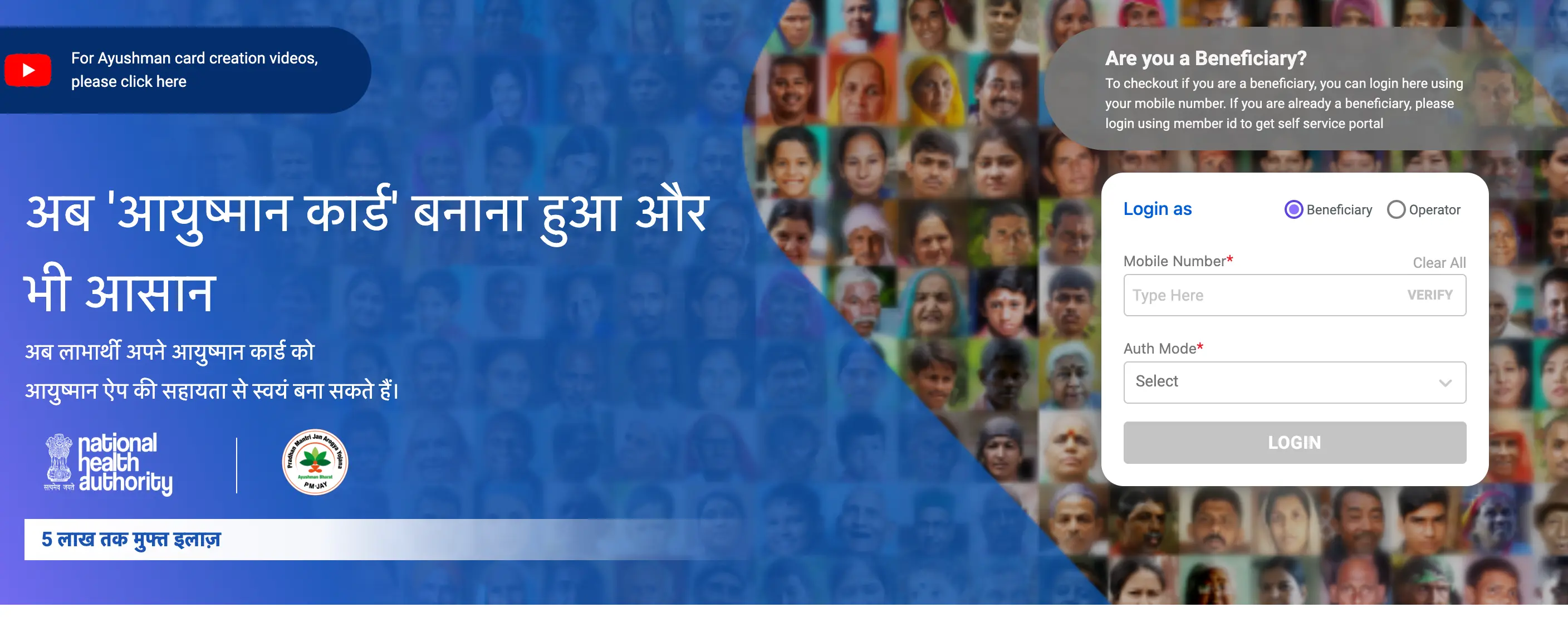
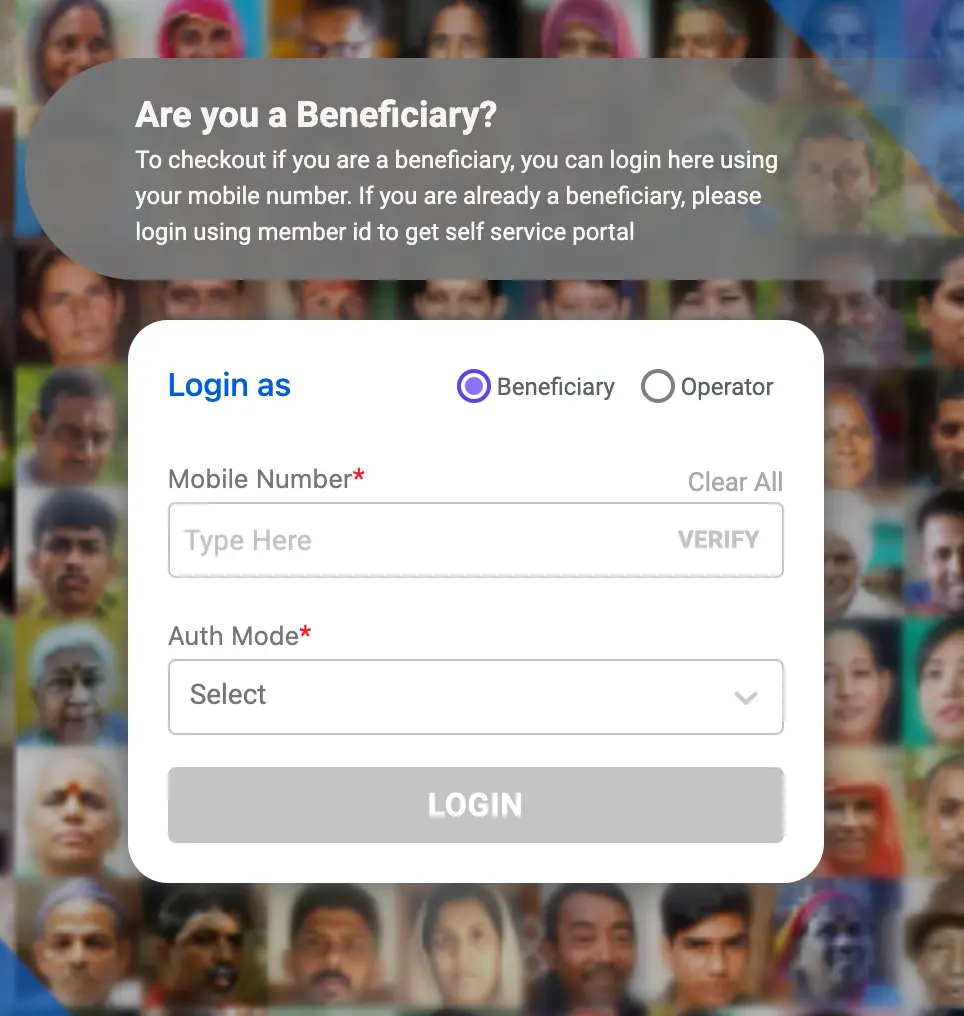
Step 2: Select the option for “Beneficiary” and log in using your registered mobile number and receive the OTP for verification.
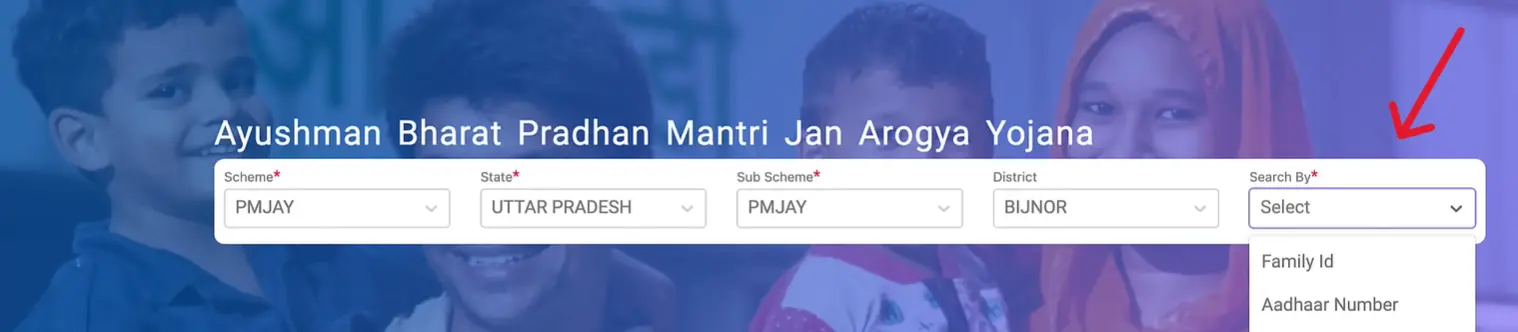
Step 3: Once logged in, provide additional information like state, district, and the scheme you want to check the status for (likely PMJAY). You might also be asked to choose your preferred identification mode.
Step 4: Click “Submit” and the portal will display your Ayushman Card application status or the validity of your existing card.
Overview of Ayushman Bharat Card Status
Here’s what you may find when you check your Ayushman Bharat Card status.
- Approved: This indicates your application for the Ayushman Bharat Card has been successful. You can now use the card to avail of benefits at empanelled hospitals under PMJAY.
- Under Process: If your application status shows “under process” or “pending”, it simply means your application is still being reviewed by the authorities. Be patient and wait for further updates.
- Rejected: The status details should provide a reason for the rejection, such as missing information, ineligibility based on SECC data, or technical errors. You can then take steps to rectify the issue and resubmit the application (if applicable).
Steps to Take When Your Ayushman Bharat Card Is Rejected
Although the Ayushman Bharat Yojana aims to cover a significant portion of the population, there might be instances where your application for an Ayushman Card gets rejected.
- Scrutinize the Rejection Notice: The official communication regarding rejection should provide details on the reason for denial. The reason might include:
- Missing Information: Your application might be incomplete or lack the necessary documents.
- Eligibility Discrepancies: The rejection might dispute your eligibility based on the latest Socio-Economic Caste Census (SECC) data.
- Technical Errors: There could be technical issues during application processing.
- Carefully Analyze the Reason: Pay close attention to the specific cause for your application’s disapproval as this will help you determine the most appropriate course of action.
- Rectify Errors (if applicable): If the rejection comes from missing information or a technical error, gather the necessary documents or rectify the mistake and resubmit your application.
- Challenge Eligibility Discrepancies (if applicable): If the rejection disputes your eligibility based on SECC data, you can consider requesting a review. This might involve contacting local authorities or the Ayushman Bharat Helpdesk for guidance on the process. Documentation like income certificates or ration cards could be helpful for such cases.
Not sure of your credit score? Check it out for free now!

Steps to Redo Your e-KYC
If your card details require an update, such as a new phone number or photograph, you might need to redo your e-KYC (electronic Know Your Customer).
- Step 1: Visit the Ayushman Bharat Yojana beneficiary portal.
- Step 2: Login using your registered mobile number and the OTP you receive.
- Step 3: Look for a section dedicated to “Update e-KYC” or “Redo e-KYC”.
- Step 4: Follow the on-screen instructions, which might involve providing your Aadhaar details and undergoing an Aadhaar OTP verification process.
- Step 5: Submit the request for e-KYC update.
Do you need an emergency loan?
Check more on the Ayushman Bharat Scheme from the links below: