

Linking your Aadhaar with your Voter ID is a crucial step towards enhancing the integrity of the electoral process and ensuring accurate voter registration.
Linking Aadhaar with Voter ID ensures secure identity verification, eliminates duplicates and fraud, promotes transparency in elections, and strengthens democracy. Here’s how you can link the same:
Link Your Voter ID to Aadhaar Card!
Easy way to upload Aadhaar card with Voter ID through online, offline and through the voter ID helpline app


Link Aadhaar Card With Voter ID Online
Linking Aadhaar with Voter ID online via Voters Service Portal or NVSP is a quick process that enhances electoral integrity and transparency. This step-by-step guide will help you link your Aadhaar card with your voter ID:
Step 1: Visit the Voters Service Portal – voters.eci.gov.in
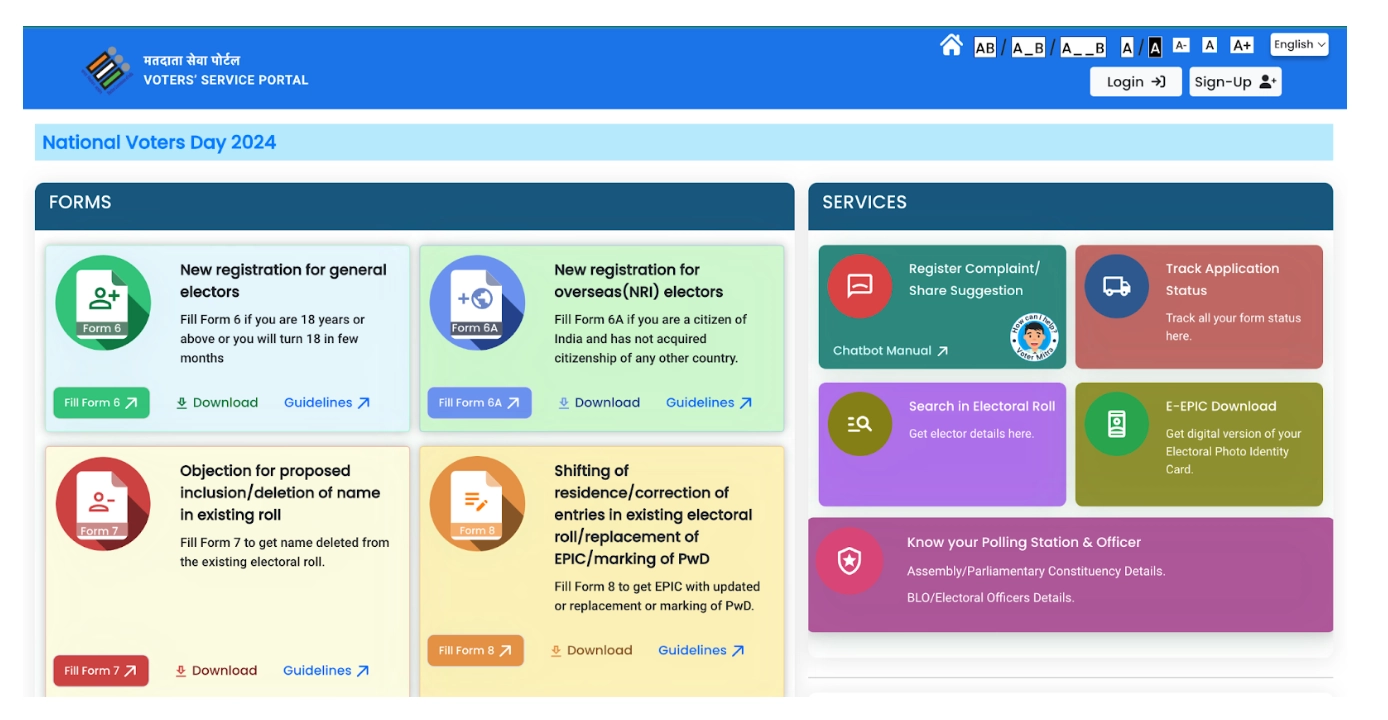
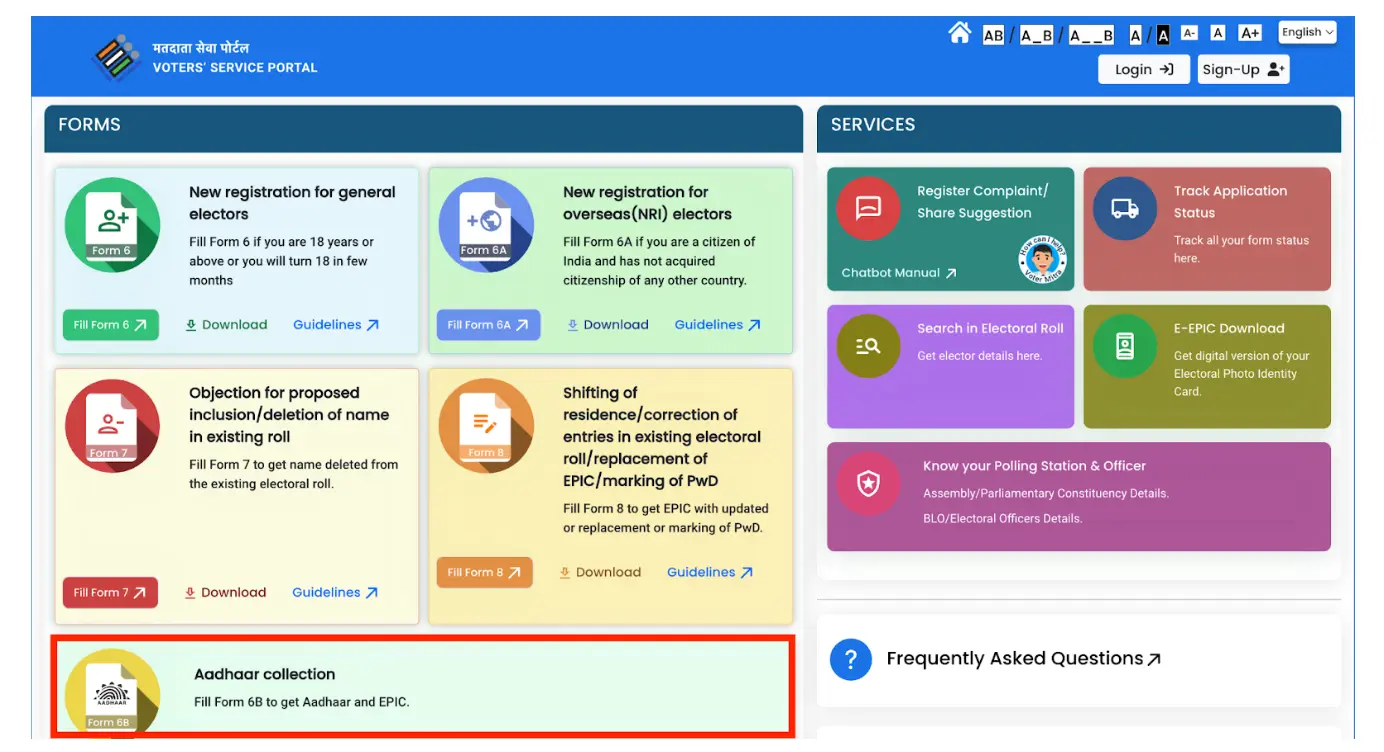
Step 2: Scroll down and click on ‘Aadhaar collection, Fill Form 6B to get Aadhaar and EPIC’.
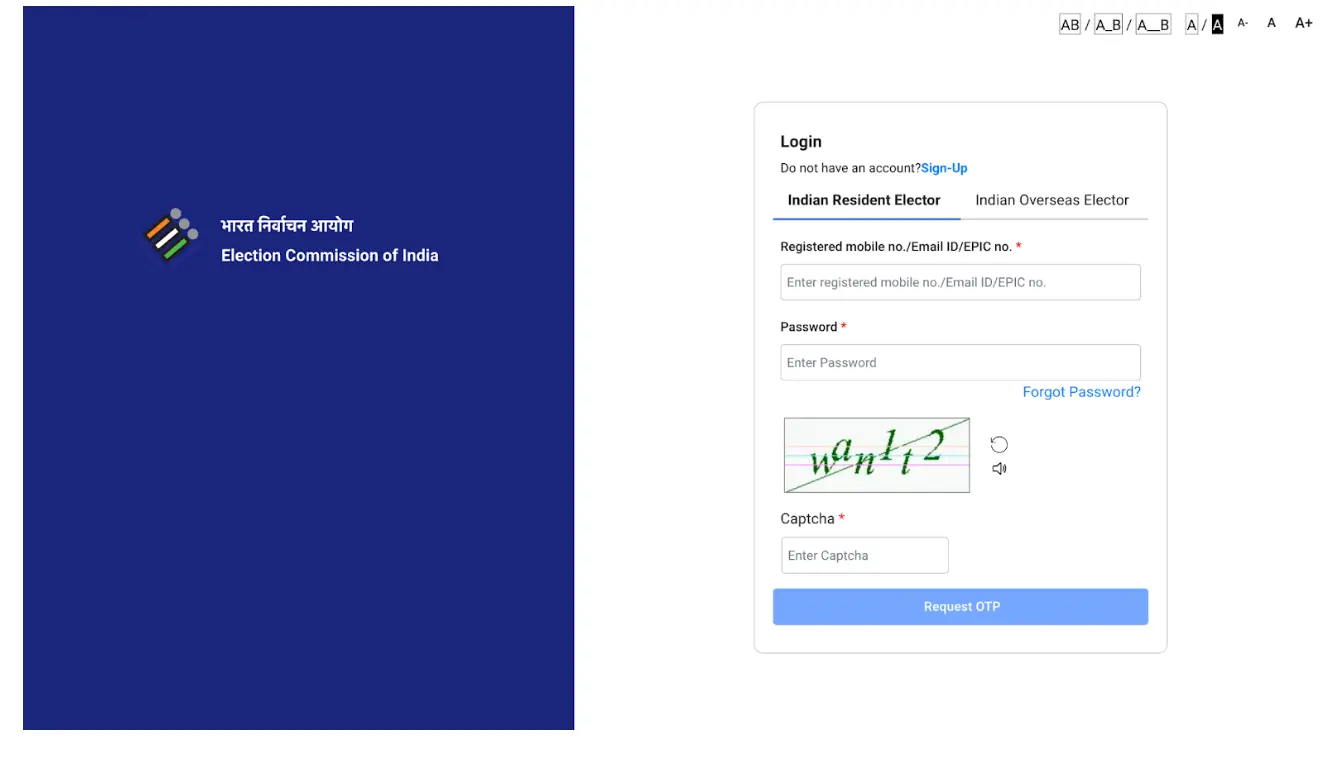
Step 3: Login in to the electoral page. Enter the registered mobile number, password, Captcha and verify the OTP.
Step 4: Enter your EPIC no. and click on ‘Verify & Fill Form.’
Step 5: Fill the Form 6B with your Aadhaar Number, Personal Details or other relevant fields as indicated.
Step 6: Click on ‘Submit’. On completion of the process, you will receive a notification about the successful Voter ID link with Aadhaar.
Note:
- If you have not signed in on the Voters Service Portal, you need to first Sign-up and then you will be able to login.
- Also, to link Aadhaar and voter ID you need to have a EPIC number. Without EPIC Number you will not be able to link aadhar & PAN.
- Also, there is a facility to fill the form 6B in your preferred language. Select your preferred language to fill in the form.
Looking for a personal loan?

How to Link Aadhaar Card with Voter ID Offline
Linking Aadhaar with Voter ID offline is a simple process ensuring accurate voter registration.
Here is the step-by-step guide for linking your Voter ID to Aadhaar card offline.
Submitting Form 6B Offline
Step 1: Download the form online or get it from your nearest Electoral Registration Officer (ERO) office or Voter Help Center. Or download the form from the official website National Voters Service Portal (NVSP)
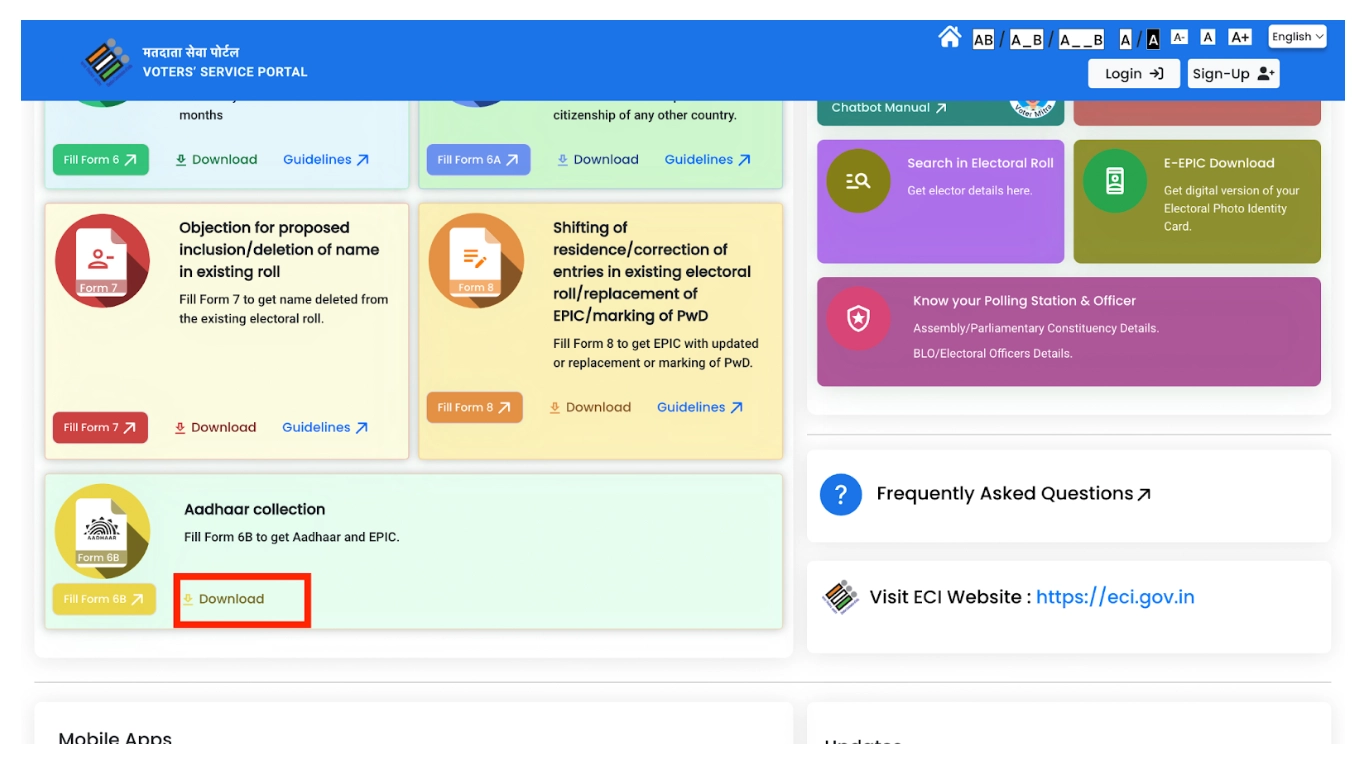
Step 2: You can download the form in Hindi or English based on your convenience.
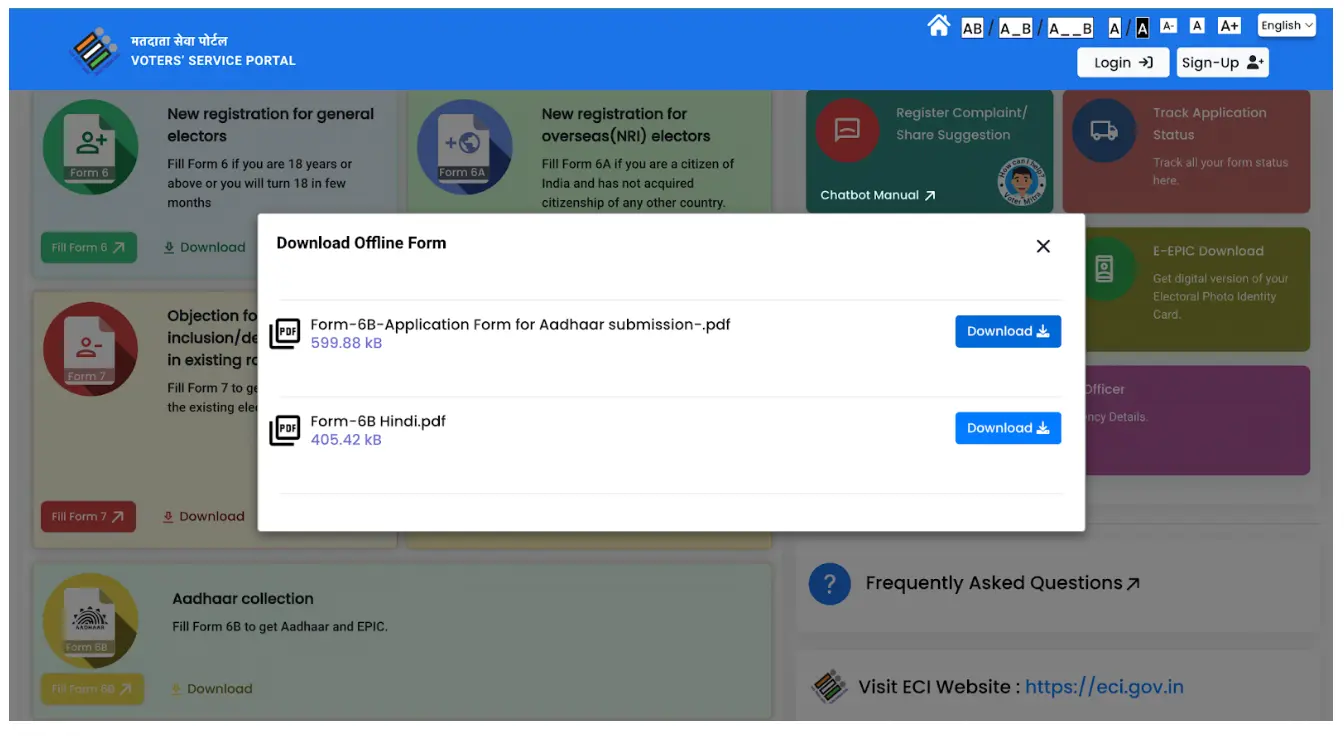
Step 3: Submit the completed form and photocopies to your ERO office or Voter Help Center. They will verify your documents and process the linking request.
Visiting ERO Office or Voter Help Center
Step 1: Take your original Aadhaar card and Voter ID card to the ERO office or Voter Help Center in your area.
Step 2: Tell the officials you want to link your Aadhaar with your Voter ID and ask for assistance with filling out the necessary forms.
Step 3: Once the form is filled out, submit it along with photocopies of your original documents for verification and processing.
Not sure of your credit score? Check it now!

Link Aadhaar Card & Voter ID Through Voter ID Helpline App
Things to remember: Be sure to note that your mobile number is registered with both Aadhaar and Voter ID for smooth verification.
Step 1: Download the Voter Helpline App
Step 2: Open the app and register
- If you’re a new user, register with your mobile number and email.
- If you’re an existing user, log in with your credentials.
Step 3: Select the “Voter Registration” option on the App’s homepage.
Step 4: Choose “Electoral Authentication Form (Form 6B)”
Step 5: Click “Let’s Start” and the app will guide you through the process.
Step 6: Enter your mobile number and verify with OTP.
Step 7: Select “I Already Have Voter ID confirming that you want to link Aadhaar to an existing Voter ID.
Step 8: Enter your Voter ID details and other required information and submit to move to the next step.
Step 9: Enter your Aadhaar number and confirm the state linked to it and the place of authentication.
Step 10: Review and submit.
Do you need an instant loan?
Documents Required for Linking Aadhaar Card With Voter ID
While the exact documents required for linking your Aadhaar card with your Voter ID may vary slightly depending on your state and chosen method (online vs. offline), here’s a general overview:
Online:
- Mobile number registered with both Aadhaar and Voter ID for verification.
- Voter ID number and state.
- Aadhaar number.
- In some states, a scanned copy of your Aadhaar card.
Offline:
- Original Voter ID card for verification.
- Photocopies of Aadhaar cards for all family members listed on the Voter ID.
- Passport-size photograph of the family head.
Benefits of Linking Aadhaar Card with Voter ID
Linking your Aadhaar card with your Voter ID offers several benefits, including:
- Reduced Fraud: Aadhaar-based authentication helps prevent duplicate voter registrations and ensures only eligible individuals can vote. This minimises fraudulent voting and strengthens the integrity of the electoral process.
- Convenience: In some states, your Aadhaar-linked Voter ID can serve as a valid document for verification at polling booths, eliminating the need to carry multiple IDs.
- Automatic Updates: Any updates made to your Aadhaar information (address etc.) are automatically reflected in your Voter ID, reducing the need for manual updates and potential discrepancies.
- Potential Future Benefits: Aadhaar-linked Voter IDs might pave the way for future innovations like online voting or remote verification, though these are still under discussion and development.
Looking for a personal loan?