

Checking your Driving Licence Status is essential for various reasons. It helps you avoid uncertainties regarding your driving eligibility, plan your vehicle use effectively, and comply with the Regional Transport Office (RTO) timelines. Whether you are waiting for a new licence, renewal, or any other update, knowing your status can save you time and effort.
On this webpage, you will learn about all possible methods to check your driving licence status, including web portals, SMS services, mobile applications, and state-specific nuances.


Check Driving Licence Application Status Online
You can check your DL status through several digital channels offered by the Ministry of Road Transport and Highways.
Method 1: Check DL Status via Parivahan Portal:
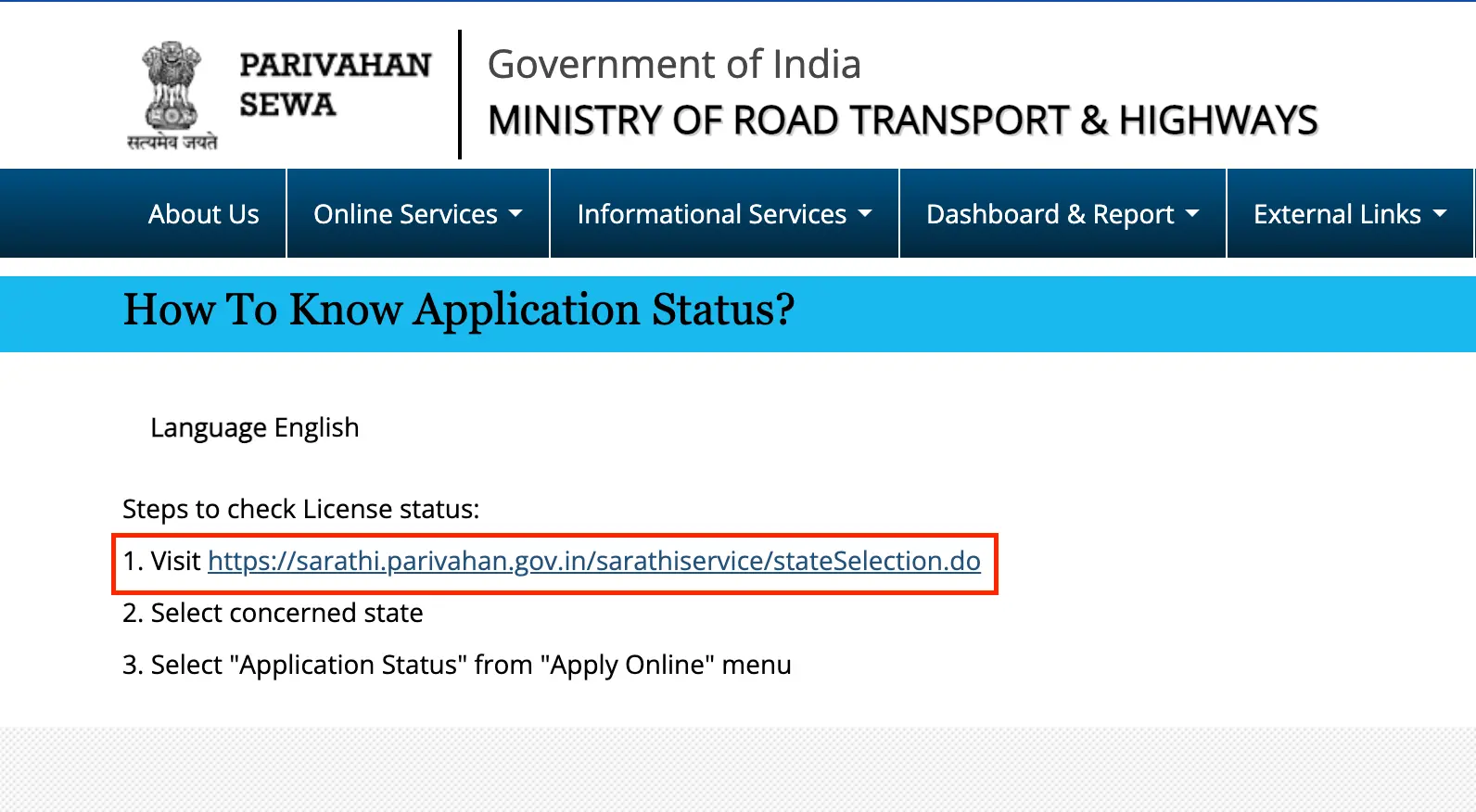
1.Go to https://sarathi.parivahan.gov.in/sarathiservice/stateSelection.do.
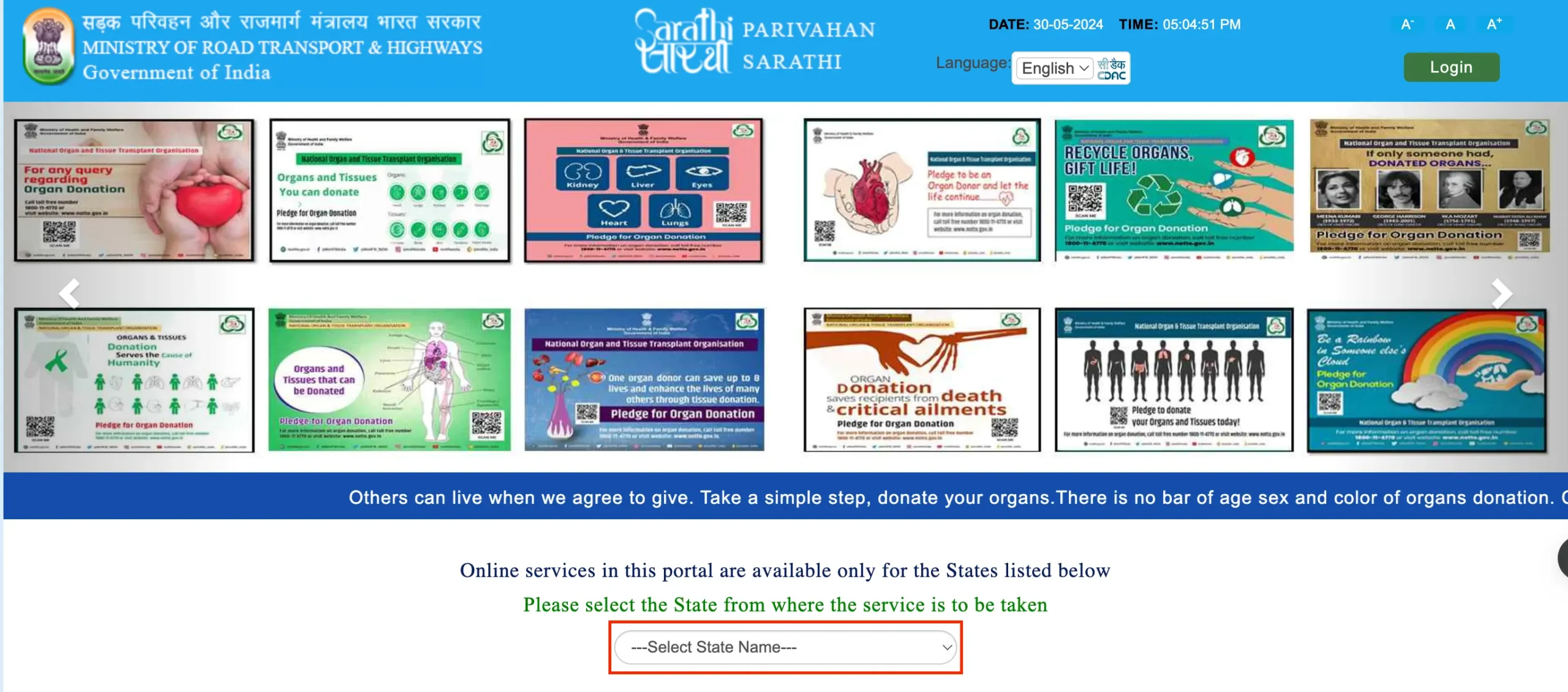
2.Select Your State: Choose the state where you applied for your DL.
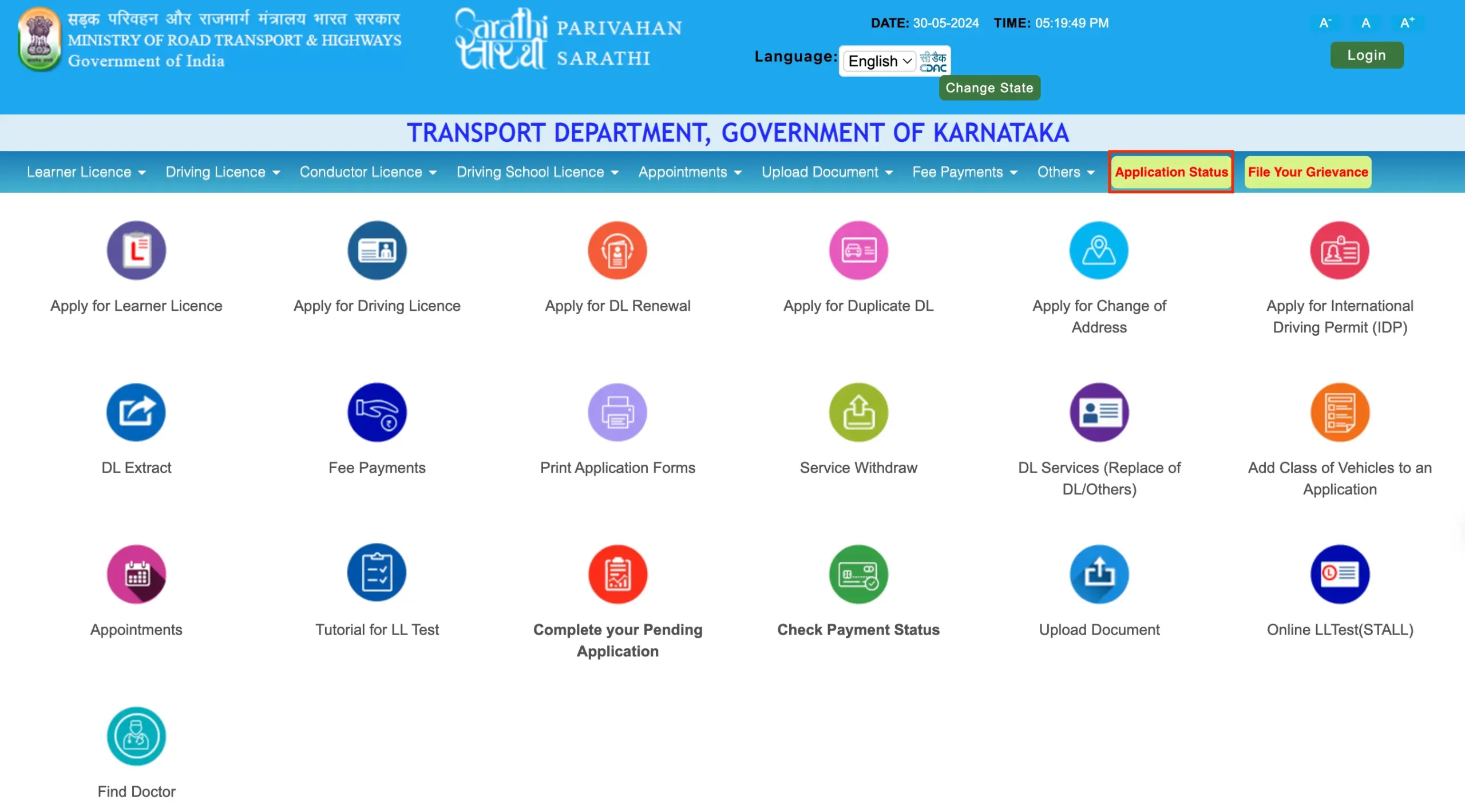
3.Click on “Application Status” in the top menu.
4.Enter Details: Fill in your Application Number, Date of Birth, and Captcha Code.
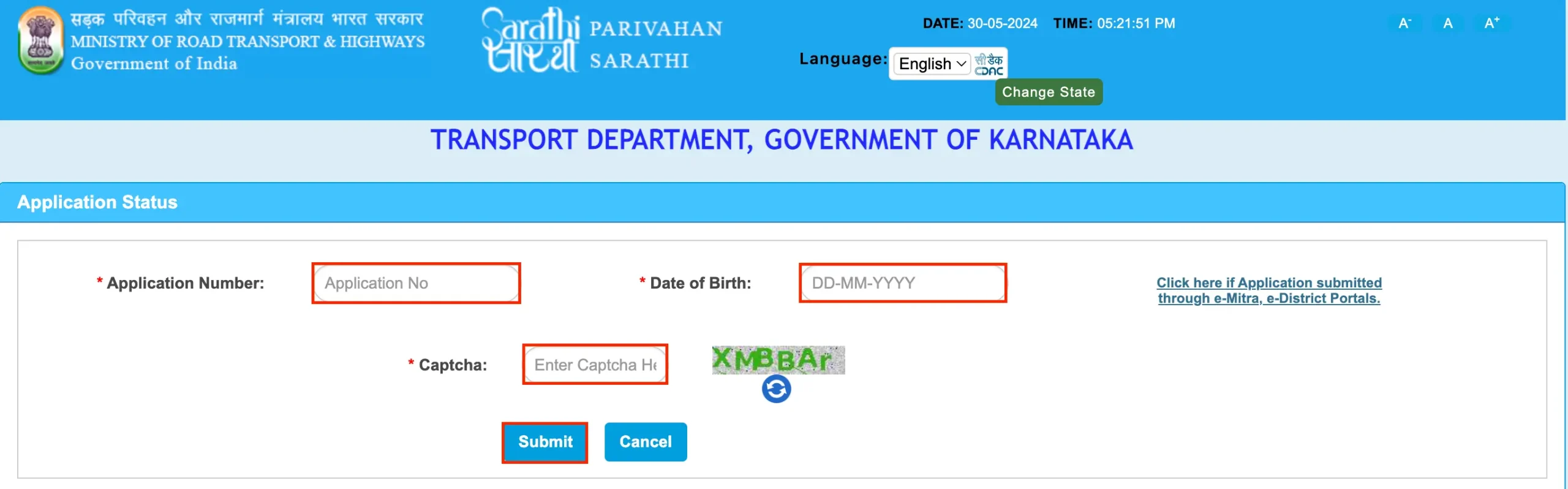
5.Submit: Click “Submit” to view your current DL status.
Method 2: Check Driving Licence Status via the mParivahan App
The mParivahan app, developed by the Ministry of Road Transport and Highways, lets you easily track your driving licence status from your mobile device.
- Download the mParivahan app from the Play Store or App Store.
- Tap “Driving Licence” on the home screen.
- Enter your DL number and date of birth (DOB).
- Tap “Search” to view your licence details and current status.
The app displays DL validity, holder’s name, issuing RTO, and authorized vehicle classes. You can also store your DL digitally via DigiLocker, making it accessible anytime as a legally valid ID.
Enquire About Driving Licence Status Offline
While online methods are convenient, you can also enquire about your dl status offline.
- RTO Helpline: Most RTOs have dedicated helplines where you can call and enquire about your driving licence status. You will likely need to provide your application number or other relevant details.
- Walk-In Inquiry: You can visit your nearest Regional Transport Office (RTO) in person to inquire about your driving licence status. It is advisable to carry your application acknowledgment slip and any other relevant documents.
Different Stages of the DL Application Process
Understanding the stages of the driving licence application process helps you track your progress and know exactly where your application stands. Whether you’re applying for a learner’s licence, permanent driving licence, or renewal, your DL status will move through several predefined stages on the Parivahan portal.
Key Stages in the Driving Licence Application:
- Application Submitted: Your online or offline application has been successfully received by the system or RTO.
- Document Verification: Submitted documents like proof of identity, age, and residence are under review by RTO officials.
- Fee Payment Completed: Your fee has been paid successfully, and the system has recorded the payment.
- Test Slot Booked: Your learner’s or driving test date and time have been confirmed.
- Test Completed: You have completed the required test (either computer-based or driving skill test).
- Approval Pending: The RTO is reviewing your test results and verifying final eligibility.
- Approved by Licensing Authority: Your DL has been approved and is queued for printing.
- DL Printed and Dispatched: Your driving licence is printed and sent via post or courier. You may also receive a tracking number (AWB).
- DL Delivered: Your licence has been successfully delivered to the registered address.
Check RC Status Online
A Registration Certificate (RC) is an official document issued by the Regional Transport Office (RTO) after a vehicle is registered. To ensure compliance and avoid penalties, it’s important to check RC status online.
The Parivahan portal offers two convenient methods to track your RC status. These include:
Method 1. Check RC Status Using DL Application Number
You can track your RC progress using the DL application number. Here’s how:
1.Visit: https://parivahan.gov.in/parivahan/
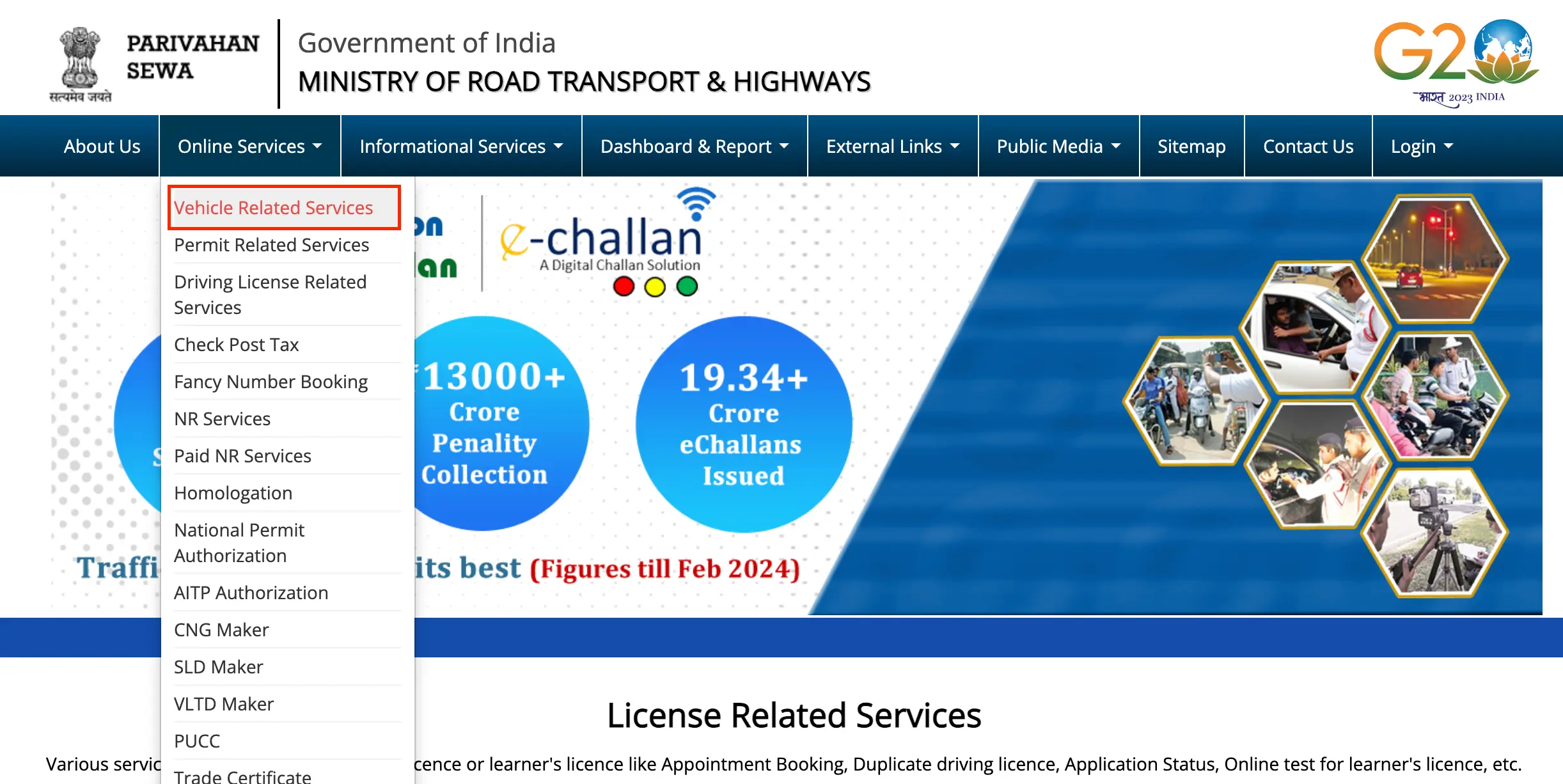
2.Click on “Vehicle Related Services” under the Online Services tab.
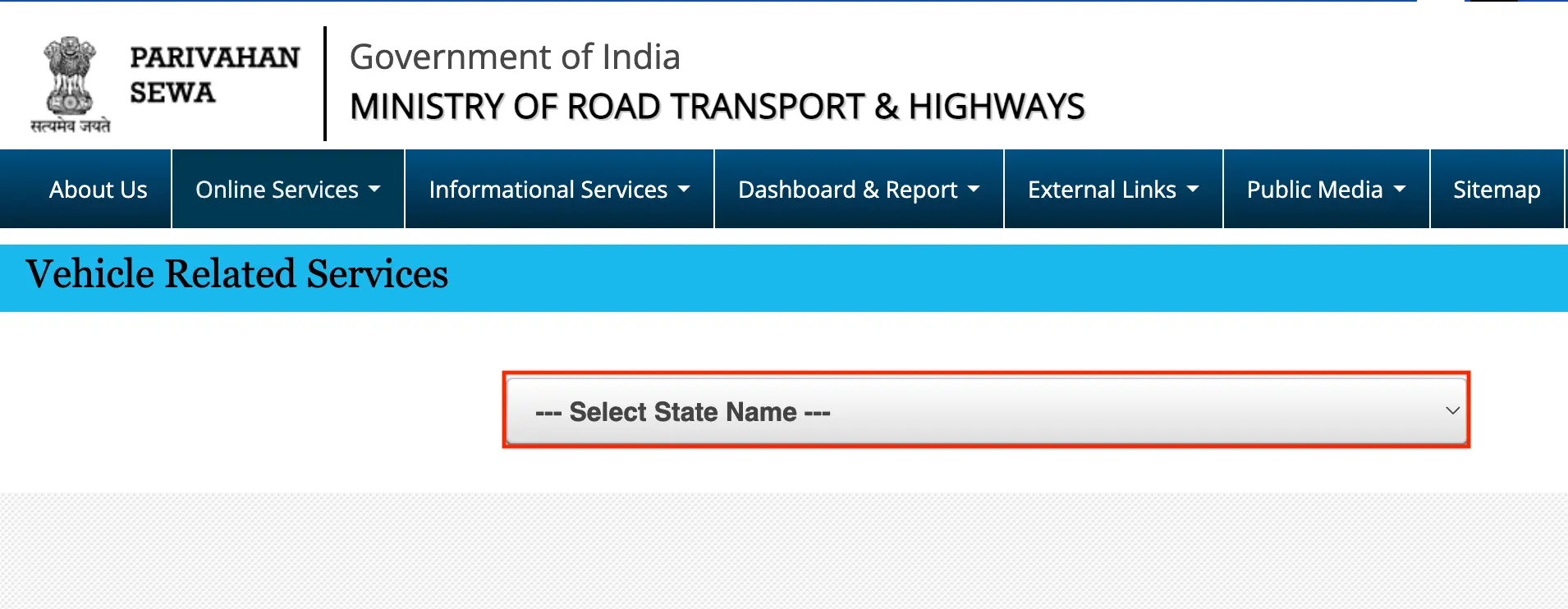
3.Select your State from the dropdown.
4.Choose your RTO and click “Proceed”.
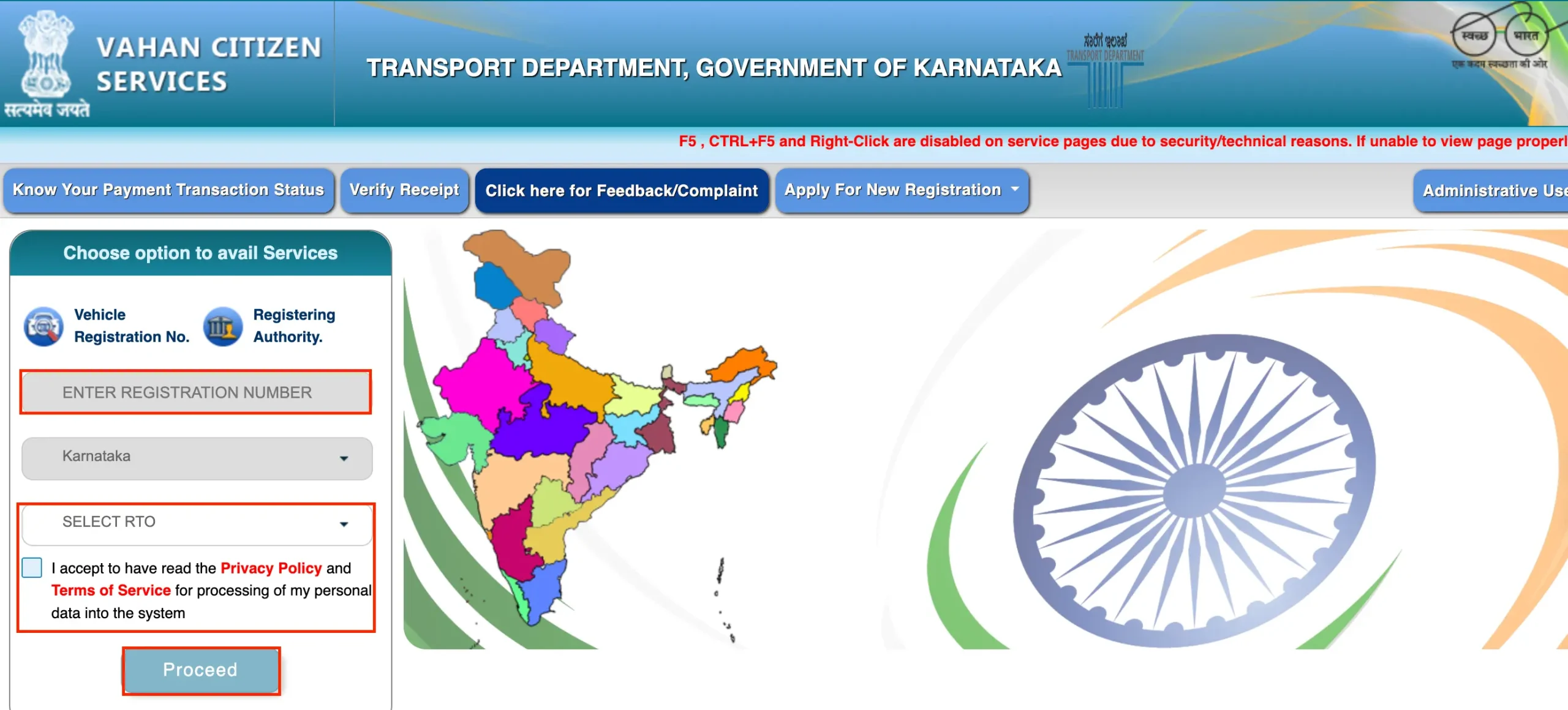
5.Enter your vehicle registration number and submit.
6.Go to the top-right corner and click on “Status”.
7.From the dropdown, choose “Know your application status”.
8.Enter your Application Number and click Submit.
9.Click “View Report” to see your RC status. This will show whether your RC is under processing, approved, dispatched, or delivered.
Method 2: Check RC Status with Vehicle Number
Alternatively, you can check the RC status using your vehicle number:
- Go to https://parivahan.gov.in/parivahan/
- Under Information Services, select “Know Your Vehicle Details”.
- Enter your Mobile number and the captcha code.
- Click on “Search Vehicle”.
The page will display your vehicle’s RC details, including registration date, owner name (partially masked), chassis number, insurance status, and fitness certificate validity.
Suggested Read: 5 Must-Have Government Apps
Why You May Need to Check Your DL Status
Regularly checking your driving licence status is essential for staying informed and avoiding unnecessary delays or legal issues. Here are the key reasons why you should track your DL status:
- Avoid Driving Without a Valid Licence: Ensure your DL is active, approved, and delivered to remain legally compliant.
- Track Application Progress: Identify what stage your application is in, whether it’s under verification, test completed, or dispatched.
- Address Application Delays: Spot issues such as failed document verification or missed test appointments early.
- Receive Timely Delivery: Monitor the dispatch status to ensure your DL is delivered to the correct address.
- Stay Updated for Renewals or IDP: Track updates for DL renewals or international driving permit requests to avoid last-minute surprises.
- Correct Errors Promptly: Correct mistakes in application details or uploaded documents.
Essential Points to Remember to Track DL Status
When you check driving licence status, keeping the following tips in mind will ensure a smooth and accurate process:
- Keep Your Application Details Handy: Always have your application number and date of birth ready, as they are required to access your DL status online.
- Use Official Platforms Only: Track your DL status through trusted sources like the Sarathi Parivahan portal or the mParivahan app to avoid misinformation.
- Monitor Status Regularly: Check updates at regular intervals, especially after completing your test or submitting documents.
- Note the Dispatch Date and Courier Number: Once your DL is dispatched, track it using the AWB number on the courier’s website (e.g., India Post).
- Use DigiLocker for eDL: While waiting for the physical DL, you can download a valid electronic Driving Licence (eDL) via DigiLocker.
- Contact RTO for Delays or Issues: If your status doesn’t update or your DL doesn’t arrive within 2–3 weeks, reach out to your RTO for clarification.
Traditional Vs Digital Methods to Check DL Status
Checking your driving licence status has become faster and more convenient with the adoption of digital platforms. Here’s a comparison of traditional vs digital methods to help you understand the benefits of modern tracking systems.
| Feature | Traditional Methods | Digital Methods (Portal, App, SMS) |
|---|---|---|
| Access | Requires a visit to the RTO during working hours | 24/7 access from anywhere |
| Convenience | Time-consuming, paperwork involved | Instant, user-friendly |
| Speed of Information | Manual processing, slower updates | Real-time updates are available instantly |
| Documentation | Hard copies needed | No physical documents required |
| Tracking Dispatch | Must follow up manually with RTO | Courier tracking is available with the AWB number |
| Availability of eDL | Not applicable | eDL downloadable via DigiLocker |
| Integration | Standalone process | Integrated with Aadhaar, DigiLocker, mParivahan |
| Eco-Friendliness | Paper-based | Fully paperless and digital |

Download the Buddy Loan App Now!
One solution to each of your financial needs at your fingertip.

Scan to download now

