

Kotak Mahindra net banking services are among the best features that make Internet banking easily accessible and efficient for its customers. Kotak Mahindra Internet banking and its mobile application have made opening, managing, and utilising bank accounts far more convenient than ever before.
Whether you are looking for the best way to manage your personal or business finances, Kotak Mahindra Net Banking can make it easy by providing all the services you need.
Know more about Kotak banking net banking and the 811 mobile application and how to benefit most from it.
Kotak Mahindra Net Banking is a comprehensive solution for easy accessibility to all of the banking functions like account overview, statement management, investments, etc.


Are you looking for a personal loan?

Kotak Mahindra Bank Net Banking Registration
The process of Kotak bank net banking registration is fairly simple.
One must have an active bank account, as the Customer Relationship Number (CRN) or debit card will be needed to register for Kotak net banking.
Here are the top 5 methods for registering at Kotak Bank Net Banking:
1. Kotak Mahindra Net Banking Online Registration
Registering via the official website is one of the best ways to access net banking services.
Here is a guide on how to register for Kotak net banking via the website:
-
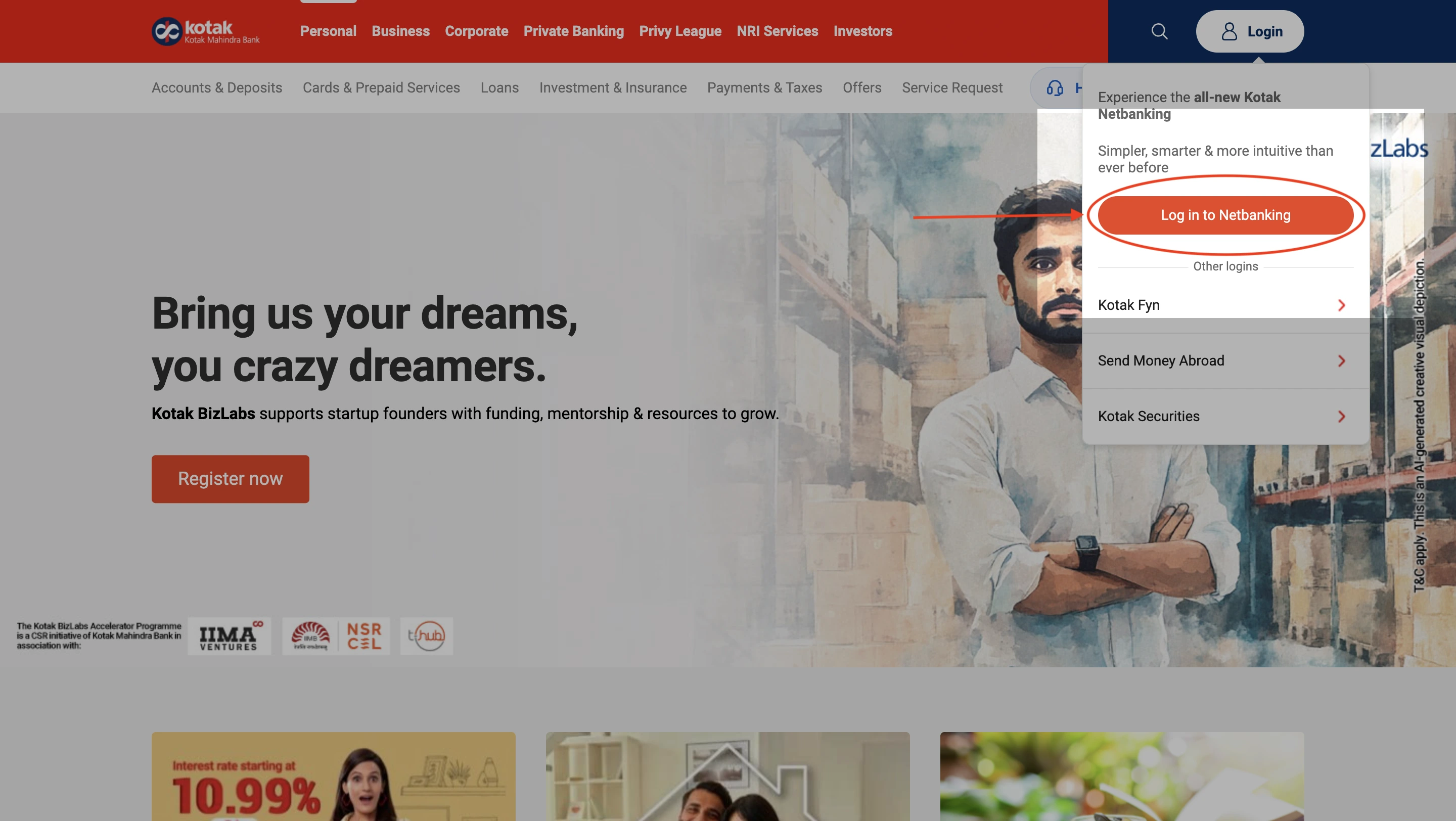
- Visit the official website of Kotak Mahindra.
- Click on the ‘Login’ option at the top right corner of the page.
-
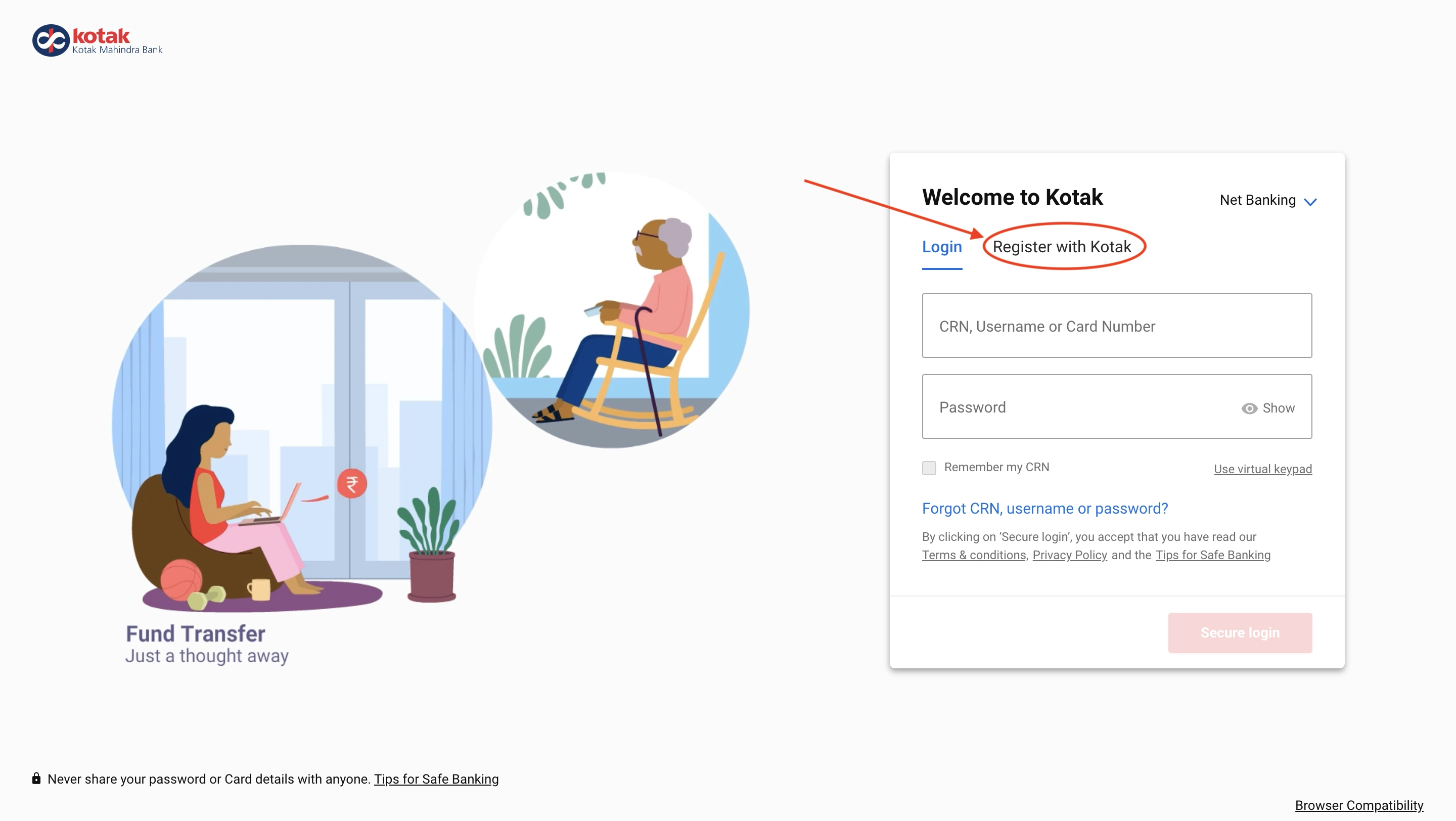
- You will be redirected to a login page. Choose the option ‘Register with Kotak’.
-
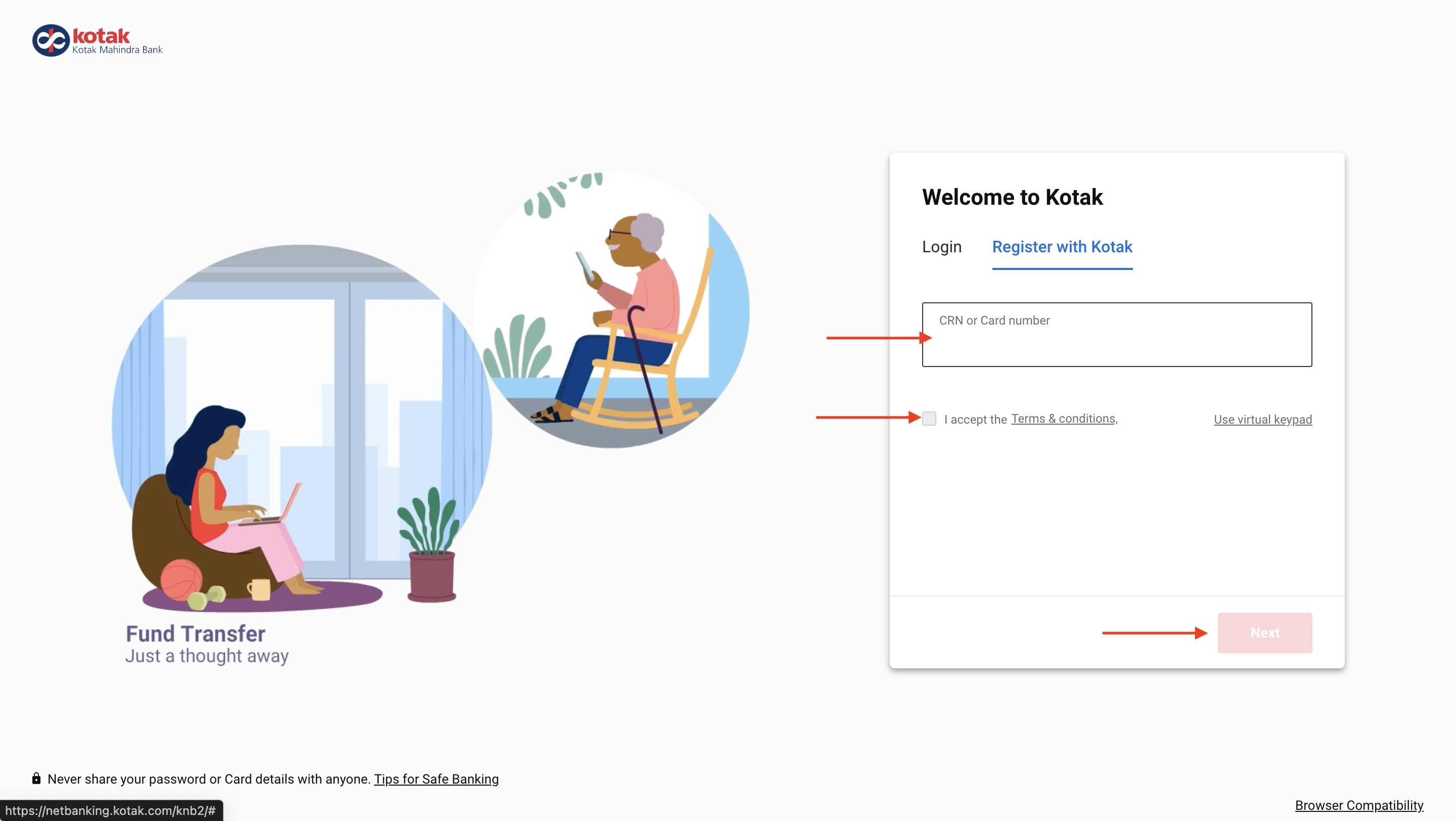
- Enter your CRN number in the blank space, acknowledge the terms and conditions and hit ‘Next’.
- You would have to enter your mobile number and verify using OTP.
- Create a net banking user ID and password.
- You might be asked to enter your debit card details for authentication.
- Once the process is complete, you will receive a confirmation mail and message, indicating successful completion.
Note: Your CRN (Customer Relation Number) can be obtained from your bank’s passbook.
Not sure of your credit score? Check it out for free now!

2. Kotak Mahindra Mobile Banking Registration
The Kotak 811 Net Banking app is a dedicated mobile application for the ease of access to net banking functions from a handheld device like a smartphone.
Here is a simple, generic guide on how to register for Kotak 811 mobile net banking:
- Download the app from trusted sources.
- Launch the application and select ‘New User Registration’.
- Choose the option for net banking.
- Use your CRN or account number to begin the registration process.
- Enter your registered mobile number and verify using the OTP.
- If you have a debit card, you have to provide the details for verification of your existing account.
- You will have to verify with OTP once again.
- After OTP verification, you will be prompted to create a username and password.
- You will receive a registration confirmation message.
3. Kotak Net Banking Registration via Customer Care
Users can call customer service and request that they be guided into activating net banking. This can be done by the following steps:
- Dial Kotak Mahindra Bank’s customer care number, 1860 266 2666, from your registered mobile number.
- Choose the option for net banking services from the IVR (Interactive Voice Response).
- Choose the option to register for net banking.
- Dial your CRN and other personal details for identity verification.
- Enter the OTP received to the mobile number.
- After authentication, you will receive your temporary username and password as a message.
- Use these credentials to log in to your net banking from a browser and change your password to a more suitable and secure one.
Check the best offers & apply for a credit card!
4. Kotak Mahindra Net Banking Registration via ATM
For registering Kotak Bank Net banking through ATM, follow the below-mentioned steps:
- Visit the nearest Kotak Mahindra Bank ATM.
- Insert your debit card.
- Enter your ATM PIN to access the menu.
- Select the ‘Net Banking Registration’ option from the available services.
- Input your CRN and confirm your registered mobile number.
- You will have to verify with the OTP.
- Follow the on-screen instructions to complete the registration.
- You will receive an SMS on your registered mobile number with your temporary ID and password.
- Use these login credentials to access net banking through a browser.
- Reset your user ID and password into something more suitable and secure.
5. Register for Kotak Net Banking via Branch Visit
To register your net banking via branch, visit, follow the below-mentioned steps.
- Go to your nearest Kotak Mahindra Bank branch during working hours.
- Carry a valid ID proof, your account details, and your registered mobile number.
- Request a net banking registration form from the bank representative.
- Fill out the form with your CRN and account information.
- Submit the form to the bank representative for processing.
- The bank will send your login credentials or activation details to your registered mobile number or email.
- Use these credentials to log into your net banking account.
- Change your temporary credentials into something safe and secure.
Get a quick loan starting at 11.99% p.a.
Kotak Mahindra Net Banking Login
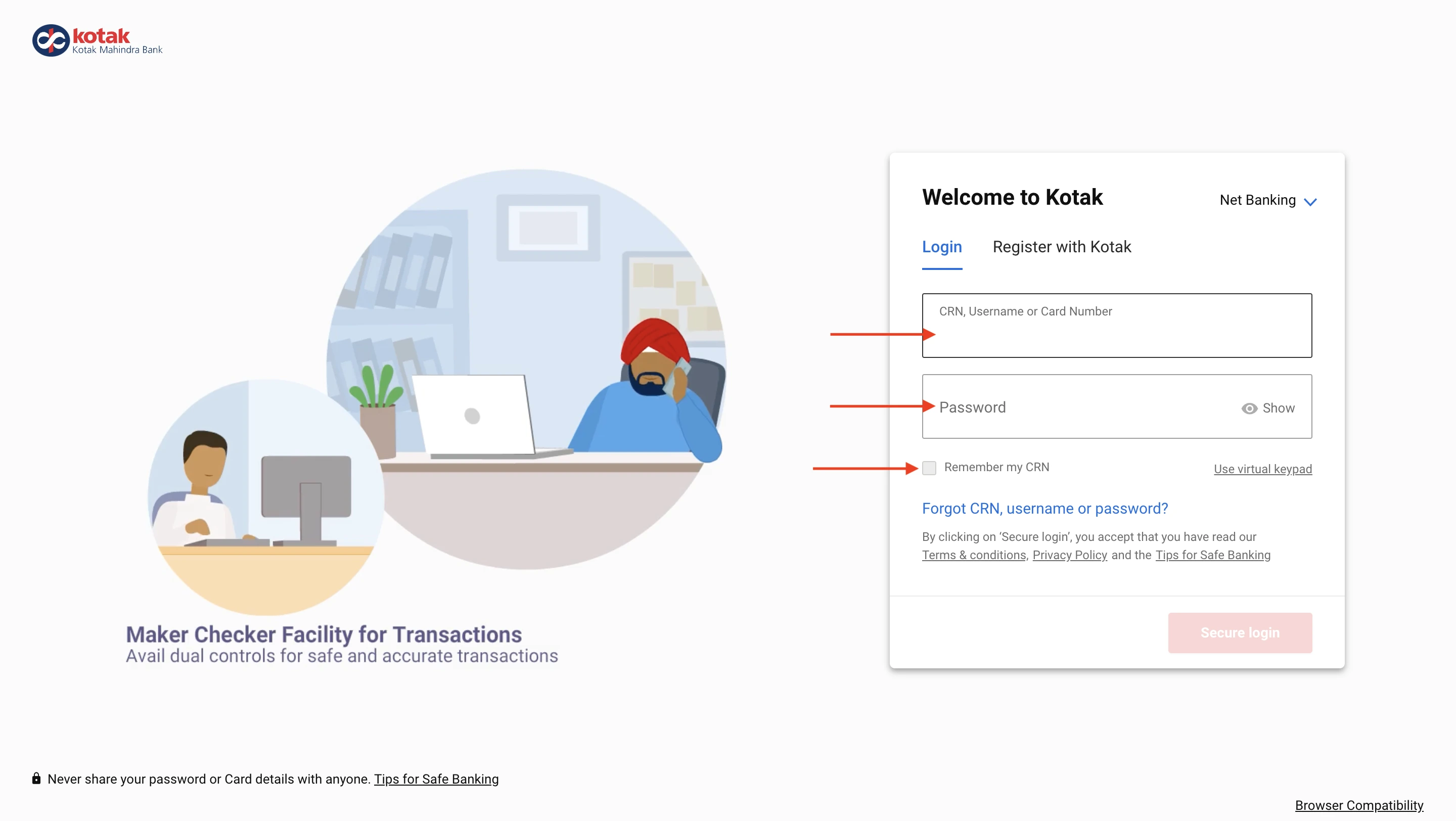
Once you have finished registration for Kotak Mahindra Internet Banking, users can log in using the same credentials the next time. To log in to your Kotak Mahindra Net banking, follow the simple steps provided below:
-
- Visit the official website of Kotak Mahindra.
- Click on the ‘Login’ button.
-
- You will be prompted with a login page.
- Enter your user name/ CRN/ card number and password.
- You will be asked to submit the OTP sent to your mobile number.
After hitting secure login, you will be redirected to your dashboard, from where you can manage your account.
During the first login, you will have to add other security features, such as security questions and multi-factor authentication.
Do you want to check the Eligibility Criteria?
Kotak Mahindra Mobile Banking Login
Using mobile net banking is one of the most convenient ways of managing your bank account remotely. Kotak Mahindra offers this function through its mobile banking application.
Here is a list of generic steps that you can follow to log in to Kotak Mahindra Mobile net banking:
- Open the Kotak Mobile Banking app on your mobile.
- Enter your CRN/card number/user ID in the login field.
- Type in your password on the following page (you can also set up biometric authentication on this page).
- Tap ‘Login’ to access net banking.
- Complete the OTP verification.
Once you are verified, you will open the app on your dashboard.
Users can check their balance using the 811 app by simply tapping on the ‘View Balance’ button in the top right corner to see your balance.
Kotak Bank NetBanking Fund Transfer
Kotak Bank offers a flexible approach to almost all of the net banking features, ensuring zero trouble for users while using any of the methods.
| Transfer Method | Ranges | Charges |
|---|---|---|
| NEFT (Maximum ₹10 Lakhs/day, ₹5 Lakhs/transaction) | ||
| Up to ₹10,000 | ₹2 + GST | |
| ₹10,001 – ₹1 Lakh | ₹4 + GST | |
| ₹1,00,001 – ₹2 Lakhs | ₹14 + GST | |
| Above ₹2 Lakhs | ₹24 + GST | |
| RTGS (Maximum ₹10 Lakhs/day, ₹5 Lakhs/transaction) | ||
| ₹2 Lakhs – ₹5 Lakhs | ₹20 + GST | |
| Above ₹5 Lakhs | ₹40 + GST | |
| IMPS (Maximum limit: ₹5 Lakhs) | ||
| Up to ₹1 lakh | ₹5 + GST | |
| Above ₹1 Lakh | ₹15 + GST | |
| UPI (Maximum limit: ₹1 Lakh) | Max 10 transactions/day | nil |
Looking for a loan?
Kotak Mahindra Net Banking Services
- Kotak 811: Kotak Bank provides an online zero-balance savings account scheme with instant setup and high interest rates.
- Fixed & Recurring Deposits: Attractive deposit schemes with flexible tenure and auto-renewal options can be availed with Kotak net banking.
- Home, Auto, & Business Loans: Quick loan processing with minimal paperwork and competitive interest rates.
- Start-up & Corporate Banking: A comprehensive financial solution for businesses, including funding, credit, and cash management.
- Kotak Net & Mobile Banking: Kotak ensures a seamless banking experience with easy access to transactions and investments.
- Money Transfers: Fast and secure fund transfer options with 24/7 availability.
- Debit, Credit, & Prepaid Cards: Exclusive cards with premium benefits like travel perks and cashback.
- Forex & NRI Banking: Special services for NRIs, including remittances, deposits, and forex solutions, allowing seamless access across the globe.
- Stock Market & Investment Services: Online trading, mutual funds, and wealth advisory services.
- Kotak Privy League Banking: Personalised banking experience with premium benefits for high-net-worth individuals.
- Life, Health & Vehicle Insurance: Wide-ranging insurance products in collaboration with leading providers to ensure security for the customers.
- Government Financial Services: Kotak Net Banking offers services like tax payments, subsidies, and government-backed loans.
- AI-driven Smart Banking: Uses AI-powered insights to help users manage expenses and investments.
- UPI AutoPay & Digital Wallets: Automated recurring payments and digital wallet services for seamless transactions.
- Gold & Commodity Trading: Unique investment avenues for customers looking to diversify their portfolios.
Be up to date with your credit score. Check it out for free now!
Features & Benefits of Kotak Bank Net Banking
Kotak Mahindra offers a lot of exciting features for its users to benefit from. These include:
-
- Fund transfers
Canara Bank offers almost all types of transactions—NEFT, RTGS, IMPS, UPI, etc.
-
- Instant bill payments
For various necessities like electricity, gas, water, etc., as well as various types of recharge services, like mobile recharges, DTH, and more.
-
- Easy access
Users can have easy access to account management and statements, which will allow users to view account balance, transaction history, download statements, and manage multiple accounts from a single dashboard with real-time updates.
-
- Instant Updates
Users can receive an instant virtual debit card, which, when opened using a mobile application, can support features like NFC.
-
- AI-powered expense tracker
Kotak Mahindra offers an AI-powered expense tracker to get creative and clever insights on your expenditure. This can also help in categorising your expenses.
-
- Dynamic security options
Kotak Mahindra offers dynamic security options along with customisable transaction limits for different payment modes.
Do you need an emergency loan?
Kotak Corporate Net Banking
Kotak Mahindra Net Banking for businesses can be viewed as a comprehensive solution for efficient financing among organizations. It ensures efficient and secure management of finances for businesses.
Some of the key features include:
- Comprehensive Account Management
- Seamless Fund Transfers
- Trade Finance Services
- Real-Time Collections Monitoring
- Maker-Checker Facility
- Customized Transaction Limits
- 24/7 Accessibility
- Integrated Digital Platform—Kotak fyn
Kotak Corporate Net Banking Online Registration
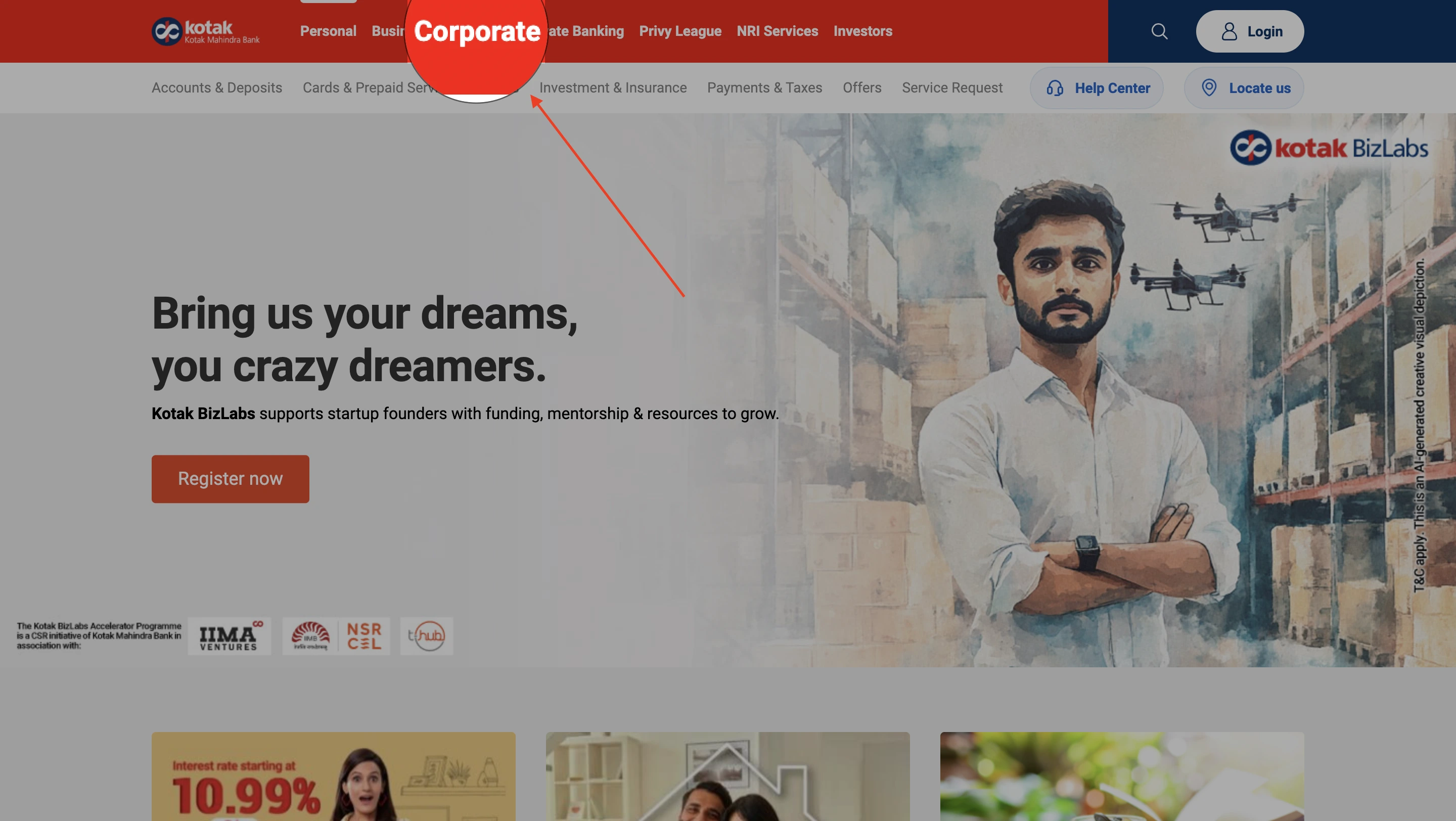
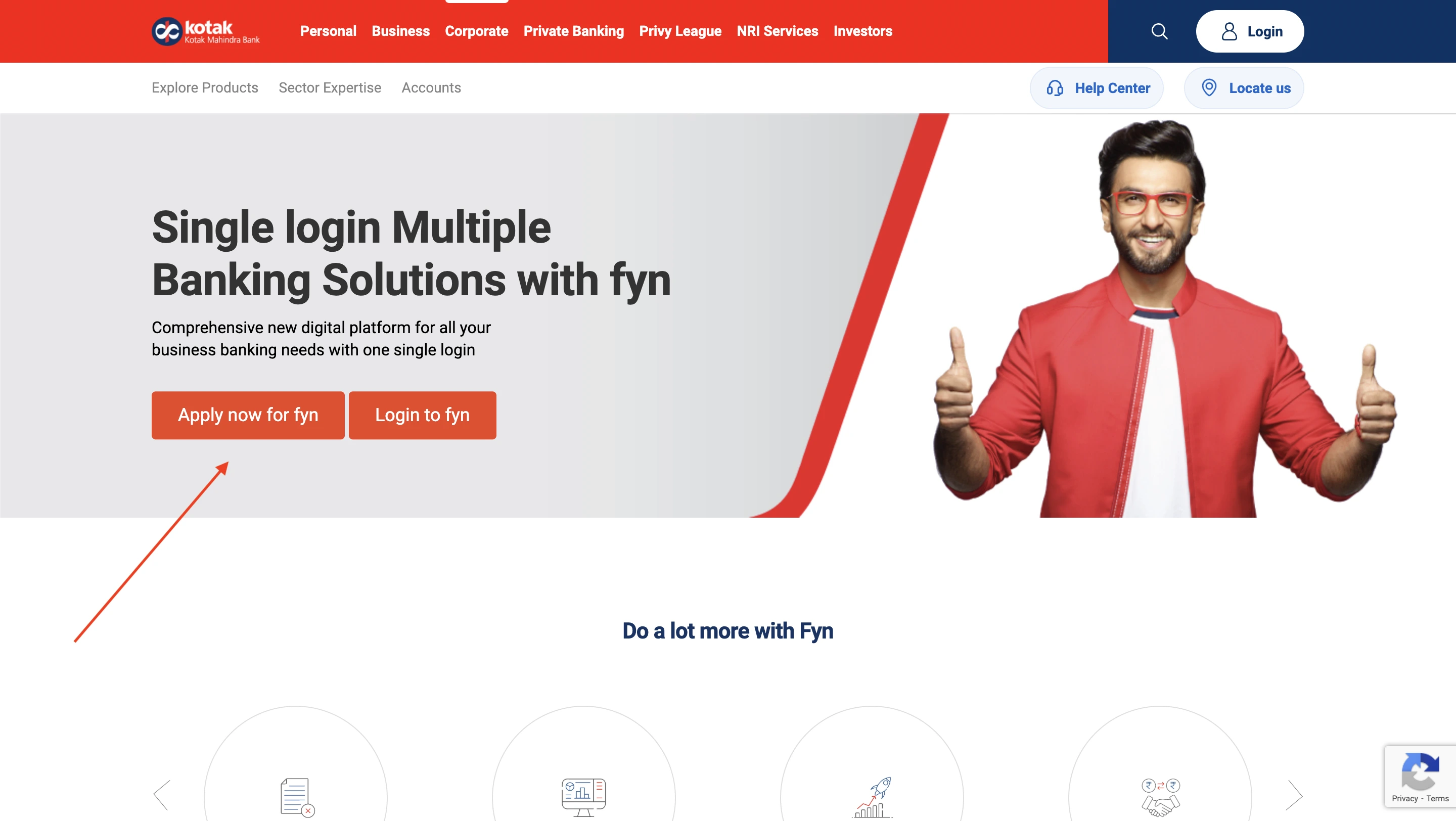
You can use either the official website or the Kotak Mahindra corporate net banking application dedicated to mobile. Here are the generic steps to log in to corporate net banking via the official website:
-
- Visit the official website of Kotak Mahindra.
- Click on the ‘Corporate’ button from the top.
-
- Click on ‘Apply now for fyn’.
-
- Choose from the options ‘existing customer’ or ‘new customer’, fill out respective details and click on ‘Apply now’.
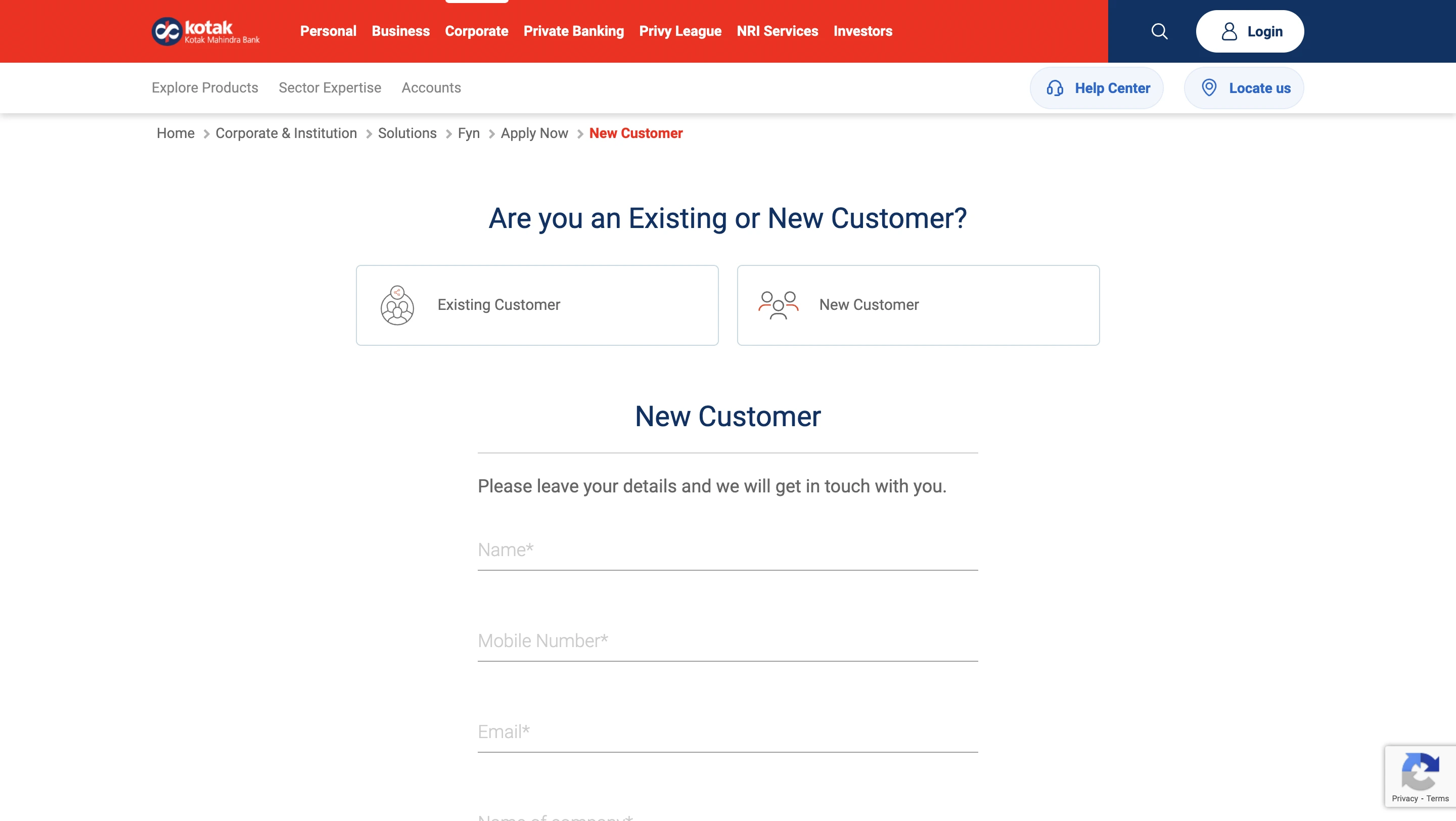
- After applying, your details will be verified by an executive at the bank, who will contact you shortly. Further details, including login credentials, will be provided after the communication.
Be up to date with your credit score. Check it out for free now!
Kotak Corporate Net Banking Login
-
- Visit the official website and choose the option ‘corporate’.
- Choose the option to log to fyn.
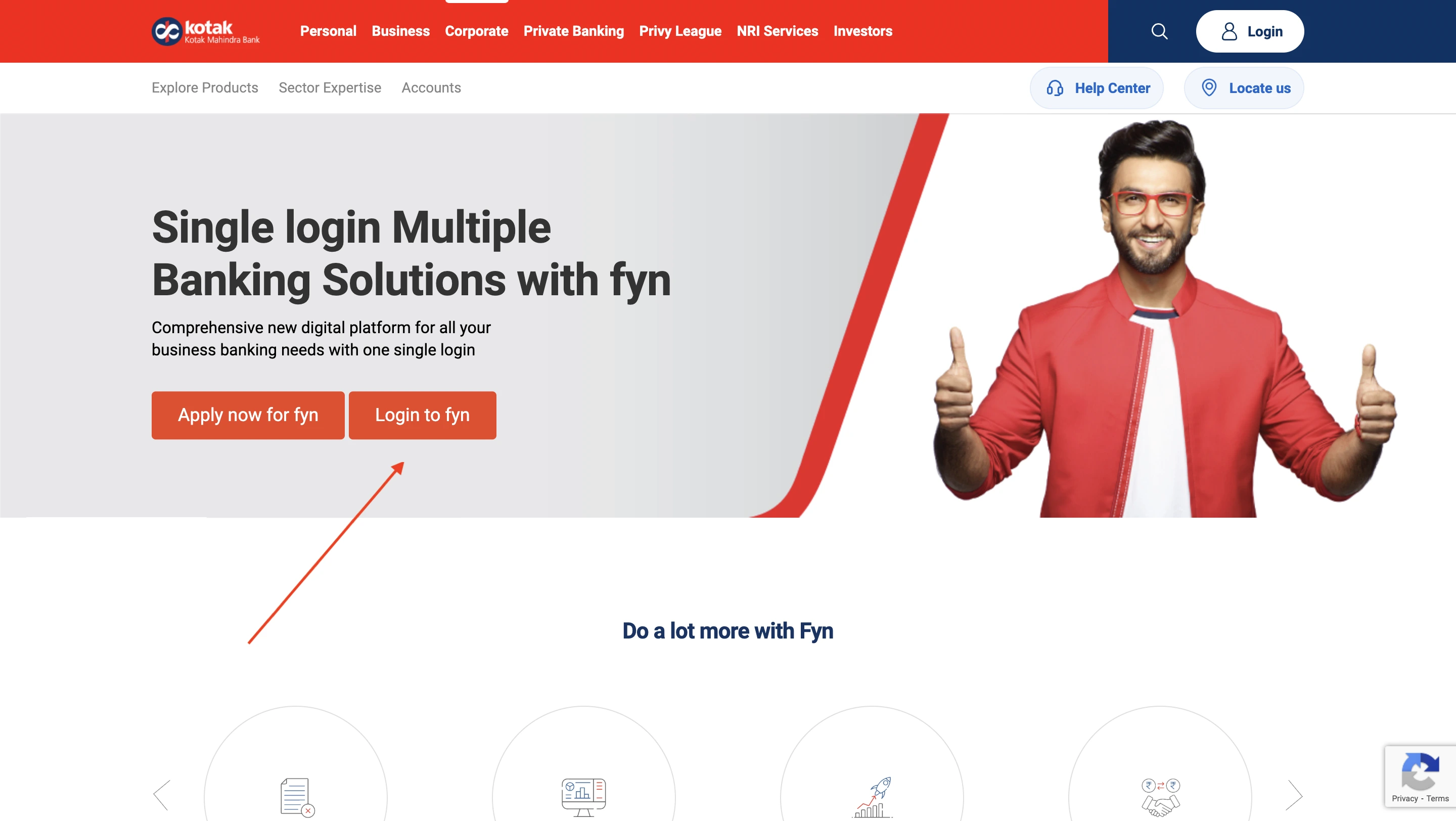
-
- For first-time login, click on ‘Generate Password’.
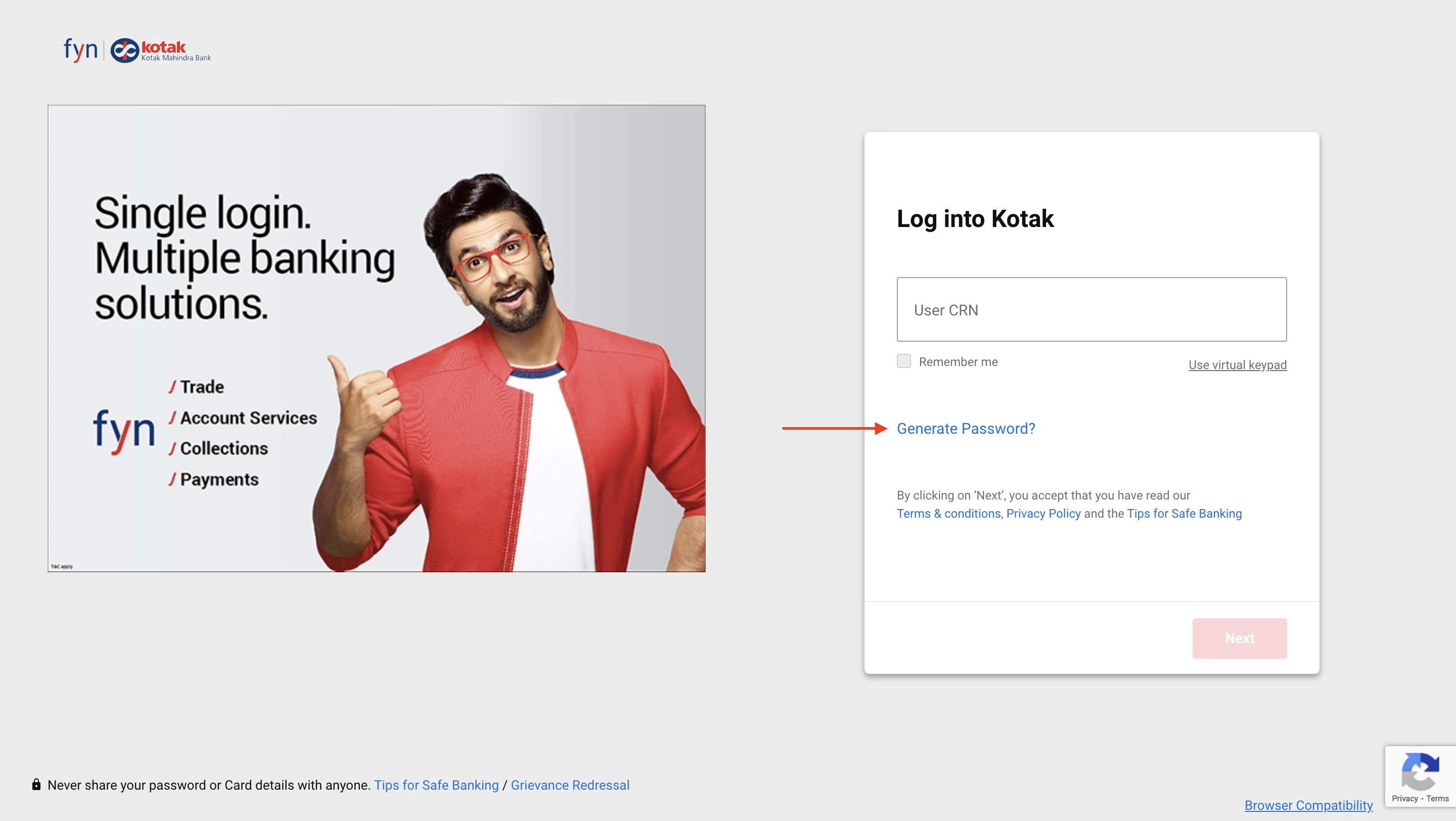
-
- The user will be taken to another page, where they have to enter the CRN/username/card number.
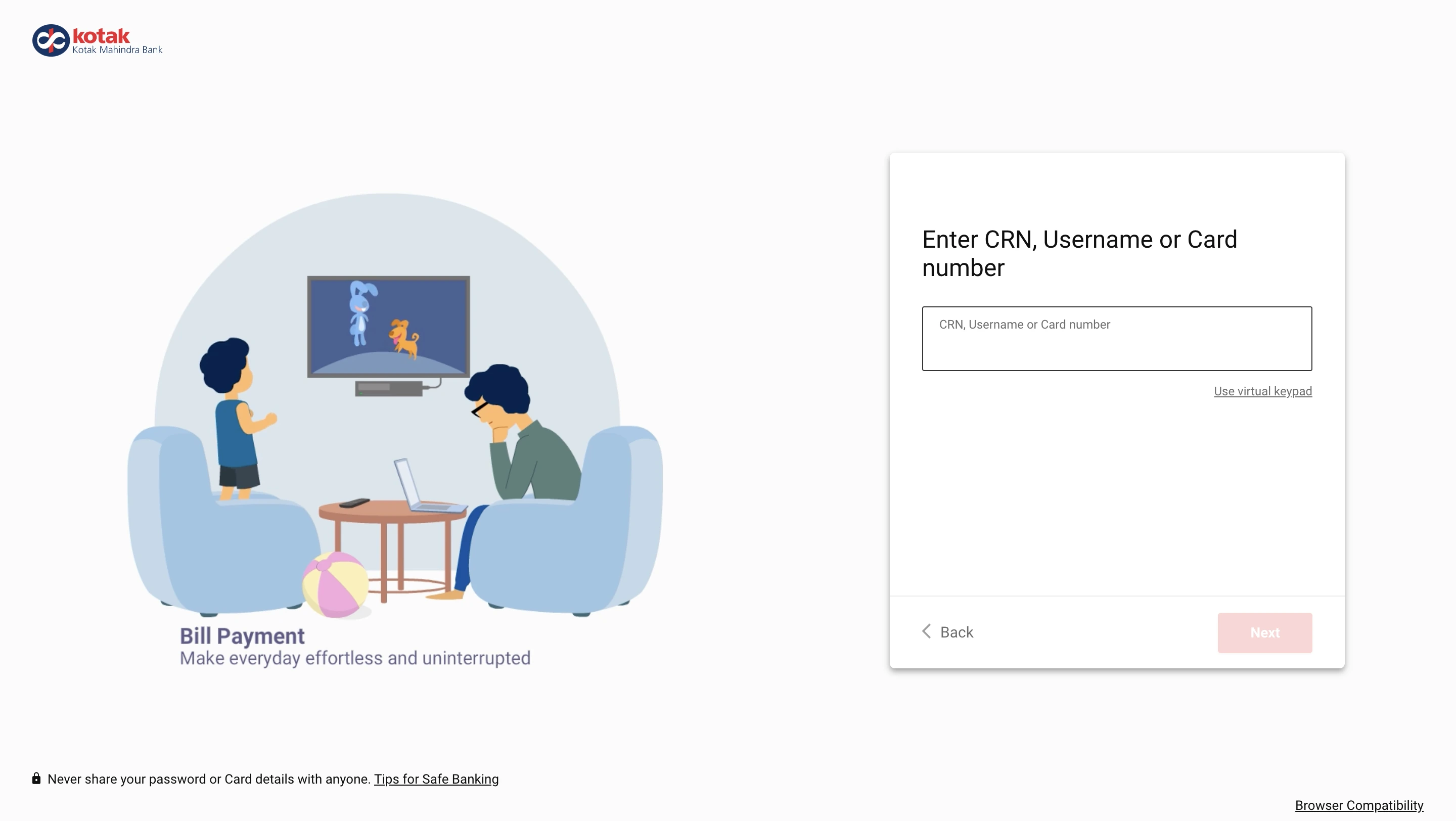
-
- This is followed by a verification using your registered mobile number.
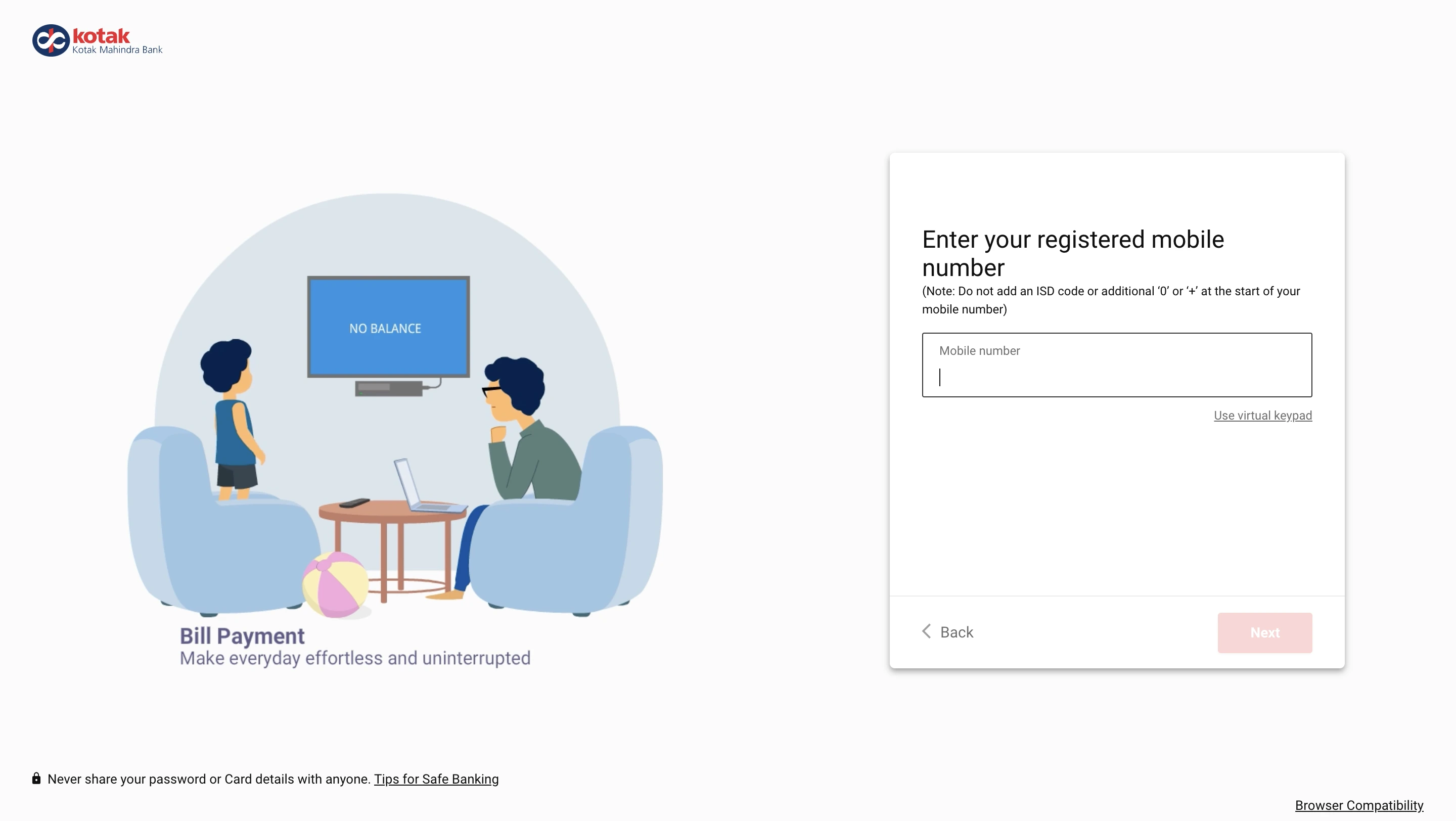
- After verification, you will be redirected to a website to create a password. You can use this to log in later.
- Follow the same steps till step 3. In step 3, enter your CRN.
- Hit next and enter your password on the next page.
You will open the webpage to your corporate account’s dashboard.
Unlock exclusive card offers from India’s leading banks with just one click
Get Zero Annual Fee Credit Cards in one click.
[web-credit-card]
Resolve or Report Banking Issues with Kotak Net Banking
Although less common, users might encounter issues when accessing net banking. Here are some of the general, useful tips and assistance provided by Kotak Bank to ensure ease for its customers:
- Forgot Password: Click on ‘Forgot Password’ on the login page and follow the steps to reset it via OTP or email for changing password for Kotak net banking.
- Account locked due to multiple failed login attempts: Verify your credentials, wait for 30 minutes or call Kotak Customer Care (1860 266 2666) to unlock your account.
- Forgot corporate ID/user ID: Check your account opening email or contact your relationship manager for retrieval.
- Transaction Failed or Stuck: Check if the entered details are correct, or wait for bank reconciliation before retrying.
- Kotak Net Banking App Not Working: Update the Kotak Mobile Banking App from the Play Store/App Store and restart your phone.
- Unable to Transfer Money: Ensure you have not exceeded the daily transaction limit and check if the beneficiary is active.
- Kotak fyn business login issue: Ensure your corporate ID and user ID are correct, and try resetting your password if needed.
- Error Message While Logging In: Note the error code/message and report it to Kotak Customer Support for assistance.
- Net Banking Auto Logged Out: This is due to inactivity for security reasons. Log in again to continue your session.
- Suspicious Account Activity: Immediately change your password and report any unauthorised transactions to Kotak’s fraud department.
Ready to take the next step? Apply for a Personal loan now!