

Managing your finances is now easier than ever. Banks have welcomed the digital era, making almost all of their processes online for easy customer access. Axis Bank Net Banking has evolved into a seamless, secure, and easily accessible function that anyone can access anytime.
Whether looking for the easiest way to transfer funds, pay bills, manage investments, or track your expenses, Axis Bank Net Banking can simplify your needs.
Learn more about how Axis Bank login works to start your personalised account and learn how to get the most out of it.
Axis Bank Net Banking is one of the best features of the bank, which users can access, create, and manage their bank account. It can also be used for personal and professional banking needs, anywhere and anytime, without visiting the branch.


Axis Bank Net Banking Registration
One must register with the Axis Bank portal to leverage the benefits of Axis Bank’s Internet banking service. However, it is to be noted that one must have an active account with Axis Bank to activate any other features like net banking.
Here are the top 5 methods for Axis Bank Net Banking registration:
1. Axis Bank Net Banking Online Registration
You can directly visit the website and follow the simple instructions provided by the bank to register your account for internet banking. The following are the steps:
-
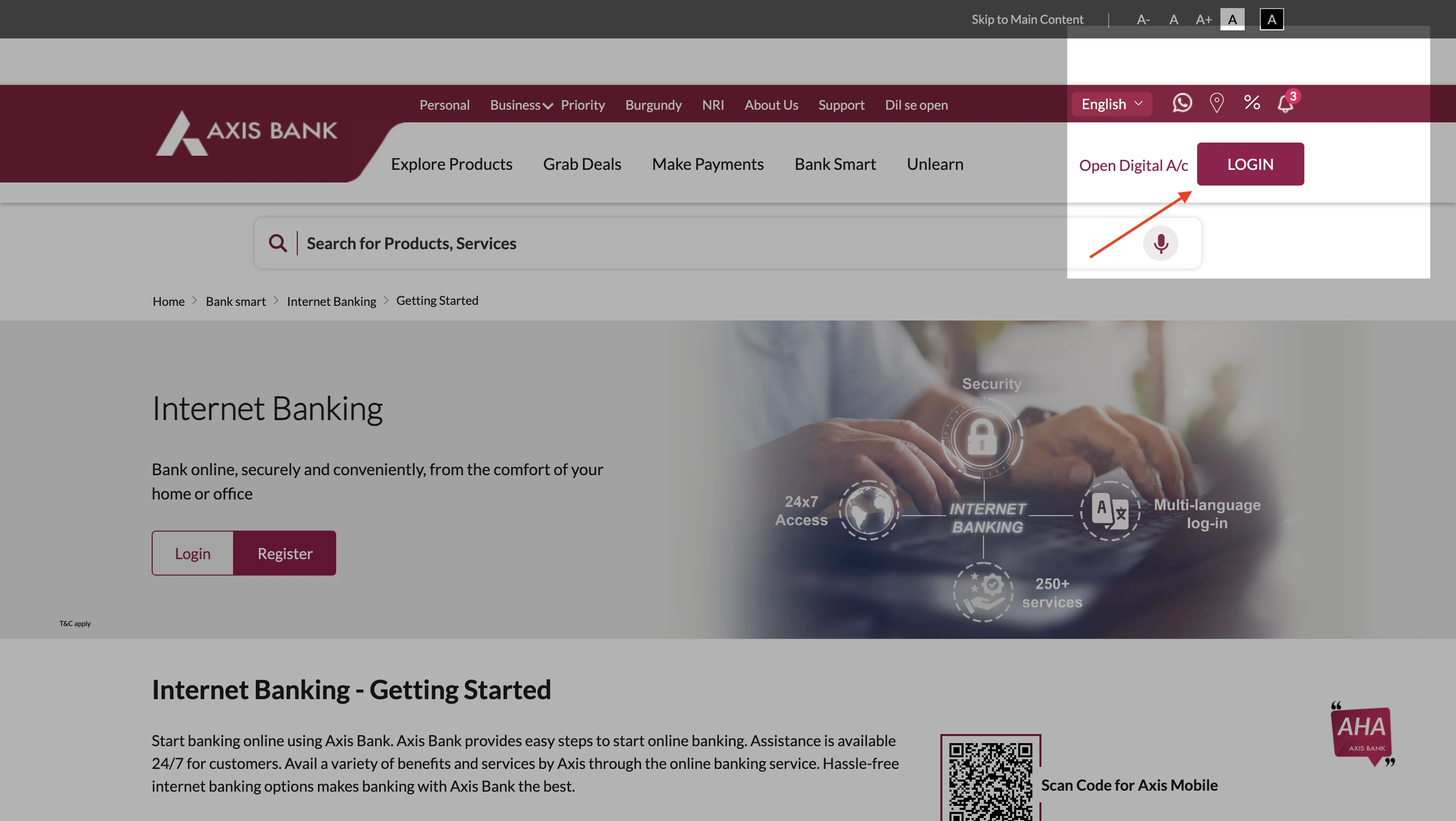
- Visit the official website of Axis Bank, and navigate to login.
-
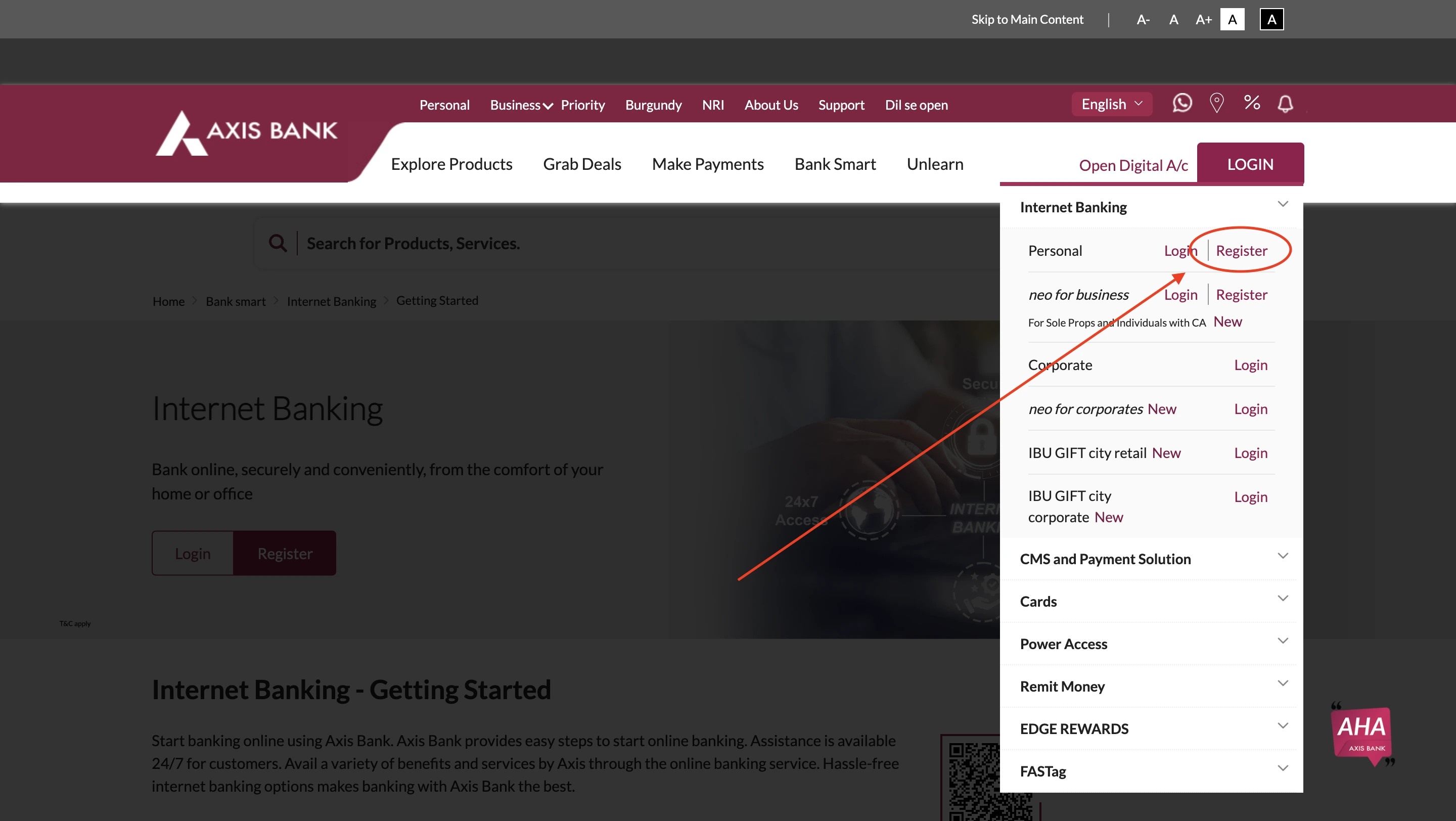
- Click on the register option that appears by hovering over the button.
-
- Use your customer ID to register for Net Banking purposes.
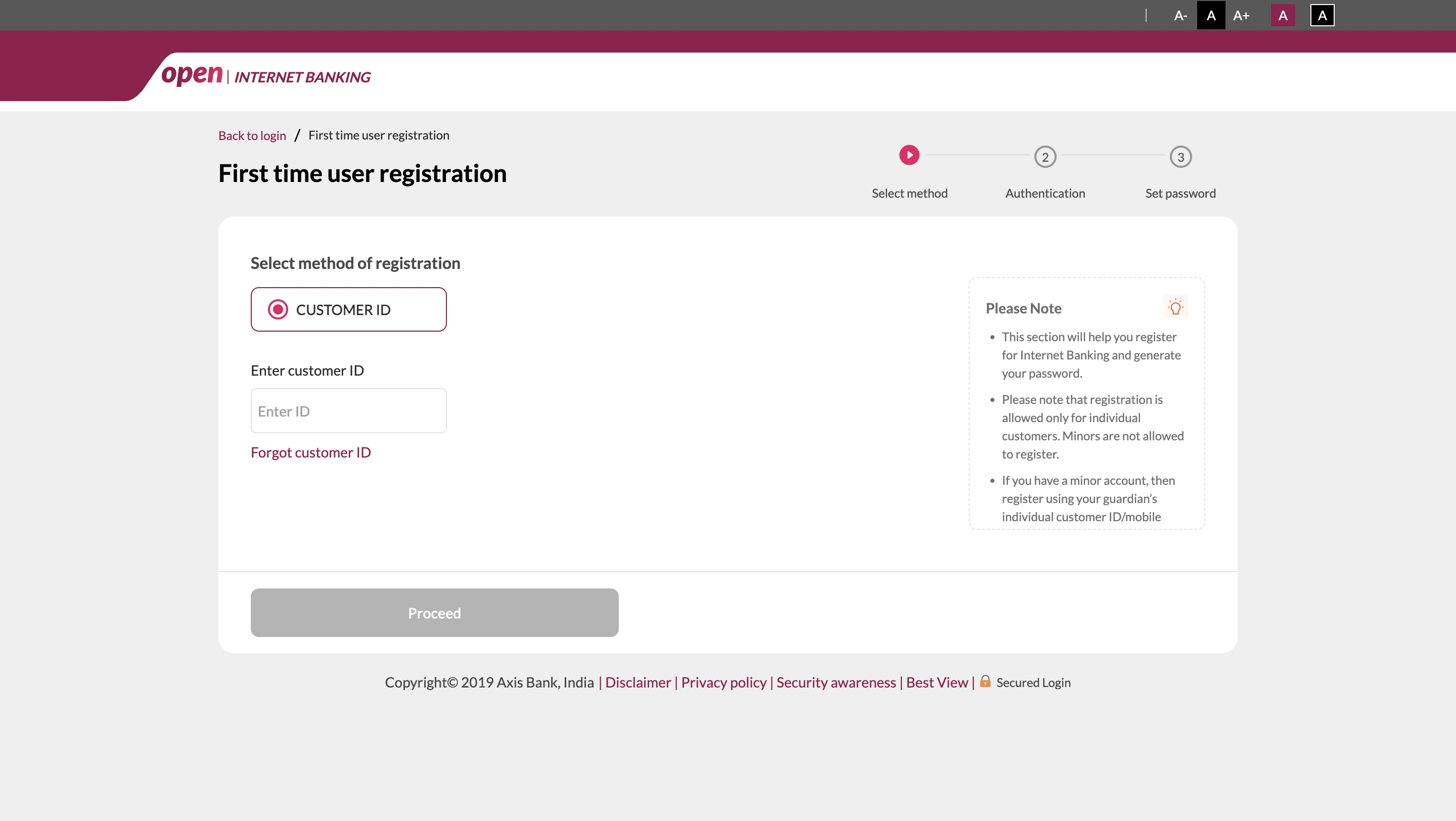
You can find your Axis Bank Customer ID in the welcome letter, passbook, or account statement. Alternatively, you can also use the SMS service to get your Axis Bank Customer ID (Send ‘CUSTID’ to 56161600 from your registered mobile number).
-
- You will be prompted to complete the verification which can be done by one of the following options such as
- Debit card
- One-time password
- Email Link
- You will be prompted to complete the verification which can be done by one of the following options such as
You will also be requested to clear your KYC (Know Your Customer) details to verify your identity after you have submitted the necessary documents.
-
- Confirm your profile name and create a strong password for future login purposes.
Your Internet Banking setup is complete after setting up the password. You can use these credentials to log in in the future.
2. Axis Bank Net Banking Mobile App Registration
Activating net banking through the application is a much more convenient process with simple steps:
- Download the official bank’s app.
- Use your mobile number to verify and log in.
- Go to the net banking section and click registration.
- You will be prompted to submit various details such as
- Customer ID
- Account Number
- Set up a login password.
- Validate with a one-time password sent to the registered mobile number.
- Confirm and complete the registration.
3. Register for Axis Bank Net Banking by Calling Customer Care
You can also set your Axis Bank Net Banking registration using customer care, which is a fairly simple and assisted feature offered by Axis Bank. Follow the generic steps below:
- Place a call from the registered mobile number to the toll-free number of Axis Bank, 1860-419-5555 or 1860-500-5555.
- Follow the interactive voice response to select the operation related to Internet banking.
- Authenticate your identity using details such as customer ID/ account number/ debit card number/ PAN number etc.
- Choose the option to register for Internet banking.
- Verify the process by sharing your OTP.
- You will receive your net banking credentials via text message or registered email.
- Visit the official website and change the temporary password into a secure one.
At any point, if you are uncertain of the steps, you can choose the option to talk to the customer care executive.
4. Axis Bank Net Banking Registration Through ATM
For registering Axis Bank Net banking through ATM, follow the below-mentioned steps:
- Visit an Axis Bank ATM.
- Insert your card into the machine.
- Select the preferred language.
- Enter your ATM pin.
- On the next interface, select “Register for Internet Banking”.
- Provide details such as mobile number.
- Details will be sent to your mobile number via SMS or Email.
- You can set up a temporary user ID and password.
- Once the process is complete, ATM will display a confirmation message.
- Visit the official website and log in using the temporary user ID and password.
- Change the credentials into a more secure one of your choice.
5. Register for Axis Bank Net Banking by Branch Visit
As the most conventional way, one can get all of the functions related to the bank account sorted by visiting the branch. Here are a few things to care for when you visit the branch for net banking activation.
-
- Visit the nearest branch during the standard working hours—9 am to 5 pm.
Carry necessary documents with you, such as
- Valid ID Proof (Aadhaar Card, PAN Card, Passport, etc.)
- Bank Passbook or Account Details
- Registered Mobile Number
- Debit/ATM Card (if applicable)
- Request net banking registration.
- Fill out the registration form.
- Submit the form with supporting documents.
You will receive the credentials via a registered mobile number or email, by which you can activate your net banking.
Are you looking for a personal loan?

Axis Banking Login
Once registered with the bank, you can log in to Axis Bank net banking portal anytime to access your bank account and related details. Below is a comprehensive guide on how to log in to Axis Bank Internet Banking service.
Axis Bank Net Banking Login
-
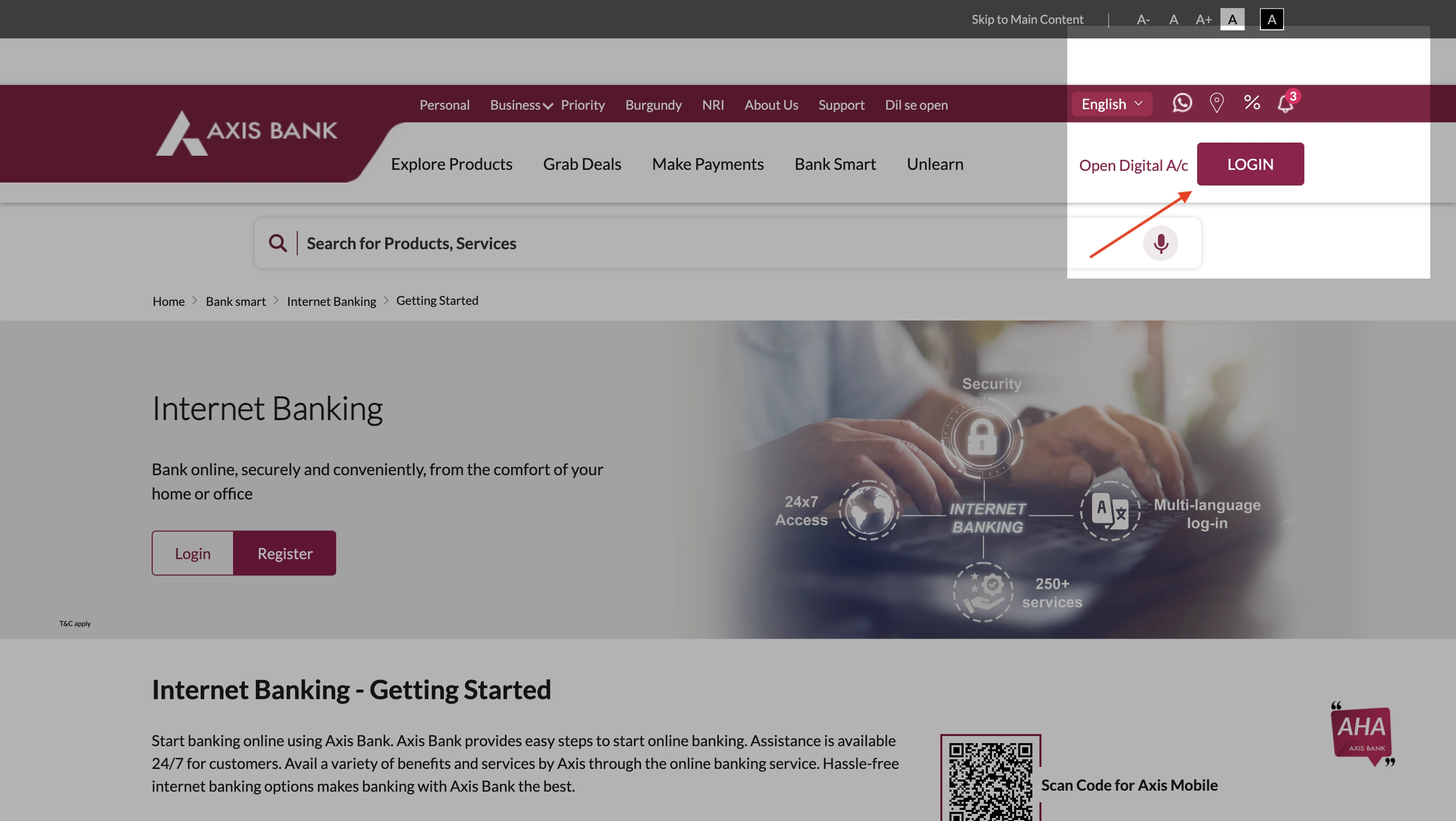
- Visit the official website of Axis Bank.
-
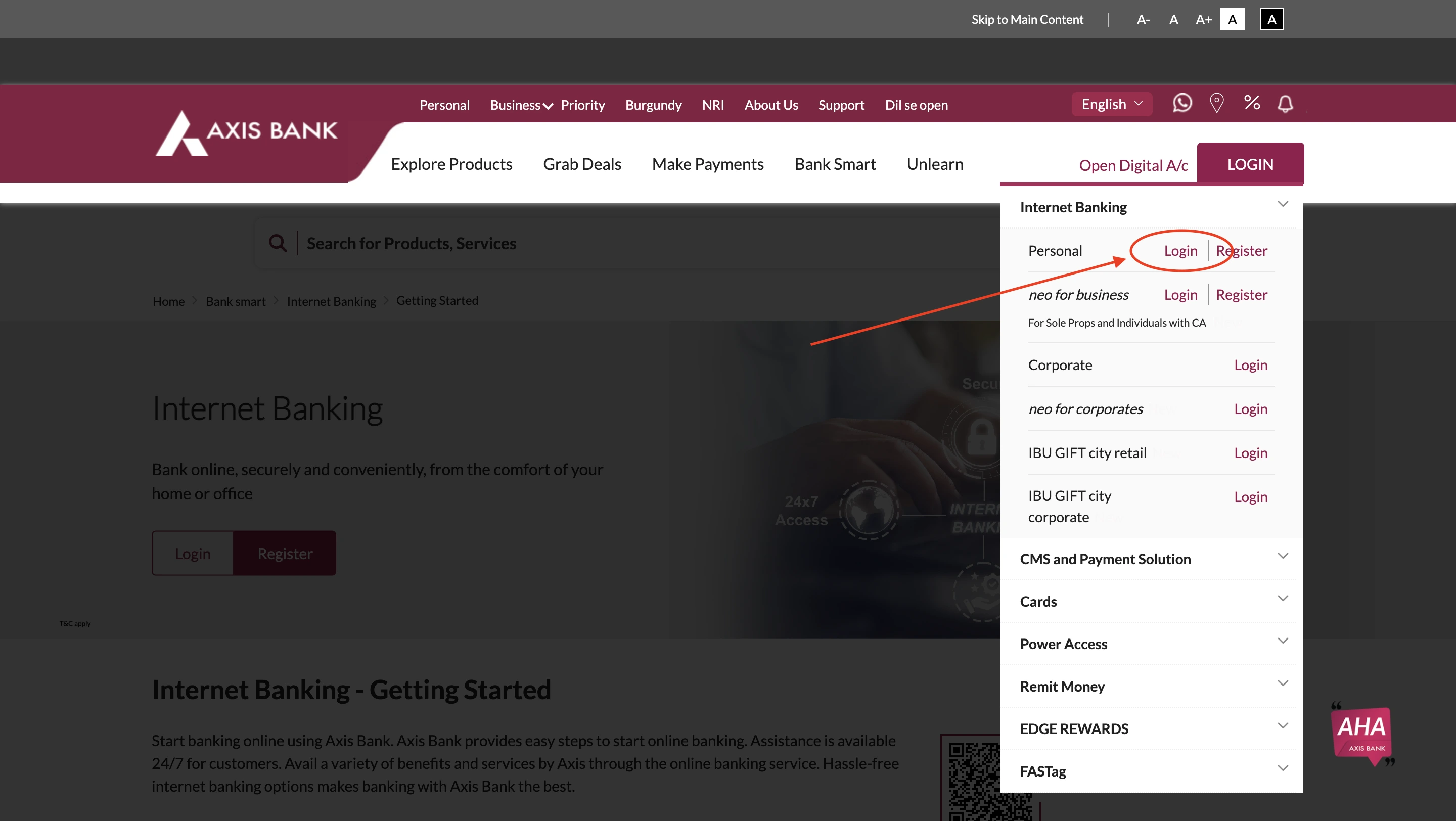
- Click on the ‘Login’ button that appears when you hover over.
-
- On the upcoming page, enter your Username and password for Axis Bank Internet Banking login.
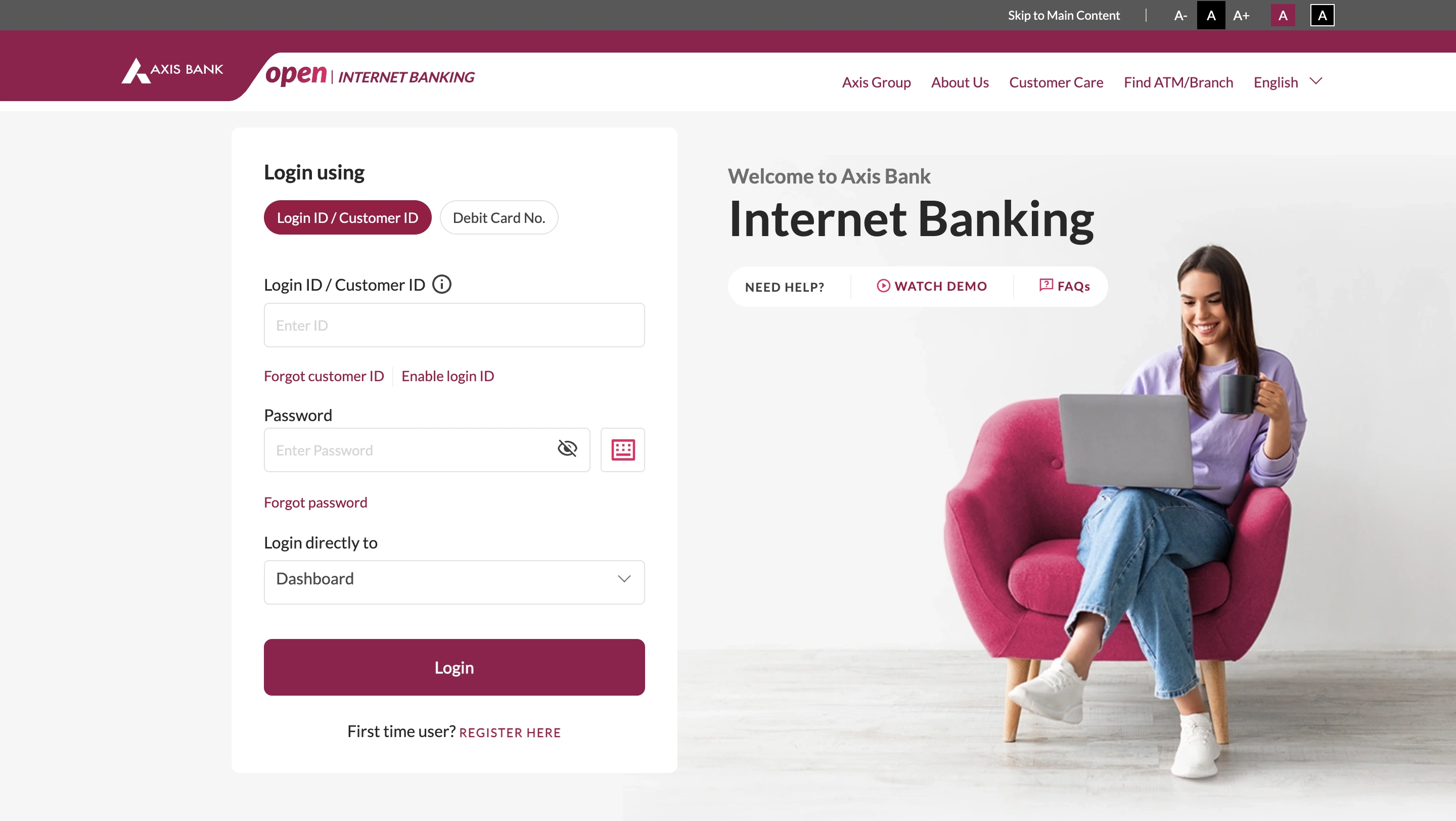
Alternatively, you can choose to log in using your debit card details too.
In case you have forgotten the user ID or password, you can hit the ‘forgot password’ option, which will prompt you to enter your registered email ID.
After verification, the details necessary for the User ID/ Password change will be sent.
Axis Bank Mobile Net Banking Login
After setting up your internet banking, making your Axis Bank Mobile app login is fairly simple. You can access all your banking needs with a few clicks:
- Open your Axis Bank Mobile app.
- Log in to the application using your MPIN or biometric verification.
After you log in to the Axis Bank Mobile application, you can use the internet banking features.
Even though the purpose of mobile banking is the same, it is not the same as net banking, as this requires a dedicated mobile application.
Mobile applications might also lack some features compared to net banking.
Don’t know your credit score? You can find out for free!

Transfer Funds with Axis Bank NetBanking
Axis Bank offers a flexible approach to almost all of the net banking features, ensuring zero trouble for users while using any of the methods.
| Transfer Method | Ranges | Charges |
|---|---|---|
| NEFT (No maximum limit) | ||
| Up to ₹10,000 | ₹2.50 + GST | |
| ₹10,001 – ₹1 Lakh | ₹5 + GST | |
| ₹1,00,001 – ₹2 Lakhs | ₹15 + GST | |
| Above ₹2 Lakhs | ₹25 + GST | |
| RTGS (No maximum limit) | ||
| ₹2 Lakhs – ₹5 Lakhs | ₹25 + GST | |
| Above ₹5 Lakhs | ₹50 + GST | |
| IMPS (Maximum limit: ₹5 Lakhs) | ||
| Up to ₹1,000 | ₹2.50 + GST | |
| ₹1,001 – ₹1 Lakh | ₹5 + GST | |
| ₹1 Lakh – ₹5 Lakhs | ₹10 + GST | |
| UPI (Maximum limit: ₹1 Lakh) | No limit specified | Generally free |
Features & Benefits of Axis Bank Net Banking
Axis Bank Net banking provides a comprehensive solution for every user, allowing them to access their banking needs from anywhere. Designed to provide ease of access, Axis Bank net banking users can take advantage of the following benefits:
- 24 / 7 Accessibility
- Easy Fund Transfer
- Quick Bill Payment
- Instant Investment Options
- E-Statements
- Easy Loan Management
- Quick Alerts & Updates
- Mobile Banking
- Secure & Easy Retail & Corporate Banking
Axis Bank NetBanking Services
- Savings & Current Accounts: Axis Bank provides tailored accounts with digital banking access and attractive benefits.
- Fixed & Recurring Deposits: Axis Bank helps customers grow their savings with competitive interest rates and flexible deposits.
- Home, Auto, & Personal Loans: The bank offers various loan products with quick approvals and minimal documentation, facilitating the need for quick loans.
- Business & MSME Banking: This service supports small businesses with working capital solutions and credit facilities.
- Internet & Mobile Banking: Allows customers to manage their accounts, pay bills, and invest online.
- Fund Transfers (NEFT, RTGS, IMPS, UPI): Instant and scheduled electronic fund transfer services are easily accessible and operable with Axis Net Banking.
- Prepaid, debit, & credit cards: The bank offers a wide range of card options with cashback, rewards, and exclusive offers.
- Forex & International Banking: Axis Bank enables foreign exchange services, global remittances, and NRI accounts.
- Investment solutions: Offers mutual funds, equity trading, and alternative investment plans.
- Life & General Insurance: Various insurance solutions covering health, travel, and personal needs can be availed through net banking.
- Government Banking & Subsidy Schemes: Partners in government programs like Mudra Loans and Pension Schemes.
- Wealth & Portfolio Management: Dedicated advisory services for high-net-worth individuals and businesses.
- Digital Lending & Buy Now, Pay Later (BNPL): Instant digital loans and easy installment payment solutions.
- Payment Gateway & Merchant Services: Secure online payment solutions for businesses and retailers.
- Gold Loans & Safe Deposit Lockers: Axis Bank provides secured loans against gold and locker facilities for valuables.
Specialised Axis Bank Net Banking Services
Apart from the basic services such as account overview and investment management, Axis Bank also provides some specialised banking services such as:
1. Axis Bank Credit Card Net Banking
Axis credit card net banking is a user-friendly option for anyone with an Axis Bank credit card to manage their credit cards online and use it for payments, transactions, and services.
Here are some key features of Axis Bank Credit Card Net Banking:
- View Card Details
- Bill Payments
- Statements
- Reward Points
- Card Controls
- EMI Conversion
- Service Requests
2. Axis Bank Forex Card Net Banking
The Forex Card Net Banking feature enables Axis Bank Internet Banking for NRIs and allows them to access their card details via the Internet at any time, anywhere.
Here are some of the key features of Axis Bank Forex Card Net Banking:
- Balance Inquiry
- Transaction History
- Reload Forex Card
- Card Block/Unblock
- Currency Conversion
- PIN Management
- Service Requests
3. Axis Bank FASTag Login & Recharge
Axis Bank FASTag Recharge is a seamless online method for managing the FASTag count. It allows quick recharges, balance checks, and transaction tracking for uninterrupted toll payments.
Users can log in and recharge their Axis Bank FASTag, by following the steps mentioned below:
- Open the Axis Bank FASTag login portal.
- You can choose to log in with OTP or User name and password.
- After verification, log in by clicking on the ‘Login’ button.
- After logging in, you can view your wallet balance, transaction history, linked vehicles and manage your FASTag account.
- To recharge Axis FASTag through net banking, head to the ‘Add money’ option under wallet section.
- Select the payment method and add money to your wallet.
Get Zero Annual Fee Credit Cards in one click.

Axis Bank Corporate Netbanking for Businesses
Axis Bank Corporate Netbanking is the ultimate solution for businesses, offering easy and quick methods to manage their finances efficiently. With this specialised net banking service, organisations of all scales can handle their finances with added ease.
Steps for Axis Bank Corporate Net Banking Login
Here are the steps to log in to Axis Bank Corporate Netbanking account:
-
- Visit the official website for Axis Bank net banking login.
- Choose the option for corporate login, from the drop-down menu.
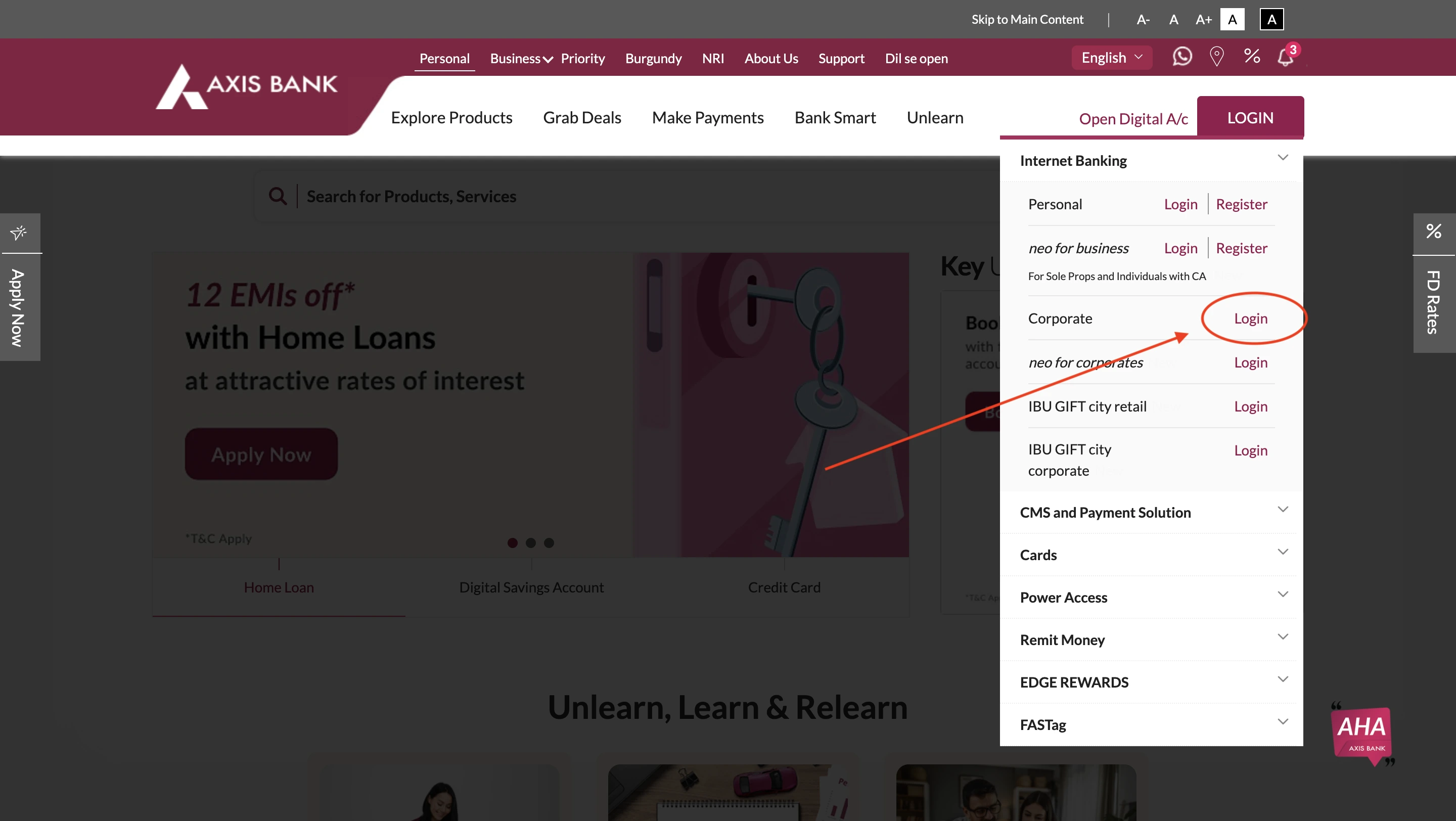
- Enter your details such as corporate ID, login ID and fill out the Captcha.
- Authenticate with OTP.
You will be logged in to your Axis Bank Corporate net banking dashboard.
Tips to Enhance Security in Axis Bank Net Banking
Ensuring your account safety is one of the most important facts to keep in mind, especially when accessing net banking. Apart from various safety measures taken forward by the Bank, there are some things users must keep in mind:
- Use Strong and Unique Passwords
- Update Password Regularly
- Enable Two-Factor Authentication (2FA)
- Avoid Public Networks
- Monitor Account Activity
- Beware of Phishing Attempts
- Log Out After Every Session
- Keep Your Devices Secure
- Use the Official Axis Bank Platforms
Get an instant loan in a few simple steps!